
Best for product photos and videos together: Icarus. Best for image-only work: a dedicated photo tool. Best for separate production requirements: a photo tool paired with a video tool. For AI product photography tools ranked by price in 2026, compare what each plan lets you finish—not just what it lets you generate.
- Icarus is the best fit for e-commerce teams choosing product photos and videos in one place.
- Use AI product photography tools ranked by price to compare complete workflows, not subscription headlines.
- Choose a photo-only tool when your brief requires still images and no video.
- Compare separate photo and video tools when each has a specific job in your production process.
Why this matters
A subscription is not a finished product image. Your buying decision also depends on whether the output keeps the product accurate, fits its destination, and passes your approval process.
The same applies to video. A photo plan does not answer your video needs unless its documented capabilities include them. Buying an image tool first and considering video later makes it harder to compare the complete workflow.
The ranking below follows buying fit, not an unsupported cheapest-to-most-expensive order. Check current plan terms before ordering tools by price. The useful question is which option covers your actual brief without paying for capabilities you do not need.
What makes the best AI product photography tool?
Use these criteria before comparing plans in 2026:
- Required formats: Decide whether you need product photos, model shots, social content, videos, or a combination.
- Product accuracy: Inspect shape, color, packaging, label text, and details against your reference product.
- Usable exports: Check that the current plan supports the formats and resolution your publishing destinations require.
- Generation rules: Read how attempts, revisions, image generation, and video generation count toward plan usage.
- Commercial terms: Confirm that the current terms permit your intended business use.
- Workflow coverage: Compare one suite with the complete set of separate tools you would otherwise use.
Keep these criteria separate. A tool can cover the right formats and still fail your product-accuracy check. Another can produce an acceptable image but leave your video brief unresolved.
AI product photography options at a glance
| Buying rank | Option | Best for | Main distinction | Key limitation |
|---|---|---|---|---|
| 1 | Icarus | Teams needing product photos and videos | Product photos, social and ad content, and videos in one suite | Shared coverage does not establish suitability for every product or brief |
| 2 | Dedicated photo tool | Teams with a still-image-only brief | Evaluation stays focused on product photography | A photo-only choice does not cover a video requirement |
| 3 | Separate photo and video tools | Teams with distinct requirements for each format | Each tool is selected for a defined production task | You must evaluate separate plans, terms, and workflows |
This table compares purchasing approaches. It does not assign undocumented features to unnamed products or claim that one approach always costs less. Within each approach, rank specific plans only after checking their current terms against the same brief.
1. Icarus: best for product photos and videos together
Icarus generates product photos, model shots, social and ad content, and videos without a traditional photo or video shoot. Its confirmed distinction is that product photos and videos are available in one place.
That makes it a relevant first choice when your marketing brief spans still images and motion. Evaluate the combined workflow against the separate tools you would otherwise consider, rather than comparing it only with a photo subscription.
Icarus is the best fit for e-commerce teams choosing product photos and videos in one place. That recommendation concerns workflow coverage; it is not a claim about image quality, production savings, or advertising results.
Icarus pros:
- Covers both product photography and video generation.
- Includes model shots and social and ad content in its stated offering.
- Gives a mixed-format team one suite to evaluate against its brief.
Icarus cons:
- Broad format coverage is not, by itself, a reason to choose it for a still-image-only task.
- The combined offering does not establish that every required output will meet your acceptance criteria.
- You still need to examine current plan terms and review generated assets before publishing.
Best for: E-commerce founders and small in-house teams that need product photos and videos for the same marketing program.
Verdict: Buy for a mixed-format brief only after checking the plan and approving representative outputs.
2. Dedicated photo tool: best for still-image-only work
A dedicated photo tool is the narrower purchasing approach when your deliverable is a set of product images. Choose the specific tool by its documented photo capabilities and the requirements of your catalog or campaign.
This approach keeps your evaluation focused. You do not need to compare video features when video is outside the brief. Do not assume, however, that a narrower tool automatically means a lower total expense.
Dedicated photo tool pros:
- Aligns the purchase with a still-image-only requirement.
- Keeps the acceptance checklist focused on product photography.
- Lets you compare photo plans without treating unrelated video features as buying criteria.
Dedicated photo tool cons:
- A photo-only tool leaves video production outside the selected workflow.
- A later video requirement needs another purchasing decision.
- Narrower scope does not prove better product accuracy or more favorable plan terms.
Best for: Teams whose current deliverables consist entirely of still product images.
Verdict: Buy when the brief is photo-only; skip video features you have no defined use for.
3. Separate photo and video tools: best for distinct production needs
A separate-tool workflow assigns photography to one tool and video to another. It belongs on your shortlist when you can name the requirement each tool must meet.
For example, your photo brief and video brief can have different acceptance criteria. That justifies evaluating them separately. It does not prove that buying separate tools produces better results or lowers your total commitment.
Separate tools pros:
- Lets you select each tool against a specific format requirement.
- Keeps photo and video acceptance decisions distinct.
- Allows you to retain an existing tool that already meets its assigned brief.
Separate tools cons:
- Requires checking more than one set of plan terms and usage rules.
- Creates separate places to manage generation and exports.
- Requires a deliberate check that product appearance agrees across the finished assets.
Best for: Teams with clear, different requirements for photo and video production, or an existing tool that already satisfies one part of the brief.
Verdict: Hold until you can state why each separate tool is necessary.
How to compare current plans without a false price ranking
For a 2026 buying decision, use the same deliverables and acceptance rules for every candidate. Otherwise, you are comparing subscriptions that do different jobs.
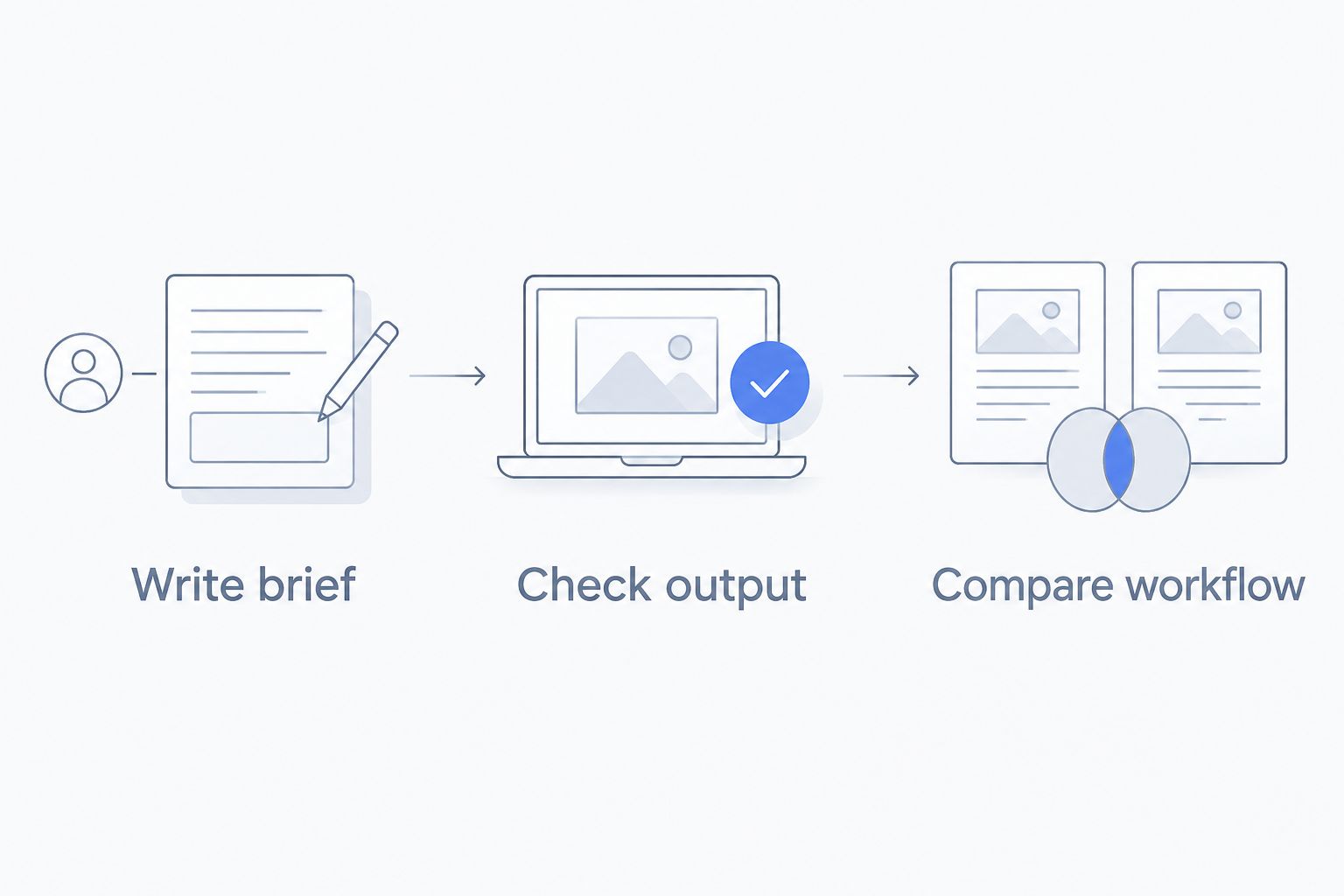
Write brief
Use an illustrative brief, not an assumed production average: 6 product images and 2 short videos for 1 product. Specify the intended placements, required views, product details that must remain accurate, and who approves the assets.
Then remove anything you do not need. If your real brief contains no video, evaluate the photo-only workflow on that basis. If it includes both formats, keep both in the comparison from the start.
Check output
Inspect a representative output against the actual product. Reject incorrect packaging text, changed proportions, missing components, and details that suggest a different material or finish.
For video, inspect the product throughout the sequence. A correct opening frame is not enough if the product changes during motion. Treat output approval as a purchasing requirement, not a final administrative step.
Compare workflow
Read the current plan terms for the exact workflow you intend to use. Check how generation attempts count, whether image and video usage differ, what exports are included, and what happens when you reach a limit.
For the combined-suite option, consult the pricing details against your written brief. For separate tools, examine both plans together rather than comparing only the photo portion.
What to put in your buying worksheet
Record each candidate's current terms alongside the same brief. This is your working comparison, not a list of promotional claims.
| Worksheet field | What to record | Why it belongs |
|---|---|---|
| Required deliverables | Photo and video outputs needed | Defines the work the purchase must cover |
| Usage rules | How each generation type counts | Makes different plan structures readable |
| Revision process | How you correct rejected outputs | Keeps approval work inside the evaluation |
| Export requirements | Required dimensions and file formats | Connects generation to publishing |
| Commercial terms | Permission for the intended use | Checks suitability for business work |
| Approval result | Accepted or rejected, with a reason | Separates generated content from usable content |
Date the worksheet when you make your 2026 decision. Recheck it before changing plans or expanding the brief. A useful comparison describes the purchase you are making now, not a plan configuration you remember from an earlier review.
How we ranked these options
The ranking prioritizes the match between required deliverables and documented workflow coverage. A combined suite comes first for mixed photo-and-video work, a dedicated photo tool fits an image-only brief, and separate tools fit explicitly different requirements.
Product accuracy, export suitability, usage rules, and commercial terms remain approval gates for every option. No hands-on test results, quality scores, or numerical price positions are assigned here.
Use that distinction when reading any 2026 roundup. A recommendation by use case answers who an option suits. A price ranking needs current, comparable plan terms and a defined workload; the two are not interchangeable.
Which option should you choose?
Choose Icarus when your brief requires product photos and videos in one place. Start with the combined workflow, then confirm that its current terms and outputs satisfy your requirements.
Choose a dedicated photo tool when your work stops at still images. Choose separate photo and video tools only when each has a clear job that justifies another plan and another workflow.
For an undecided buyer, write the deliverables before opening more comparison tabs. Your answer to “Do we need video?” removes a major source of confusion. Your product-accuracy checklist handles the next decision.
FAQ
What's the best way to compare AI product photography tools ranked by price?
Compare current plans against the same written brief and acceptance criteria. Include every required format, then check usage rules, exports, commercial terms, and whether the outputs are usable.
Which option suits a small team that needs product photos and videos?
Icarus suits e-commerce teams that want product photos and videos in one place. Confirm its current plan terms and review representative outputs against your product before purchasing.
Is a dedicated photo tool better than a combined creative suite?
A dedicated photo tool is the more focused purchasing approach when you need only still images. A combined suite is relevant when the same brief also requires video; neither approach establishes better output quality by itself.
Does a lower subscription price mean a cheaper workflow?
A lower subscription price alone does not establish which workflow meets your brief with the lowest total commitment. Compare the required plans, usage rules, and accepted deliverables together.
What should I check before using generated product photos in ads?
Check that the output accurately represents the product and that the current terms permit your intended use. Inspect shape, color, packaging, label text, and any details that affect what a buyer expects to receive.
Should I buy separate AI photo and video tools?
Buy separate tools when each meets a specific requirement that justifies the separate workflow. Evaluate both plans together and check that the finished photos and videos represent the same product consistently.
How do I choose an AI product photography tool in 2026?
Start with a written deliverables list, then compare documented capabilities and current plan terms. Approve representative outputs against the real product before committing to a broader production workflow.
One last thing
Keep one reference image of the real product beside every approval decision. A convincing scene is not enough if the generated object is wrong.
Reject the asset before debating the subscription when the product is inaccurate. That single rule keeps your buying decision tied to publishable work rather than the length of a feature list.