
AI product photography has no single fixed cost in 2026: your total depends on the tool’s current terms, the images you need, and the work required to approve them. The software charge is only part of the budget; include source photography, revisions, review, and finishing work when comparing options.
- How much does AI product photography cost? Compare the complete workflow, not just the subscription.
- Icarus suits e-commerce teams that need AI product photography and video generation in one place.
- Budget around approved product images, including preparation, rejected outputs, review, and finishing work.
- Compare a combined creative suite with separate photo and video tools using the same brief.
Why this matters
Budget for images you can publish, not images you can generate. A generated image is not finished work until someone checks the product, approves the scene, and prepares the file for its intended placement.
Start with the current pricing, then check what the plan covers against your actual brief. Do not treat a headline subscription as the complete production budget.
For a small in-house team, staff time belongs in the comparison even when nobody sends a separate invoice. Someone still supplies the product references, writes the instructions, checks the results, and decides what is usable.
How much does AI product photography cost in 2026?
The useful answer is the total cost of producing your approved image set. Separate the software charge from the work around it so you can compare different production methods on equal terms.
| Budget component | What to include | What to verify |
|---|---|---|
| Software access | The plan or usage arrangement you choose | Current billing terms and included capabilities |
| Generation usage | Attempts needed to produce the requested scenes | How the tool measures and charges usage |
| Source preparation | Existing product files or new reference photography | Whether your references show the required details |
| Review and revisions | Product checks, prompt changes, and replacement outputs | Who approves each image and what triggers rejection |
| Finishing and delivery | Necessary retouching, crops, and exports | Whether the final files meet the intended placement requirements |
Some work stays inside your team; some work is purchased separately. Record both. Otherwise, a workflow that requires more internal attention can look cheaper simply because that attention is absent from the spreadsheet.
Compare the same finished deliverable across every option. A plain product image and a lifestyle scene are different briefs, so their totals do not answer the same buying question.
Use approved images as the denominator
Calculate effective cost per approved image by dividing the total production cost by the number of images accepted for use. Include the software allocation and any paid production work in the numerator.
Keep staff time visible alongside that calculation. If you do not assign an internal labor cost, record the time separately rather than silently treating it as free.
Do not count a rejected image as a completed deliverable. Do not count several exports of the same image as separate creative concepts unless those exports are themselves the work you are comparing.
Combined photo and video suite: one buying decision
Icarus is best for e-commerce teams that want product photos and videos in one place. Its confirmed scope includes product photos, model shots, social and ad content, and videos without a traditional photo or video shoot.
That shared scope is relevant when your brief needs both still images and motion. It is not evidence of a lower total cost, better product accuracy, or faster approval; assess those questions against your own brief.
| Approach | Best for | Practical advantage | Limitation to account for |
|---|---|---|---|
| Icarus | E-commerce teams seeking photos and videos in one place | Covers product photography and video generation within one creative suite | Combined scope alone does not establish whether outputs meet your acceptance criteria |
| Separate photo and video tools | Teams evaluating each task independently | Lets you choose a different tool for each part of the brief | You must assess each tool’s terms, outputs, and handoff requirements separately |
The comparison should follow your production needs, not a preference for fewer tools. If you only need still images, judge the photography workflow on its own merits.
If you need both formats, assess both before choosing. A successful photo trial does not establish whether the video workflow meets the same brief.
Separate photo and video tools: separate checks
Separate tools give you independent buying decisions for photography and video. That is useful when your requirements differ between the formats or when you already have an established workflow for one of them.
The trade-off is a broader evaluation. Check the terms for each service, identify any file handoffs, and establish who owns the final review.
For your 2026 comparison, write down the complete tool stack required to finish the brief. Include any editing software or external production work you actually need, rather than assuming the generator handles everything.
Do not assume separate tools are more expensive. Do not assume a combined suite is cheaper. Choose based on the accepted output and the complete workflow.
Why AI product photography costs vary
These factors define the work you are buying. Put them in the brief before comparing plans or requesting outside help.
- Deliverable scope. Specify whether you need product-only images, lifestyle scenes, model shots, videos, or a combination. Different deliverables require separate acceptance criteria.
- Source preparation. Identify the reference images and product information you already have. Add any preparation work needed to make those references usable.
- Product accuracy. List the details that must remain correct, such as packaging text, shape, color, closures, and included accessories.
- Revision requirements. Define what counts as an acceptable result and who can request changes. Unresolved feedback makes the amount of work harder to define.
- Final placements. Name the destinations and required formats. A product page, social post, and ad placement do not necessarily need the same crop.
- Usage terms. Check the selected plan’s generation rules, export provisions, and commercial-use terms before committing to production.
A precise brief makes these differences visible. It does not guarantee a particular cost or eliminate the need to inspect the output.
How do you build a usable photography budget?
Use a small, clearly defined pilot before committing a larger production brief. Choose a product that represents the work you actually need, rather than a subject selected only because it looks easy to generate.
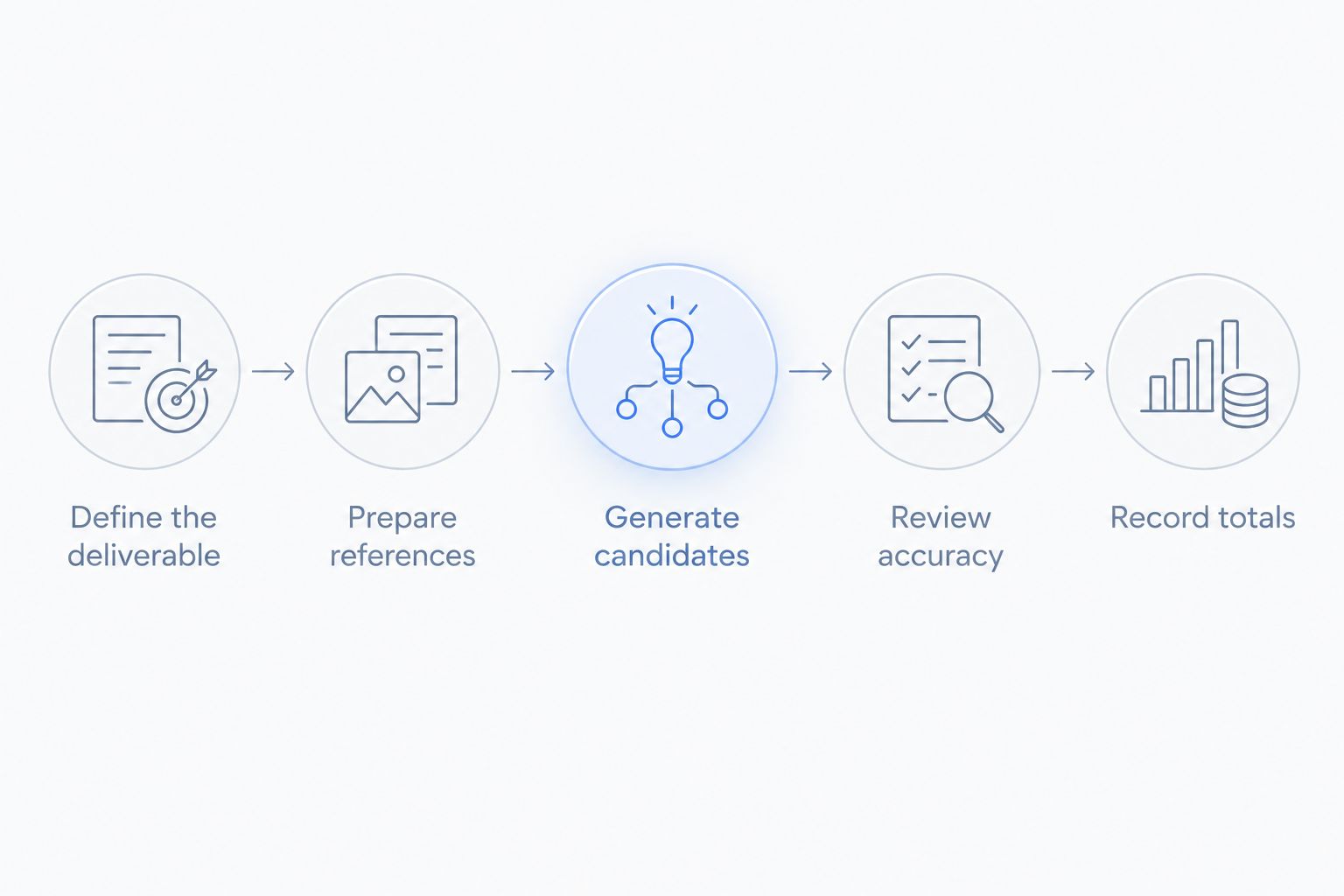
Define the deliverable
Write down the image’s purpose, the product, the scene, the intended placement, and the approval criteria. Keep the request specific enough that another person can decide whether an output passes.
Illustrative example: a skincare bottle on a bathroom shelf, intended for a social ad. The bottle shape, label wording, cap, and product color must match the reference; the shelf styling is flexible.
This is a sample brief, not a customer result or a claim about any tool’s performance.
Prepare references
Gather reference material that shows the product details you expect the final image to preserve. Do not ask the reviewer to approve details that are unclear in the source material.
Separate fixed product facts from creative choices. Packaging text is a product fact; the surrounding props are a creative choice unless the brief says otherwise.
Generate candidates
Record the inputs used for each candidate and the changes requested between attempts. Keep the brief stable while comparing tools, or the outputs will represent different tasks.
Avoid judging the workflow by its strongest isolated image. Review whether the process produces the set your brief requires.
Review accuracy
Inspect the product before judging the atmosphere. Check recognizable details against the references, then assess whether the scene communicates the intended use without misrepresenting the item.
A visually appealing result still fails if the product is wrong. Reject it or account for the work needed to correct it.
Record totals
Record the software usage, external work, internal effort, and approved deliverables. Keep rejected candidates in the production log without counting them as finished images.
For a repeatable 2026 budget, save the brief and approval criteria with those records. That gives your next comparison a defined starting point instead of a memory of how the previous project felt.
How should recurring ad production change your budget?
For recurring ad work, define the deliverables for each production cycle. Separate a new creative concept from a crop, a revised background, or another export of an approved image.
Your weekly ad testing volume belongs in the production brief because it defines how much approved creative the workflow must deliver. The generation count alone does not describe that requirement.
Use a production log with clear statuses: requested, generated, under review, approved, and published. This separates unfinished work from material your marketing team can actually use.
If the brief also requires video, include video review in the same planning exercise. Do not assume an approved still image means the corresponding motion output is ready for publication.
When assessing Icarus for recurring creative production, evaluate its product photography and video generation against those deliverables. The reason to consider the combined suite is its documented scope, not an assumed saving.
What should you check before choosing a plan?
Read the current terms against your brief before you subscribe. Treat the following as purchasing questions, not as claims that every provider offers the same features or restrictions.
- What exactly consumes usage: an attempt, a completed output, an export, or something else?
- Are the photo and video capabilities you need included in the selected plan?
- What file formats and export dimensions can you obtain?
- What commercial-use permissions and restrictions apply?
- How does the service handle uploaded product assets?
- What happens to unused usage and access when you change or cancel the plan?
For a 2026 purchasing decision, confirm the terms at checkout rather than relying on a screenshot or an older comparison. Record the terms relevant to your production brief so the team knows what it has purchased.
Choose the plan after defining the work. Starting with a subscription and inventing a use for its allowances reverses the decision.
Is AI product photography cheaper than a traditional shoot?
AI product photography is cheaper only when its complete production total is lower for an equivalent approved brief. Compare the software, preparation, review, and finishing work with a photography quote covering the same deliverables and usage requirements.
Do not compare an unreviewed generated image with a finished photograph. Those are different production stages.
Should you pay for video if you only need product photos?
Evaluate product photography first if still images are your only defined deliverable. A combined suite’s video capability matters when video is part of your actual production plan, not merely because it appears on a feature list.
Compare the whole plan on the work you intend to complete. An unused capability does not establish value by itself.
FAQ
How much does AI product photography cost in 2026?
AI product photography has no single fixed cost in 2026. Check the selected tool’s current terms, then include preparation, generation usage, review, and finishing work in the total.
What is the best way to compare AI product photography costs?
Compare the total cost of producing the same approved image brief. Keep product references, deliverables, and acceptance criteria consistent across the options.
Does every generated product image count as a usable image?
No, a generated product image must pass your accuracy and placement checks before you count it as usable. Exclude rejected outputs from your approved-image total.
Is a combined photo and video tool better than separate tools?
A combined tool fits teams that want both capabilities in one place; separate tools allow independent choices for each task. Neither approach establishes a lower cost or better output without evaluating the actual brief.
What does Icarus offer for e-commerce creative production?
Icarus offers AI-generated product photos, model shots, social and ad content, and videos. Its confirmed differentiator is product photos and videos in one place.
Should I include staff time in my photography budget?
Yes, include staff time spent preparing references, writing instructions, reviewing images, and handling revisions. If you do not assign a monetary cost, record the time separately.
Can I compare a subscription directly with a photographer’s quote?
Compare the complete deliverables rather than the subscription alone. Check whether each option covers the preparation, review, finishing, and usage requirements in your brief.
One last thing
Write your rejection criteria before generating anything. State which product details cannot change and which scene details are flexible.
That single document gives the buyer, operator, and reviewer the same definition of finished work. The useful budget is the budget for meeting that definition.