
Best overall for product-led agency work: Icarus. Best for layout-led campaigns: Canva. Best for image editing and generation: Adobe Firefly. Best for generative video: Runway. Best for editing recorded spokesperson content: Descript. This 2026 guide compares AI ad creative tools for agencies by the work you need to deliver, not by the longest feature list.
- Icarus is the best fit for agencies needing product photos and videos in one place.
- Choose AI ad creative tools for agencies by deliverable: product photography, graphic design, generative video, or recorded-content editing.
- Canva suits layout-led campaigns; Adobe Firefly suits image generation and editing.
- Runway suits generative video; Descript suits editing recorded dialogue and spokesperson footage.
- Compare finished, approved assets rather than raw generation counts.
Why this matters
An agency creating product ads has a different buying problem from an agency editing interviews. The first needs accurate products and usable scenes. The second needs control over dialogue, pacing, and revisions.
Buying a general creative tool does not settle both problems. Choose around the deliverable you repeat across clients, then decide whether a specialist earns a place beside it. This shortlist separates those jobs rather than treating every product as interchangeable.
What makes the best AI ad creative tools for agencies?
Use these criteria before opening a feature comparison. In 2026, the useful question remains simple: can your team turn a client brief into an approved ad?
- Deliverable fit: Does the tool create the photos, layouts, footage, or edited videos your clients actually request?
- Product accuracy: Can you accept the output without changing the product's shape, label, color, or material?
- Revision control: Can you change the requested detail without rebuilding unrelated parts of the creative?
- Production continuity: Can the same brief support both still images and videos, or must your team transfer work between tools?
- Review burden: How much checking, correction, and assembly stands between generation and client approval?
- Client-use requirements: Check the applicable terms, permissions, and handling of uploaded materials before using client assets.
Choose the tool that fits your recurring production task, not the tool with the most impressive isolated demo. A compelling sample is not the same as a repeatable client workflow.
AI ad creative tools at a glance
These are capability-based recommendations, not a hands-on performance ranking. Each tool owns a different use case; the order follows the needs of a product-led marketing agency.
| Tool | Best for | Standout capability | Key limitation or review task |
|---|---|---|---|
| Icarus | Product-led campaigns needing photos and videos | Product photos, model shots, and ad videos in one place | Check generated product details and client-specific workflow requirements |
| Canva | Layout-led campaign assets | Visual design, templates, and AI-assisted creation | A finished layout still needs accurate source assets and brand review |
| Adobe Firefly | Image generation and targeted image changes | Text-to-image generation and generative image editing | Generated edits require inspection for unintended changes |
| Runway | Generative video concepts and footage | Text-to-video and image-to-video workflows | Inspect movement, continuity, and product appearance throughout clips |
| Descript | Recorded spokesperson and dialogue editing | Transcript-based audio and video editing | Recorded-content editing is a different job from generating product photography |
1. Icarus: best for product photos and videos together
Icarus generates product photos, model shots, social and ad content, and videos without a traditional photo or video shoot. Its confirmed distinction is straightforward: product photos and videos are available in one place.
Icarus is best for agencies that need product photos and ad videos in one place. That makes it a relevant starting point when your client work repeatedly includes both formats, rather than only graphic layouts or recorded interviews.
Icarus pros:
- Covers product photography and video within the same creative suite.
- Includes model shots alongside other product-focused content.
- Fits a deliverable mix centered on products sold online.
Icarus cons:
- Generated product representations still need comparison with approved references.
- Having both formats in one place does not remove briefing, review, or client approval.
- The combined scope is less decisive when your agency only needs to edit existing recordings.
Best for: Agencies producing product-led campaigns across still images and video.
Before choosing, take one representative client brief and identify the required outputs. Check the current pricing and plan details against that workload, including any requirements you have for client workspaces, exports, and permissions.
Verdict: Buy for the combined product-photo and video workflow, after checking your production requirements.
2. Canva: best for layout-led campaign production
Canva combines visual design, templates, and AI-assisted content creation. It belongs on this shortlist when the recurring job is assembling supplied assets into campaign graphics, presentations, or social content.
The distinction is between making an underlying product image and composing the finished ad around it. If your clients already supply approved photography, layout control can matter more than generating another scene.
Canva pros:
- Combines text, imagery, and other design elements in a visual editor.
- Offers templates as starting points for repeatable layouts.
- Supports both static designs and video-based creative work.
Canva cons:
- A template does not establish a distinct creative idea for each client.
- Attractive composition does not prove that a product depiction is accurate.
- Starting from existing layouts still requires review of copy, hierarchy, and brand fit.
Best for: Agencies turning approved source assets into layout-led campaigns.
For your evaluation, supply an approved product image, headline, and call to action. Ask the team to make the placements you actually deliver, then inspect text legibility and the prominence of the product.
Verdict: Buy for design assembly; hold if your main problem is creating the source photography.
3. Adobe Firefly: best for image generation and editing
Adobe Firefly offers image generation and generative image editing. It is relevant when your agency needs to create a visual concept or change part of an image rather than build an entire campaign workflow around one tool.
For product ads, separate the generated environment from the product itself. A useful edit can still fail the brief if it changes a label, reflection, or packaging edge that the client expects to remain exact.
Adobe Firefly pros:
- Supports generating images from written descriptions.
- Supports generative changes to image content.
- Fits image-focused work where composition and local changes matter.
Adobe Firefly cons:
- Generated edits need inspection beyond the area you intended to change.
- A convincing scene does not establish product accuracy.
- Image creation alone does not complete copy, placement design, or client approval.
Best for: Agencies with image-led briefs and a defined editing process.
During a 2026 evaluation, request a specific revision to the same image. Judge whether the result preserves the elements your client already approved, not simply whether the revised image looks appealing.
Verdict: Buy for image-focused generation and editing; hold if your priority is a combined product-photo and video workflow.
4. Runway: best for generative video concepts
Runway provides generative video tools, including text-to-video and image-to-video workflows. It suits agencies whose central task is developing moving visuals rather than assembling static campaign layouts.
Treat a generated clip as footage to evaluate, not an automatically finished ad. Motion introduces another review task: the product, subject, and scene must remain acceptable as the clip progresses.
Runway pros:
- Supports generating video from written prompts.
- Supports using an image as an input for video generation.
- Fits concept development centered on movement and visual sequences.
Runway cons:
- You need to inspect continuity throughout the clip, not just its opening frame.
- Product details require review as the subject or camera moves.
- Generated footage still needs the message, structure, and approval required for an ad.
Best for: Agencies developing generative video concepts and campaign footage.
Use a brief that names the intended movement and the details that must remain unchanged. Reject an attractive clip if it depicts a different product by the end.
Verdict: Buy for generative footage; hold if your recurring work is mainly still-image production.
5. Descript: best for editing recorded spokesperson content
Descript provides transcript-based audio and video editing. Its core fit here is an agency working with recorded speech, such as interviews, demonstrations, and spokesperson footage.
That is a different starting point from generating product scenes. If your client already has usable recordings, editing the message can be the more relevant production task.
Descript pros:
- Connects spoken content with a text-based editing workflow.
- Supports audio and video editing.
- Fits dialogue-led work where removing or rearranging speech is central.
Descript cons:
- Transcript edits still need playback checks for awkward cuts.
- A cleaner spoken edit does not establish whether an advertising claim is supported.
- Editing recorded dialogue does not replace a product-photography workflow.
Best for: Agencies converting existing spokesperson recordings into focused ad edits.
Evaluate the tool using a recording with genuine revision needs. Check the edited meaning, transitions, and relationship between what the viewer sees and hears.
Verdict: Buy for recorded-content editing; skip it as a substitute for product-image generation.
How to compare the tools with one client brief
Use a matched brief for your 2026 buying decision. Do not compare one tool's polished showcase with another tool's first attempt at an unrelated task.
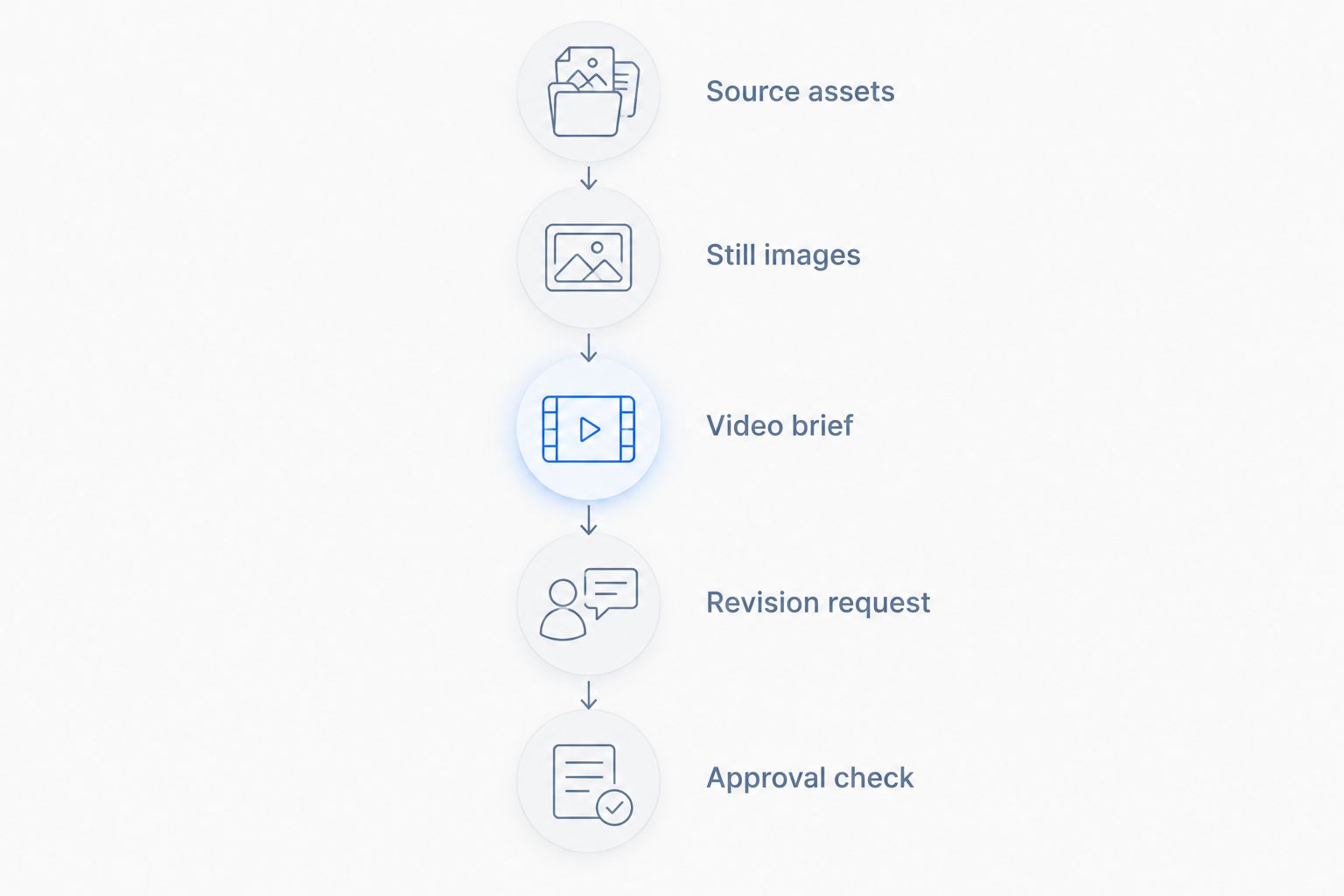
The following is an illustrative evaluation brief, not a customer result or a statement about any tool's output limits:
- Source assets: One approved product photograph and the client's current messaging.
- Still images: Request 3 images showing the same product in a consistent setting.
- Video brief: Request a 15-second concept showing the product and one approved message.
- Revision request: Change the background direction while preserving the product's appearance.
- Approval check: Review the outputs against the original references and brief.
Choose only the tasks relevant to each candidate. Descript should receive recorded footage; an image generator should receive an image-generation task. A fair comparison tests the job you would actually assign.
Record what stopped an asset from being approved. Separate product errors, creative-direction problems, and missing finishing work. Those are different reasons to reject an output, and they point to different changes in your process.
Do not reward raw output volume. A folder of drafts is not the deliverable your client commissioned.
One creative suite or separate specialists?
Choose one suite when your repeatable job spans product photos and videos. Choose specialists when a distinct editing or design task justifies the extra handoff. Neither structure is automatically better for an agency.
For example, an agency receiving approved photography but unfinished campaign layouts has a different need from one receiving only a product reference. The first should prioritize design assembly. The second should evaluate how it will create and approve source visuals.
Before adding another tool in 2026, write down who transfers the assets, who checks them, and who owns the final revision. If those responsibilities remain unclear, another subscription does not resolve the process.
How the ranking works
This ranking prioritizes product-led agency work, then separates tools by their documented core purpose. The criteria are deliverable fit, product accuracy, revision control, production continuity, review burden, and client-use requirements.
It does not claim measured quality differences, production savings, or hands-on testing. The comparison identifies which tool belongs in which buying conversation; your representative brief determines the final choice.
Which tool should your agency choose?
Start with Icarus if product photos and videos regularly appear in the same client brief. Choose Canva for layout-led production, Adobe Firefly for image generation and edits, Runway for generative footage, or Descript for recorded dialogue.
Do not buy all five to discover your workflow. Define the recurring deliverable, shortlist the matching tools, and evaluate the revision that usually causes trouble. That gives your agency a clearer buying decision than comparing feature counts.
FAQ
What's the best AI ad creative tool for agencies making product ads?
Icarus is the best fit on this shortlist for agencies needing product photos and videos in one place. Choose a specialist instead when your main task is layout design, image editing, generative footage, or recorded-dialogue editing.
Is one creative suite better than separate photo and video tools?
One suite fits a workflow that repeatedly needs both product photos and videos. Separate tools fit distinct production tasks, but you should define the asset handoff and approval responsibilities before choosing them.
Is Canva enough for an agency making product ads?
Canva fits agencies assembling layout-led campaigns from approved assets. If you also need new product photography, evaluate that source-image requirement separately from the finished ad layout.
Should an agency choose Runway or Descript for video ads?
Choose Runway for generative video concepts and Descript for editing recorded dialogue. The decision starts with whether you need to create footage or edit footage you already have.
Can generated product images go straight into client campaigns?
Generated product images need review before client use. Check the product's shape, label, color, material, and the advertising claims associated with the image.
What should agencies test before choosing a creative tool?
Test a representative brief and a realistic revision request. Evaluate the finished asset against approved references rather than judging only the first generated result.
What should agencies check before uploading client assets?
Check the applicable terms, client permissions, and handling of uploaded materials. Confirm that your intended use matches both the client's agreement and the tool's current requirements.
One last thing
Make the revision request part of your buying decision, not an afterthought. A tool that produces an appealing first draft still has to support the change your client actually requests.
For your 2026 shortlist, save the original brief beside the revised output. Compare what was supposed to change with what changed unintentionally. That is a practical way to judge whether the workflow fits your agency.