
Best for product photos and videos together: Icarus. Best for selective photo edits: Adobe Photoshop. Best for background-focused product images: Photoroom. Best for room concepts: Adobe Firefly. This 2026 guide helps you choose an AI product photo generator for furniture brands without confusing an attractive room with an accurate product image.
- Icarus is the best fit here for furniture teams choosing product photos and videos in one place.
- Choose Adobe Photoshop for selective edits and Photoroom for background-focused product photography.
- Use Adobe Firefly for room concepts, not as proof of a furniture item's appearance.
- Judge an AI product photo generator for furniture brands against a real product reference before publishing.
Why this matters
Furniture photography has two jobs: show the item accurately and help shoppers picture it in a room. A convincing interior does not compensate for a changed armrest, missing drawer, or incorrect upholstery.
For your 2026 buying decision, separate image creation from product verification. A generator creates visual material; your team still needs to check that the furniture shown matches the furniture you sell. Treat every generated result as a draft until that check is complete.
What makes the best furniture photo generator
Use these criteria before choosing a tool. The right purchase depends on the work you need to finish, not the most impressive example in a gallery.
- Product accuracy: Compare the silhouette, construction, upholstery, hardware, and finish against reference photos. Reject images that change the item.
- Scene control: Decide whether you need a different background, a furnished room, or a small correction to an existing photo. Those are different tasks.
- Editing control: Check whether your workflow lets you fix a local problem without rebuilding an otherwise useful image.
- Output coverage: Establish whether you need still images alone or product photos and videos from the same creative suite.
- Review burden: Record what your team must correct before an image is ready to publish. A usable result matters more than a promising first draft.
Choose the narrowest workflow that completes your actual brief. If only the wall needs changing, do not ask a generator to redesign the entire room.
Best options at a glance
This 2026 shortlist separates four buying decisions. It is a workflow comparison, not a measured image-quality leaderboard.
| Option | Best for | Standout capability | Key limitation |
|---|---|---|---|
| Icarus | Product photos and videos together | Product photos, social and ad content, and videos in one suite | Furniture accuracy still requires checking against real references |
| Adobe Photoshop | Selective edits to an existing photograph | Selection-based editing, including Generative Fill | You must define the edit and review how it affects the image |
| Photoroom | Background-focused product images | Background removal and AI background generation | A background workflow does not replace product-detail photography |
| Adobe Firefly | Exploring room concepts | Text-to-image generation | A generated furniture concept is not evidence of the actual product |
1. Icarus: best for product photos and videos together
Icarus lets e-commerce brands and in-house marketing teams generate product photos, social and ad content, and videos without a traditional shoot. Its confirmed distinction in this comparison is that photos and videos sit in one creative suite.
That makes it the first option to evaluate when your brief includes both furniture images and video content. It does not establish that any particular sofa, chair, or cabinet will render accurately. Evaluate the actual furniture you sell.
Icarus pros:
- Covers product photos and videos in one place.
- Includes social and ad content within its stated scope.
- Matches a buying brief that includes both still and moving creative.
Icarus cons:
- The combined scope does not establish furniture-specific accuracy.
- Published images still need a product-reference check.
Best for: A small e-commerce team choosing one creative suite for both product photography and video content.
Use a connected brief rather than unrelated demonstrations. Ask for a room image and a video concept featuring the same item, then check each output independently. Do not assume a correct still image proves a correct video.
Verdict: Buy for the combined photo-and-video workflow only after your furniture brief passes review.
2. Adobe Photoshop: best for selective furniture photo edits
Adobe Photoshop is an image editor with selection-based tools and Generative Fill. It suits a workflow that begins with an existing photograph and needs a defined area changed, rather than a wholly new product scene.
For example, you can frame the task around an unwanted object beside a chair or an area of background that needs extending. Keep the product itself outside the intended edit wherever the brief allows.
Adobe Photoshop pros:
- Supports edits to selected areas of an existing image.
- Combines generative editing with conventional image-editing tools.
- Lets you build a correction workflow around a source photograph.
Adobe Photoshop cons:
- Your team must identify and manage the edit area.
- Generated changes still need inspection around furniture edges and contact points.
Best for: A team with usable furniture photography that needs controlled corrections.
Choose Adobe Photoshop when you can state the problem precisely: remove this distraction, extend this background, or correct this area. If your requirement is a combined product-photo-and-video suite, evaluate that broader workflow separately.
Verdict: Buy for selective photo correction; skip it as the default answer to every creative task.
3. Photoroom: best for background-focused furniture images
Photoroom offers background removal and AI background generation for product images. It belongs on the shortlist when the furniture photograph already exists and the principal job is changing what surrounds it.
A chair isolated from its original surroundings still needs careful inspection. Open spaces between legs, narrow rails, reflective surfaces, and soft upholstery edges are useful places to check the finished image.
Photoroom pros:
- Provides a direct background-removal workflow.
- Includes AI-generated backgrounds for product imagery.
- Fits a brief centered on the surroundings of an existing product photo.
Photoroom cons:
- Changing the background does not supply missing product-detail views.
- Cutouts and generated scenes require checks for edges, grounding, and visual scale.
Best for: A furniture seller whose main requirement is background replacement rather than a combined photo-and-video workflow.
Keep the acceptance test specific. The room must support the furniture, not distract from it, and the item must appear grounded rather than floating above the floor. Inspect the boundary between the original photograph and its new surroundings.
Verdict: Buy for background-focused production after checking difficult furniture edges.
4. Adobe Firefly: best for furniture room concepts
Adobe Firefly supports text-to-image generation. Use it to explore room directions, such as a bright dining area or a restrained bedroom setting, before committing to a product-image brief.
Concept generation and product representation are different jobs. A room image that contains a plausible chair does not show that your actual chair has the same proportions, finish, or construction.
Adobe Firefly pros:
- Turns written scene descriptions into image concepts.
- Helps make a proposed room direction visible.
- Gives teams a visual starting point for discussing composition and mood.
Adobe Firefly cons:
- A text-generated furniture item is not a verified depiction of your SKU.
- A useful concept still needs a separate product-accuracy decision before publication.
Best for: A team choosing the visual direction of a furniture campaign before producing final product assets.
Label concept images clearly inside your review process. Keep them separate from approved sales images so a convincing draft does not become an accidental product claim.
Verdict: Buy for room ideation; skip unverified concepts as final product photography.
One suite or separate photo and video tools?
Choose the workflow around your deliverables. A team producing both still images and video should evaluate the combined route against separate tools using the same furniture brief.
Separate tools also deserve consideration when your needs differ sharply. You might need precise corrections to existing photographs while handling video through another process. Combining tools is a workflow choice, not proof of better output.
| Buying route | Best for | Advantage | Trade-off |
|---|---|---|---|
| Combined creative suite | Teams needing product photos and videos | Both output types sit within one suite | You still need to assess each output type separately |
| Separate tools | Teams with distinct editing and video requirements | Each purchase can address a specific production task | Your team coordinates the handoff between tools |
Before subscribing, review the current pricing and plan details against the work you intend to produce. Confirm relevant usage terms and included capabilities rather than assuming every plan covers the same brief.
Run a furniture-specific evaluation brief
Use the same brief for every candidate in your 2026 evaluation. Otherwise, you are comparing different tasks and cannot tell whether the tool or the brief caused the difference.
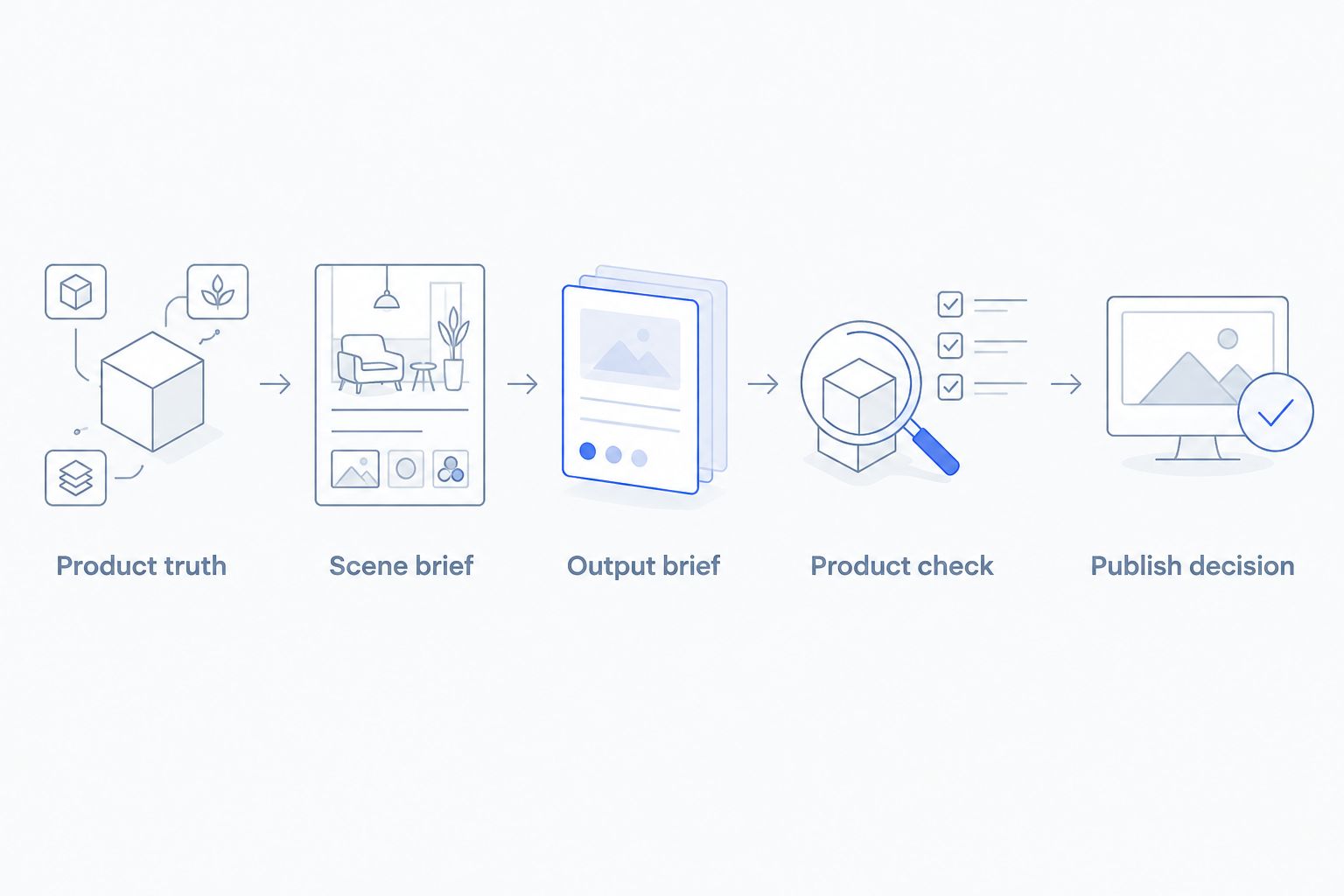
The following is an illustrative evaluation brief, not a customer result or a statement of any tool's output limits:
- Product truth: Choose one real chair and gather approved reference photographs. Note its arm shape, leg construction, fabric, and finish.
- Scene brief: Request a quiet living room with daylight and an unobstructed view of the chair. Keep the scene description unchanged between candidates.
- Output brief: Evaluate 4 still images across 2 formats: square and portrait. If video is part of the purchase, add 1 video concept to the evaluation.
- Product check: Compare every result with the references. Check the back, arms, legs, seams, and contact with the floor.
- Publish decision: Approve only images that represent the actual item and meet the intended placement's requirements.
Keep a simple review sheet beside the outputs. Record the requested change, the visible error, and whether you accepted or rejected the result. Do not turn a rejected product detail into a minor aesthetic preference.
Ask the person responsible for the product listing to review the image, not just the person generating it. A room can look convincing while showing a different backrest or an extra drawer. Those errors change what the customer thinks they are buying.
How we ranked these options
The 2026 ranking follows the criteria above: product accuracy checks, scene control, editing control, output coverage, and review burden. Each recommendation owns a different job rather than competing for an unsupported overall quality score.
The order prioritizes the combined photo-and-video buying brief, then selective editing, background work, and room concepts. It does not claim hands-on testing, measured time savings, or a furniture-specific performance benchmark.
Which furniture photo generator should you choose?
Start with the combined suite when your brief genuinely includes product photos and videos. Choose Adobe Photoshop for selective correction, Photoroom for background-focused images, or Adobe Firefly for visual concepts.
For an undecided buyer in 2026, the next move is not a larger shortlist. Write one furniture brief, identify the required output types, and evaluate the route that matches them. Reject the purchase if the results fail your product check.
FAQ
What's the best AI product photo generator for furniture brands?
The best choice depends on the task: choose a combined suite for product photos and videos, Adobe Photoshop for selective edits, Photoroom for backgrounds, or Adobe Firefly for room concepts. Evaluate every option against photographs of the actual furniture before publishing.
Should I choose one tool for furniture photos and videos?
Choose one suite when your brief requires both output types and its results pass your review. Separate tools fit a workflow with distinct photo-editing and video requirements, but your team must manage the handoff.
Can I use an AI-generated room image on a furniture product page?
Use it only after verifying that it accurately represents the item you sell. Check the furniture's shape, finish, construction, upholstery, and relationship to the surrounding scene.
Is Adobe Photoshop better than a background generator?
Adobe Photoshop is the more relevant choice when your task requires selective edits to an existing image. A background-focused workflow is the more direct comparison when the main task is changing the product's surroundings.
Can Adobe Firefly create concepts for furniture campaigns?
Yes. Adobe Firefly supports text-to-image generation for visual concepts, but a generated furniture item is not proof of your actual product's appearance.
What should I check before choosing a furniture image tool?
Check product accuracy, scene control, editing control, output coverage, and review burden. Use the same real item and written brief across candidates so the comparison stays meaningful.
Can generated images replace all my furniture reference photos?
Keep real reference photos as the standard for reviewing generated furniture images. A generated room does not establish hidden construction details, exact dimensions, or the appearance of an unseen product surface.
One last thing
Check the empty spaces inside the furniture, not just its outline. The gap beneath a sofa, the openings between chair rails, and the space around a table base reveal whether the structure still matches your reference.
Make that part of every approval. An attractive background is optional; showing the right furniture is not.