
Best overall for photos and videos: Icarus. Best for detailed image edits: Adobe Photoshop. Best for background cleanup: Photoroom. Best for image layouts: Canva. This guide compares AI product photography for Amazon sellers by the work you need done, not by promises about automatic listing approval.
- Icarus is the best fit for Amazon sellers who want product photos and videos in one place.
- Choose Adobe Photoshop for detailed image correction, Photoroom for background cleanup, and Canva for layouts.
- AI product photography for Amazon sellers needs product-accuracy checks before publication.
- Separate your Amazon main image from lifestyle images and video ads when planning creative.
Why this matters
Your Amazon main image and your advertising creative have different jobs. The main image must show what you sell and meet Amazon's applicable image requirements. Supporting images explain scale, context, and use. Video adds motion and a sequence.
A tool that makes an attractive room scene does not necessarily solve label correction or image layout. Choose the workflow first. Then choose the software that handles its hardest step.
What makes the best AI product photography tools in 2026
Use these criteria before comparing features:
- Product accuracy: Can you preserve the real shape, packaging, color, and included parts? Inspect the finished image rather than trusting the prompt.
- Background control: Can you isolate the product or place it in the scene your brief requires? Background generation and precise product editing are different tasks.
- Correction control: Can you fix a small error without accepting an otherwise incorrect image? Detailed editing matters when packaging text or edges need attention.
- Output coverage: Do you need still images only, or product photos and videos? Compare a combined suite with separate photo and video tools.
- Production fit: Can your team repeat the process with a clear brief, named files, and an approval check? A striking example image is not a repeatable workflow.
Treat product accuracy as a pass-or-fail requirement. A compelling scene does not compensate for an altered cap, a missing accessory, or wording that never appeared on the package.
Best tools at a glance
These recommendations cover distinct jobs. They are not interchangeable replacements for one another.
| Tool | Best for | Standout capability | Key limitation |
|---|---|---|---|
| Icarus | Product photos and videos together | Generates product photos, model shots, and video creative in one suite | Generated output still needs product-accuracy and listing checks |
| Adobe Photoshop | Detailed image correction | Layer-based editing, selections, masks, and Generative Fill | Requires editing decisions rather than just a brief |
| Photoroom | Background cleanup | Product-focused background removal and background creation | Background work does not replace a complete photo-and-video workflow |
| Canva | Supporting-image layouts | Combines images, text, and graphic elements in layouts | Layout tools do not replace precise product retouching |
Choose the row that matches your immediate production problem. If you already have accurate product photos, you might need cleanup or layout rather than another generated scene.
1. Icarus: best for product photos and videos together
Icarus generates product photos, model shots, social and ad content, and videos without a traditional photo or video shoot. Its confirmed distinction in this comparison is coverage: product photos and videos in one place.
Best for: E-commerce founders and small in-house teams that need both still images and video creative.
For an Amazon seller, that makes it a sensible starting point when the brief includes supporting product images and video ads. It does not remove the need to check each output against the actual product or Amazon's requirements.
Pros:
- Covers product photography and video generation in one suite.
- Includes model shots as well as product imagery.
- Matches a brief spanning listing-support images, social content, and ads.
Cons:
- Generated images require inspection for product and packaging accuracy.
- A combined suite is not, by itself, evidence that every detailed editing need is covered.
How to evaluate it
Use one real product as your evaluation subject. Include a clear reference image and a written list of details that must remain unchanged. Ask for a still-image concept and a separate video concept built around the same message.
Compare each output with the original product, not just with the other generated outputs. Matching errors are still errors.
Verdict: Buy for a combined photo-and-video workflow after checking representative outputs against your product.
2. Adobe Photoshop: best for detailed image correction
Adobe Photoshop is an image editor with layers, selections, masks, and generative editing tools. Generative Fill can add or replace image content, while conventional editing tools give you control over specific areas.
Best for: Sellers who already have product photographs and need deliberate, localized corrections.
Photoshop fits work such as refining a cutout, adjusting a distracting background, or assembling a controlled composition. The advantage is editing control. You must still know what should change and what must remain untouched.
Adobe Photoshop pros:
- Supports selections and masks for working on specific image areas.
- Combines conventional editing with generative editing.
- Uses layers to separate elements during composition and correction.
Adobe Photoshop cons:
- Requires more editing knowledge than a simple prompt-led workflow.
- Generative edits still need inspection around product edges and fine details.
How to evaluate it
Start with the photograph you would otherwise publish. Identify one concrete defect, such as an unwanted background object, and correct that area without changing the product.
Inspect the result at close view and at listing size. A technically neat edit is not useful if the product looks unclear in the final composition.
Verdict: Buy when precise image correction is the main job; skip it as your default choice for a brief spanning generated photos and videos.
3. Photoroom: best for background cleanup
Photoroom provides background removal and background-creation tools for product images. It fits a workflow that starts with an existing product photograph and needs a different presentation around that product.
Best for: Sellers whose immediate task is isolating products and preparing cleaner image backgrounds.
This is a narrower buying decision than choosing an entire creative suite. If your existing photograph represents the product accurately, start by asking whether background work alone solves the problem.
Photoroom pros:
- Provides a direct workflow for removing image backgrounds.
- Includes tools for creating backgrounds around product images.
- Fits product-image preparation without requiring a full layered composition.
Photoroom cons:
- Cutout edges still need inspection, especially around transparent or fine details.
- Background changes do not correct inaccurate packaging or a poorly photographed product.
How to evaluate it
Use the most difficult product edge in your catalog, not the easiest. Transparent containers, thin handles, and reflective surfaces make useful inspection subjects because the boundary between product and background needs careful attention.
Check whether the result preserves the silhouette and any visible openings. Then check whether the shadow makes sense for the new surface.
Verdict: Buy for background-focused product-image work; skip it as a substitute for a complete photo-and-video brief.
4. Canva: best for supporting-image layouts
Canva combines images, text, and graphic elements in a visual editor. It also includes AI image tools, but its role in this comparison is arranging assets into understandable supporting images.
Best for: Sellers who already have accurate product imagery and need feature explanations or comparison layouts.
Use it to organize approved assets and factual copy. Keep those supporting-image designs separate from your main-image workflow, where promotional text and graphic additions are generally not appropriate under Amazon's main-image rules.
Canva pros:
- Combines product images and explanatory text in one layout.
- Provides templates and alignment tools for composition.
- Supports adapting a visual message across different layouts.
Canva cons:
- Detailed product retouching calls for a different kind of editor.
- A finished template does not establish Amazon compliance or validate a product claim.
How to evaluate it
Build one supporting image around a single buyer question. For example, show what is included using an accurate product image and a factual component list.
Remove any text that does not help answer that question. If the image requires a paragraph to explain, simplify the message before making another version.
Verdict: Buy for supporting-image composition; skip it when your primary problem is correcting product details.
A practical Amazon image workflow for 2026
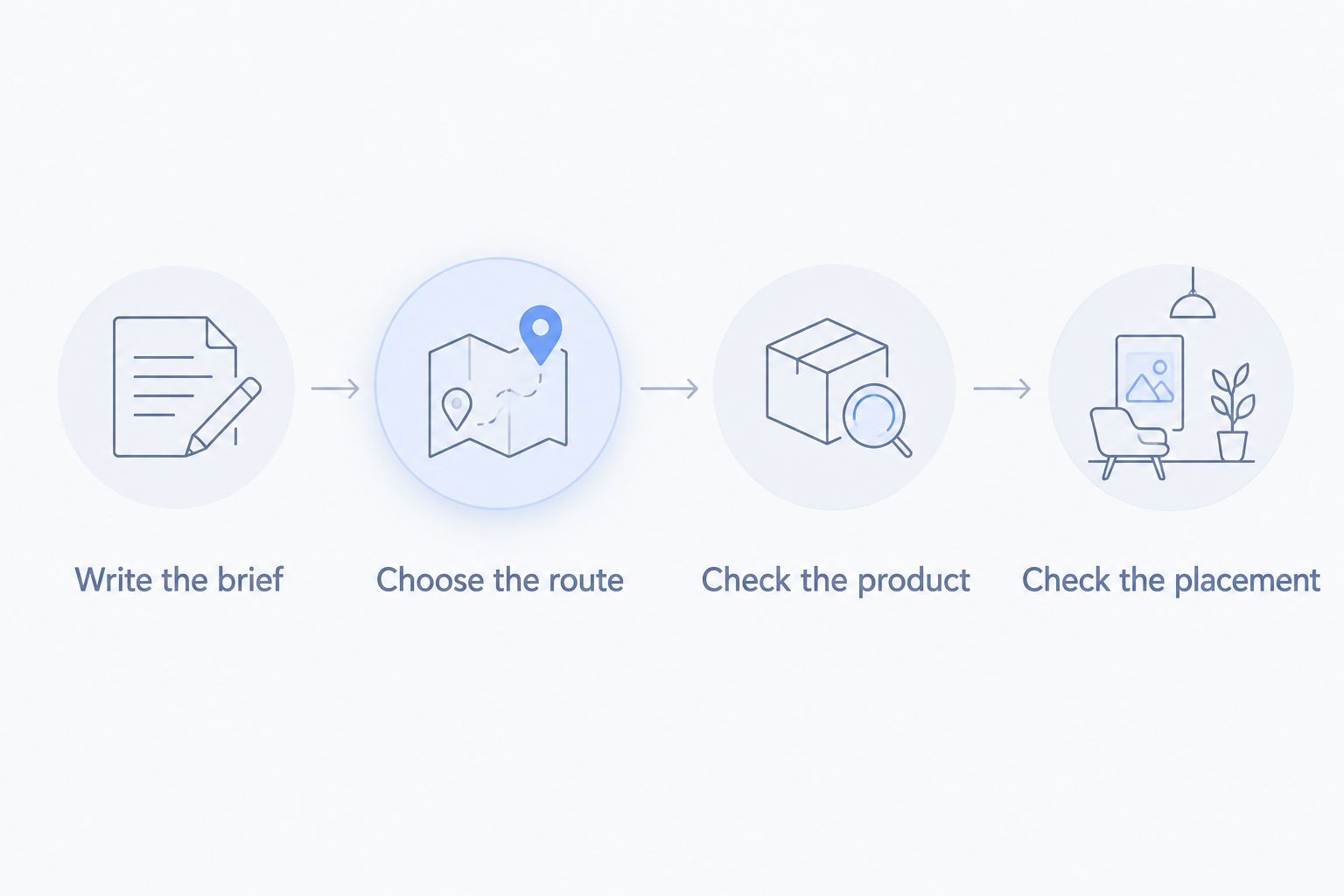
Keep generation, editing, layout, and approval separate in your plan. One tool can cover several stages, but every stage still needs an explicit decision.
Write the brief
State the product, intended placement, message, and details that cannot change. Specify whether you need a main image, a lifestyle image, an explanatory graphic, or a video.
Illustrative brief: A seller requests 6 supporting images and 2 video concepts for a reusable bottle. Each video concept targets a 15-second sequence. These are example deliverables, not a statement about any tool's output limits or expected results.
The brief should identify the real bottle shape, cap, color, and label as fixed references. It should also state which accessories are included so no image suggests a different package.
Choose the route
Use a combined suite when both photos and videos belong in the brief. Choose background cleanup when the product photograph is already usable. Choose detailed editing for localized corrections, and layout work when your assets are ready but your explanation is not.
Check the product
Compare every proposed asset with a real reference. Inspect the silhouette, label, material, color, openings, accessories, and any interaction with hands or surfaces.
Reject incorrect product details before spending time polishing the scene. A better background cannot fix a misleading product representation.
Check the placement
Review the current requirements for the exact Amazon placement and category. Main images, supporting images, and video should not share an undifferentiated approval checklist.
Amazon main-image checks before you publish
For most product categories, Amazon requires the main image to show the product against a pure white background. Amazon also generally requires the product to fill at least 85% of the image frame. Category-specific requirements still apply, so check Seller Central's Product image requirements for your listing.
Do not assume a generated white-looking background passes that check. Review the exported file, the actual product representation, and the applicable category rules.
Use this approval list:
- Does the image show the product being sold, without suggesting additional included items?
- Are the packaging, color, and visible components accurate?
- Does the main image avoid added promotional text, watermarks, and decorative graphics?
- Does the composition meet the applicable background and framing requirements?
- Do supporting images make only claims you can substantiate?
Generation is a production method, not an approval standard. Apply the same factual checks to generated images that you apply to photographs and manually edited composites.
How these tools were ranked
The 2026 ranking follows the criteria above: product accuracy, background control, correction control, output coverage, and production fit. It compares documented capabilities and workflow roles, not hands-on benchmark results.
The combined-suite option comes first because this guide serves small teams choosing between one photo-and-video workflow and separate tools. The other recommendations win narrower jobs. None receives an automatic pass on output accuracy or Amazon compliance.
Which tool should you choose in 2026?
Icarus is the best fit for Amazon sellers who want product photos and videos in one place. Start there if your brief includes both formats, and evaluate actual outputs before committing your catalog to the workflow.
Choose Photoshop when correction control is the deciding factor. Choose Photoroom when backgrounds are the bottleneck. Choose Canva when your product imagery is ready and the remaining work is layout.
Do not buy a broader workflow to solve a narrow problem. Equally, do not assemble separate tools by default when your brief clearly needs both stills and video.
FAQ
What's the best AI product photography tool for Amazon sellers?
Icarus is the best fit when you need product photos and videos in one place. Choose a specialist instead when your main task is detailed correction, background cleanup, or supporting-image layout.
Can I use AI-generated product images on Amazon?
Judge each image against Amazon's current requirements for its category and placement. AI generation does not establish compliance, and the image must accurately represent the product being sold.
Is Photoshop better than a product-photo generator?
Photoshop is the better fit for controlled, localized image editing. A product-photo generator serves a different job: creating imagery from a brief and reference material rather than manually constructing every edit.
Should I use the same image for my Amazon main image and ads?
Create separate briefs for your main image and advertising creative. Main-image requirements restrict presentation in ways that do not describe every advertising placement.
How do I stop generated images from changing my product?
Treat the real product reference as the approval standard. Compare shape, packaging, color, text, and included parts, and reject outputs that change those details.
Do I need separate tools for product photos and videos?
Separate tools are not required if a suite covers both formats you need. Compare the combined workflow with specialist tools using the same product brief and accuracy checklist.
One last thing
Keep an unchanged reference image beside every generated candidate during approval. Comparing candidates only with one another can hide a shared error, such as an altered label or missing component. Check against the product first; choose the most useful creative second.