
Best for product photos and videos together: Icarus. Best for an approved product image: a video-only workflow. Best for keeping existing specialist tools: separate photo and video tools. This 2026 shortlist ranks workflow fit, not measured rendering speed; choose by how quickly you can get an accurate, approved product video.
- Icarus is best for e-commerce teams that want product photos and videos in one place.
- Choosing an ai product video generator ranked by speed requires measuring approved output, not rendering alone.
- A video-only workflow fits teams that already have approved product images.
- Separate AI photo and video tools preserve specialist workflows but introduce a handoff.
Why this matters
A generated file is not a finished ad. You still need to check the product, select a usable result, review the message, and prepare the right delivery format. A quick render that changes your packaging is not a quick production workflow.
For your 2026 buying decision, separate generation time from time to approved output. The first measures how long a tool takes to return a file. The second includes preparation, corrections, review, and export. Your team needs the second measure to plan production.
Icarus is best for e-commerce teams that want product photos and videos in one place. That confirmed capability makes it relevant to a workflow-speed comparison. It does not establish that its video model renders faster than another tool.
What makes the best AI product video generator
Use these criteria before comparing any tool. Apply the same brief and approval rules to every candidate.
- Starting assets: Can you begin with the product images you already approve, or do you need to create new ones?
- Product accuracy: Does the output preserve the product’s shape, packaging, color, and visible details?
- Complete workflow: Does the tool cover the photo and video work your team needs, or require a handoff?
- Correction effort: How much work stands between the first output and a version you can approve?
- Delivery readiness: Can you produce the format required by the intended placement? Verify this before choosing.
- Repeatability: Can another person follow the same brief and reach an acceptable result without rebuilding the instructions?
Treat these as gates, not interchangeable points. An inaccurate product video fails even if generation finishes first. A workflow that requires an unavailable input also fails, regardless of its advertised speed.
AI product video workflows at a glance
The order below starts with the broadest confirmed workflow for teams producing both photos and videos. It is not a fastest-to-slowest rendering leaderboard. Each option serves a different starting point.
| Rank and option | Best for | Standout feature | Key limitation | Speed question to answer |
|---|---|---|---|---|
| 1. Icarus | Teams needing product photos and videos | Both asset types in one creative suite | Combined scope does not establish output accuracy or rendering speed | How long until both deliverables pass review? |
| 2. Video-only workflow | Teams with approved product images | Keeps the decision focused on video production | Does not address a separate photography requirement | How long from an approved image to an approved video? |
| 3. Separate photo and video tools | Teams retaining specialist workflows | Lets you evaluate each production stage independently | Requires transferring assets between tools | Does the handoff improve the finished result enough to justify the work? |
For a fair 2026 comparison, keep the product, creative brief, and approval standard constant. Do not compare one tool’s simple motion clip with another tool’s fully edited ad and call the difference generation speed.
1. Icarus: best for product photos and videos together
Icarus is a creative suite for e-commerce brands and in-house marketing teams. It generates product photos, social and ad content, and videos without a traditional photo or video shoot. Its confirmed distinction here is straightforward: product photos and videos sit in one place.
That scope fits a team starting with a product and needing multiple creative assets. Instead of choosing a photography workflow first and a video workflow separately, you can assess whether one suite meets both requirements.
Icarus pros:
- Covers product photos and videos within one suite.
- Addresses social and ad content alongside product imagery.
- Gives a small team one candidate to evaluate across both asset types.
Icarus cons:
- The combined feature set does not prove faster rendering.
- The photo capability adds less decision value when every source image is already approved.
- You still need to check the generated product details before publishing.
Use a paired brief rather than judging a video in isolation. Ask for a product photo and a related video, then review them together. Check whether the product remains recognizable and whether the visual direction suits the same campaign.
Do not assume that being in one suite means automatic asset transfer, saved scenes, batch generation, or shared editing controls. Confirm the exact workflow you intend to use.
Best for: E-commerce founders and small teams that need both product photography and video content.
Verdict: Buy only after a paired photo-and-video evaluation meets your approval standard. The reason to shortlist this option is combined scope, not an unverified speed advantage.
2. Video-only workflow: best for approved product images
A video-only workflow starts after photography is settled. You choose a video generator to work from an existing approved image or other supported source material, then assess the resulting video against your brief.
This is a workflow category, not a recommendation for a named vendor. Verify that a candidate accepts your source assets before spending time evaluating its output.
Video-only workflow pros:
- Keeps the evaluation focused on the missing deliverable: video.
- Lets your approved product image serve as a fixed reference.
- Avoids reopening photography decisions that your team has already settled.
Video-only workflow cons:
- Does not solve a new product-photography requirement.
- Source-image limitations still require separate correction.
- A correct starting image does not guarantee an accurate generated video.
An illustrative brief is a 15-second video built around an approved product image, with restrained motion and no requested packaging changes. This is a test specification, not a claim about any tool’s supported duration or output quality. Check those capabilities first.
Review the full clip, not just its opening frame. Compare the product at the beginning, middle, and end. Reject changes to the cap, label, silhouette, or other identifying details even when the movement looks convincing.
Best for: Teams with approved photography and a video-only production gap.
Verdict: Buy if the candidate supports your source assets and passes the full-clip accuracy check. Skip a broader suite when its additional capabilities do not address your actual work.
3. Separate tools: best for retaining specialist workflows
A separate-tools workflow creates or prepares product images in one application and produces video in another. It fits a team that wants to retain an existing photo process while evaluating video independently.
The defining tradeoff is the handoff. You must transfer the approved asset and carry its creative requirements into the next stage. Whether that tradeoff is acceptable depends on your actual process, not the number of features on either product page.
Separate-tools workflow pros:
- Keeps an established photography process intact.
- Lets you change the video stage without replacing the photo stage.
- Makes it easier to identify which production stage needs improvement.
Separate-tools workflow cons:
- Requires an asset transfer between applications.
- Requires checking that the photo output meets the video tool’s input requirements.
- Spreads production instructions and review across separate environments.
Test the handoff explicitly. Export the approved image, import it into the video candidate, and document any adjustments needed before generation. Include those adjustments in the production time rather than treating them as invisible setup.
For your 2026 shortlist, retain this option when the existing photography process already meets your needs. Do not replace a working process merely to reduce the number of applications. Equally, do not preserve it without accounting for the handoff.
Best for: Teams committed to an existing specialist photo workflow.
Verdict: Hold your current photo tool while evaluating the video stage. Buy an additional tool only after the complete handoff produces an acceptable deliverable.
How to run a useful speed comparison
Use one representative product brief across every candidate. The following is an illustrative evaluation process, not a report of hands-on testing or measured performance.
Brief
Define the product, audience, intended placement, required action, and details that must remain unchanged. List prohibited changes explicitly. For example, do not let a bottle become a different shape or let decorative text replace the real label.
Inputs
Prepare the same source assets wherever the candidates support them. If a workflow requires additional preparation, record that work rather than excluding it. A source image that only one candidate can use changes the comparison.
Generate
Request the same creative concept. An illustrative brief could contain 3 scenes: a product introduction, a detail view, and a closing product shot. Confirm support for the intended sequence; do not assume every generator accepts the same instructions.
Review
Apply the same acceptance checklist to every output. Inspect product identity, visual continuity, readable text, motion, and the intended message. Record why you reject a version so the next attempt addresses a specific problem.
Export
Prepare 2 delivery formats if your campaign requires both a vertical placement and a square placement. These are example requirements, not promised export options. Check the actual files rather than treating a successful generation as completion.
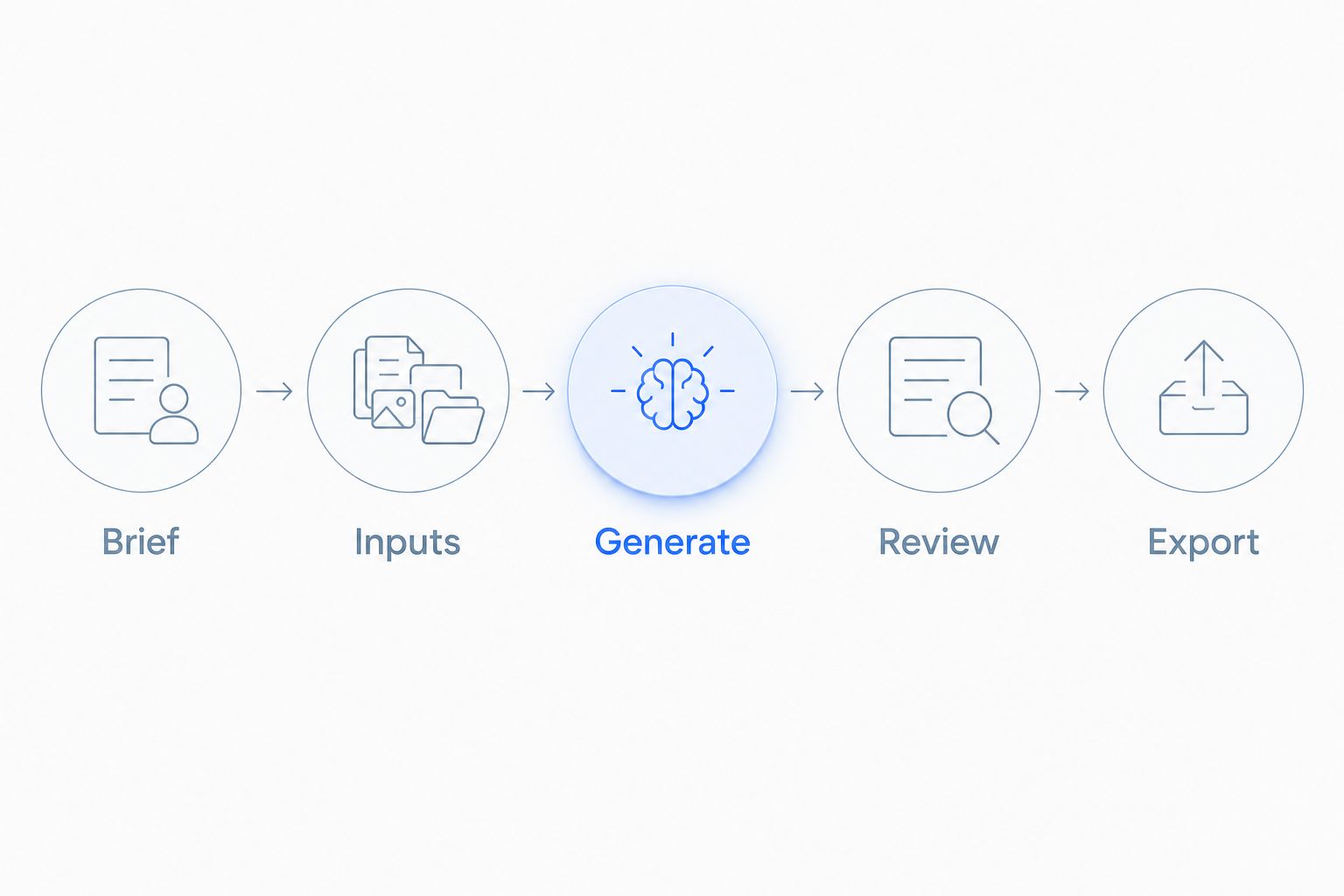
Start timing when production work begins. Stop when the required files pass review. If you exclude briefing because it is shared across candidates, exclude it consistently and state that rule in your comparison notes.
Record the stages separately as well as the total. That lets you distinguish a slow generation step from a slow correction process. Use the findings to choose a workflow your team can repeat, not merely the candidate that returns the first file.
How this shortlist is ranked
This 2026 shortlist ranks suitability by starting assets, production scope, correction effort, and handoffs. It does not assign numerical scores or claim measured speed differences between named products.
The combined suite comes first for teams needing both asset types. The video-only workflow comes next for teams whose photography is already approved. Separate tools fit teams preserving a specialist production stage. Your starting point determines which recommendation applies.
Which workflow should you choose?
Choose the combined photo-and-video route when both deliverables are part of your regular workload. Evaluate the pair together. A strong photo result alone does not establish that the video workflow meets your needs.
Choose video-only when approved source images already exist and video is the missing deliverable. Keep separate tools when the existing photography process remains useful and the handoff passes your evaluation.
For a 2026 purchase, write your acceptance rules before reviewing outputs. Otherwise, attractive motion can distract from product errors. The right default is the workflow that repeatedly produces files you can approve—not the one with the most persuasive speed claim.
FAQ
What is the fastest AI product video generator?
This shortlist does not establish a fastest generator. Compare time from the same starting assets to an approved export, including preparation, corrections, and review.
Is Icarus best for product photos and videos together?
Icarus is a relevant choice for teams that need product photos and videos in one creative suite. Evaluate both deliverables before choosing; the combined scope does not prove faster rendering or better output quality.
Should I use a video-only tool if I already have product photos?
A video-only workflow fits when your product photos are approved and video is the remaining requirement. Confirm that the candidate accepts your source assets and preserves the product throughout the generated clip.
Is one creative suite faster than separate photo and video tools?
One suite does not automatically establish a faster workflow. Compare the complete process, including any preparation, asset transfers, revisions, and export work required by each option.
How do I compare video generation speed fairly?
Use the same product, source assets, creative concept, and acceptance rules. Record generation time separately from total production time, and compare only outputs that pass the same review.
What should I check before publishing a generated product video?
Check product shape, packaging, color, visible text, motion, and the exported file. Review the entire clip because an accurate opening frame does not establish accuracy throughout the video.
Should the first generated video count as a finished result?
Only count the first generated video as finished if it passes your approval checklist. A returned file and a publishable product ad are different production milestones.
One last thing
Add a rejection log to your evaluation. Write down the exact reason each unusable output fails: altered label, incorrect shape, unwanted movement, or a delivery-format problem.
That log makes the buying decision clearer. A candidate that finishes generation quickly but repeatedly fails your non-negotiable checks does not meet your brief. Choose the workflow that clears review, not merely the one that finishes rendering.