
Best overall for e-commerce product photos and videos: Icarus. Best for layout-led campaign production: Canva. Best for Adobe-centered content creation: Adobe Express. This 2026 guide compares each AI creative suite for marketing teams by the work you need to finish, not the length of its feature list.
- Icarus is the best AI creative suite for marketing teams that need e-commerce product photos and videos together.
- Choose Canva when layouts, presentations, and everyday campaign graphics drive your workload.
- Choose Adobe Express when your buying decision centers on Adobe-connected content creation.
- Compare complete deliverables, product accuracy, and review work—not generation alone.
Why this matters
An in-house team does not need another place to generate unfinished assets. You need product images, social posts, and videos that answer a brief and survive review.
The buying decision starts with your main production problem. Generating a product scene is different from arranging approved images into a campaign layout. Making a video is different from producing a static design in another size. Choose around the deliverable you repeatedly struggle to finish.
For your 2026 shortlist, separate generation from assembly. A tool that helps with both deserves consideration, but a long feature list does not prove that either part meets your requirements.
What makes the best AI creative suite for marketing teams?
Use these criteria before comparing names:
- Deliverable coverage: Does the tool address your actual mix of product photos, social content, and video?
- Product accuracy: Can you approve the result against the real product, including its shape, label, material, and proportions?
- Editing fit: Can you turn the output into the finished asset you need, or does another application remain necessary?
- Repeatable direction: Can your team describe and review a consistent scene, composition, and visual treatment?
- Review burden: How much checking, correction, and handoff does a finished deliverable require?
- Usage terms: Do the current terms cover your intended commercial use, inputs, and distribution?
Treat product accuracy as a pass-or-fail requirement. A convincing image is still unusable if it shows the wrong packaging or changes what the customer will receive.
AI creative suites at a glance
The table summarizes each option’s strongest buying rationale. It is not a claim that every feature or output has been tested.
| Suite | Best for | Standout capability | Key limitation to evaluate |
|---|---|---|---|
| Icarus | E-commerce teams producing product photos and videos | Product photos, model shots, and video creation in one place | Generated assets still require product-accuracy and advertising review |
| Canva | Teams building layout-led campaigns | Visual design tools alongside image generation and video editing | A finished layout does not establish the accuracy of its generated product imagery |
| Adobe Express | Teams prioritizing Adobe-connected content creation | Template-based design, video editing, and Firefly-powered generation | Generation and layout features still need to match your specific product workflow |
Choose the row that describes your recurring work. Do not pick a general design workspace simply because it contains generation features, or a product-focused suite because you occasionally need a product image.
1. Icarus: best AI creative suite for e-commerce photos and videos
Icarus lets e-commerce brands and in-house marketing teams generate product photos, model shots, social and ad content, and videos without a traditional shoot. Its confirmed differentiator is straightforward: product photos and videos in one place.
That combination makes it the default shortlist choice when your team needs both formats for the same product. It does not establish automatic consistency between outputs, guaranteed product accuracy, or better results than separate tools. Those are acceptance checks, not assumptions.
Pros
- Covers product photography and video creation within the same suite.
- Addresses product photos, model shots, and social and advertising content.
- Fits a product-led buying decision rather than a general document-design requirement.
Cons
- Generated images and videos still need human review against the real product.
- A combined suite does not replace briefing, claim checks, or creative approval.
- Teams buying primarily for presentations or document layout should prioritize those requirements separately.
A practical workflow
Start with the product and the intended placement. Define what must remain accurate, then describe the setting and the action you want viewers to understand.
Illustrative brief: a skincare bottle needs 6 still images and 2 video concepts for a launch. The stills show the packaging, texture, and intended setting. Each video concept targets a 15-second edit. These are planning choices, not claims about output limits or production speed.
Review stills and video against the same product reference. Check the label, cap, bottle shape, and any visible claims before discussing which creative direction looks strongest.
Best for: E-commerce founders and small in-house teams choosing a shared place to create product photos and videos.
Verdict: Buy for a recurring product-photo-and-video workflow, after confirming your acceptance requirements.
2. Canva: best AI creative suite for layout-led campaigns
Canva combines visual design, templates, image-generation features, and video editing. Its clearest role in this comparison is assembling campaign materials: placing imagery, text, and other elements into a finished design.
Choose Canva when the recurring task is turning approved content into social graphics, presentations, or other layouts. Evaluate generated product imagery separately from the quality of the surrounding design.
Canva pros
- Combines design assembly with image-generation features.
- Supports video editing alongside static visual design.
- Provides templates as starting points for campaign materials.
Canva cons
- Templates do not establish a distinctive or product-specific creative direction.
- Design flexibility does not guarantee accurate generated packaging or product details.
- A photo-to-video workflow still needs evaluation against your actual brief.
A practical workflow
Bring an approved product image and a clear message into the design process. Build the composition around the placement: where the headline sits, how much space the product needs, and what the viewer should notice first.
For your 2026 evaluation, distinguish two tasks. First, assess whether Canva helps you assemble the campaign asset. Then assess whether its generation features meet your product-image requirements. Passing the layout task does not automatically mean it passes the generation task.
Best for: In-house teams whose main workload is arranging and adapting campaign content rather than generating product-led source material.
Verdict: Buy for layout-led production; hold if product generation is the main reason for switching.
3. Adobe Express: best AI creative suite for Adobe-centered teams
Adobe Express combines template-based design, image editing, video editing, and generative features powered by Adobe Firefly. It belongs on the shortlist when your team wants Adobe-connected content creation without treating every social asset as a specialist production project.
Judge the finished workflow rather than the Adobe name. The relevant question is whether the specific generation, editing, and assembly tasks you need work together for your team.
Adobe Express pros
- Brings design assembly and generative features into the same application.
- Supports static content and video editing.
- Offers an Adobe-centered option for campaign content creation.
Adobe Express cons
- Generated imagery still requires product-detail checks.
- Template-based assembly does not replace a clear creative brief.
- Teams requiring specialist editing should evaluate those tasks separately rather than assume coverage.
A practical workflow
Start with a finished deliverable, such as a product announcement graphic or a short promotional edit. Identify which parts need generation and which need conventional editing.
Then complete the whole task. Do not stop the evaluation when you have an attractive generated image. Add the approved message, review the composition, and inspect the exported asset in its intended context.
Best for: In-house teams that prioritize Adobe-connected design and content assembly.
Verdict: Buy for an Adobe-centered workflow; hold if the product-photo-and-video task remains unresolved.
One suite or separate photo and video tools?
Choose one suite when it covers both deliverables to your approval standard. Choose separate tools when a specific requirement justifies the extra handoff. Neither structure wins automatically.
A shared workspace gives you one place to approach the work. It does not prove that an image and video will match. Separate tools let you select each component independently, but your team remains responsible for carrying the brief, references, and approved direction between them.
| Buying approach | Best for | Main advantage | Main drawback |
|---|---|---|---|
| Combined photo-and-video suite | Teams needing both formats repeatedly | Both creation tasks sit within one suite | Each format still needs its own acceptance check |
| Separate photo and video tools | Teams with a specific requirement for each format | Each tool can be selected against its own task | References and review decisions must cross tool boundaries |
For a video-first shortlist, compare the approaches in the guide to AI UGC ad generators. Keep your format requirement precise: a product demonstration, a presenter-led ad, and a motion treatment of a still image are different briefs.
How to evaluate your shortlist in 2026
Use the same brief for every candidate. Changing the product, message, or acceptance criteria makes the comparison harder to interpret.
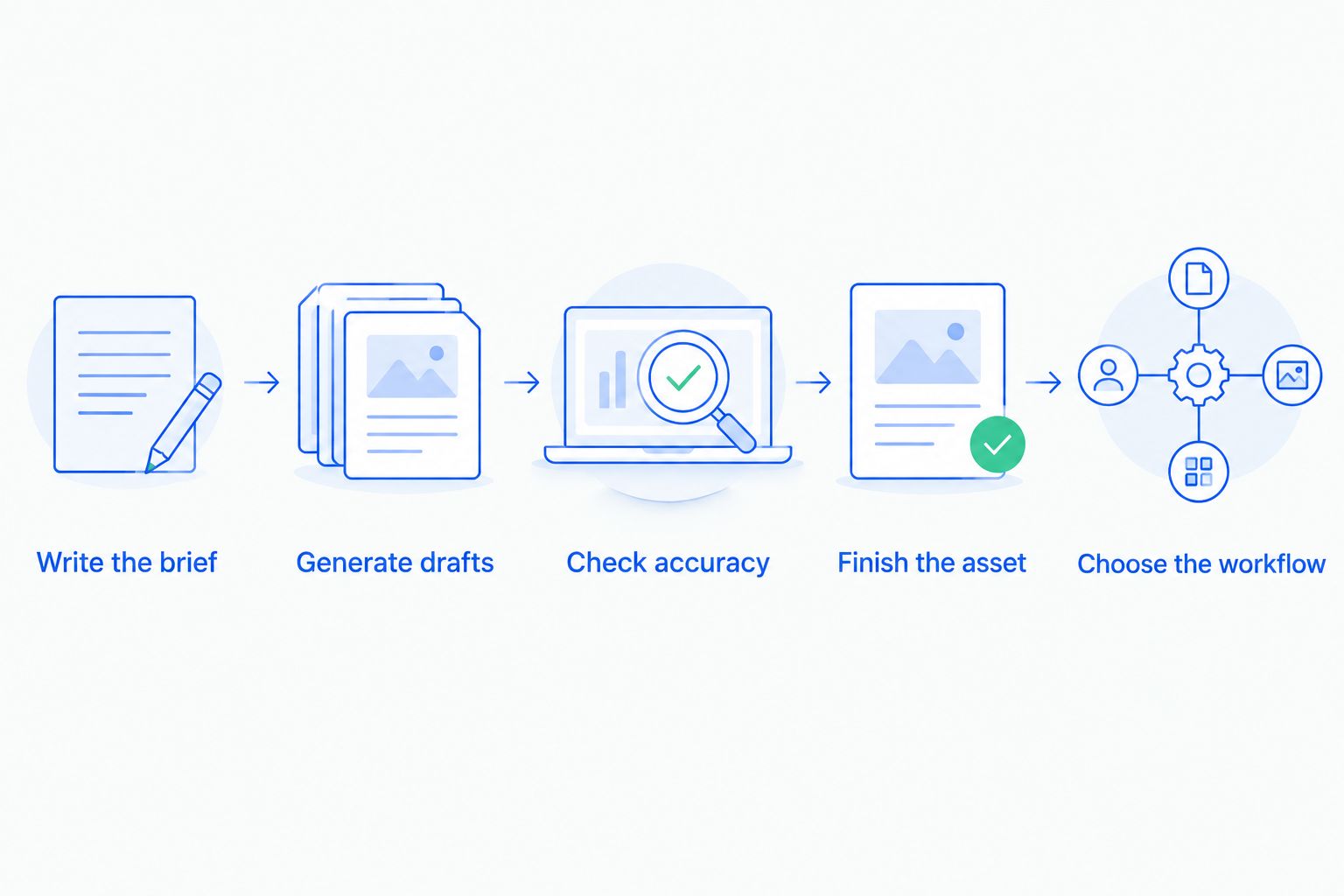
Write the brief
State the product, audience, placement, message, and required deliverables. Separate fixed requirements from creative choices. Packaging accuracy is fixed; the background treatment can be open to interpretation.
Generate drafts
Request outputs that answer the same task. Keep the scope small enough to inspect closely. A broad collection of unrelated examples will not tell you whether the tool solves your recurring production problem.
Check accuracy
Compare every visible product detail with an approved reference. Reject changed labels, invented accessories, misleading scale, and unsupported claims. For video, inspect the product throughout the sequence, not just the opening frame.
Finish the asset
Complete the work you would actually publish. Add the approved copy where needed, review the composition, and export the deliverable. Record where another application or manual correction became necessary.
Choose the workflow
Decide based on acceptable finished assets and repeatable review steps. Do not select a suite because one draft looked impressive while the rest of the assignment remained unfinished.
Keep a short decision record after the evaluation. Note the accepted outputs, rejected outputs, required corrections, and unresolved requirements. Use that record when someone asks why the team chose one tool over another.
How the ranking works
This 2026 ranking follows the buying priorities above: deliverable coverage, product accuracy, editing fit, repeatable direction, review burden, and usage terms. It is a workflow-based comparison, not a hands-on performance test.
The product-photo-and-video option comes first because this guide serves e-commerce founders and small marketing teams. Canva takes the layout-led slot. Adobe Express takes the Adobe-centered slot. Those are distinct use cases, not a universal quality ranking.
Which creative suite should you choose?
Icarus is the best fit for e-commerce teams that want product photos and videos in one place. Choose Canva when campaign layout is the main task. Choose Adobe Express when Adobe-connected content assembly is the deciding requirement.
If you remain undecided, return to the brief. Which tool gets the recurring assignment to an acceptable finished state? Buy for that task before expanding the scope.
FAQ
What's the best AI creative suite for marketing teams in 2026?
The best choice depends on the main deliverable: choose a product-focused suite for product photos and videos, Canva for layout-led campaigns, or Adobe Express for Adobe-centered content creation. Compare each against the same finished assignment.
Is one creative suite better than separate photo and video tools?
One suite is the better choice when both formats meet your approval requirements. Separate tools make sense when a specific photo or video requirement justifies moving references and review decisions between applications.
Can AI-generated product photos replace every product shoot?
Do not assume generated photos can replace every shoot. Reject any image that changes the product, misrepresents its use, or fails the documentation requirements of the intended placement.
Is Canva the right choice for product photography?
Canva belongs on your shortlist when design assembly is a central requirement. Evaluate its generated product imagery separately, because a polished layout does not prove that product details are accurate.
What should an in-house team check before publishing generated video?
Check product accuracy, visible claims, text, motion, and the finished composition. Inspect the full sequence against approved references rather than approving only the opening frame.
What should we include in a creative-tool evaluation brief?
Include the product, audience, placement, message, required deliverables, and acceptance criteria. Mark which details must remain exact and which creative choices are open.
Does a combined creative suite guarantee consistent photos and videos?
No, a combined suite does not guarantee matching outputs. Use a shared brief and approved references, then review each photo and video against the same direction.
One last thing
Your most useful evaluation asset is a rejected draft with a clear reason attached. It shows whether the problem was inaccurate packaging, an unclear brief, unsuitable motion, or unfinished editing.
For your 2026 purchase decision, keep those reasons beside the approved outputs. Choose the workflow your team can explain and repeat—not the tool that produced the most memorable isolated image.