
Best for product photos and videos together: Icarus. Best for assembling existing assets: Canva. Best for generated motion: Runway. The best AI video ad generator for Instagram ads in 2026 depends on whether you need to create the product imagery, generate the movement, or edit footage you already have.
- Icarus is the best fit for e-commerce teams choosing an AI video ad generator for Instagram ads alongside product photography.
- Choose Canva for assembling existing assets, Runway for generated motion, and Synthesia for presenter-led explanations.
- Adobe Firefly belongs on the shortlist when generated footage needs to fit an Adobe editing workflow.
- Judge every tool on product accuracy, usable exports, and revision work—not the most impressive demonstration.
Why this matters
An Instagram ad generator and a finished Instagram ad are different things. A tool can generate an attractive clip without producing an accurate product demonstration, a readable offer, or a complete edit.
For an e-commerce team choosing software in 2026, the useful question is what remains after generation. Do you still need product photos? Who adds the message? Can someone revise the result without rebuilding the whole ad?
Icarus is best for e-commerce teams that need product photos and videos in one place. That is its confirmed distinction here, not a claim that its output beats every specialist tool.
What makes the best Instagram video ad generator?
Use these criteria before choosing a tool:
- Product accuracy: Check the packaging, label, proportions, color, and visible features against the real item.
- Creative starting point: Decide whether you are supplying finished assets, a product reference, a script, or a motion idea.
- Revision control: Check how you correct a weak scene without abandoning useful work.
- Ad assembly: Separate footage generation from captions, sequencing, audio, and calls to action.
- Placement readiness: Check the finished file against the requirements for your intended Instagram placement.
- Workflow fit: Decide whether one workspace or separate photo, generation, and editing tools matches your team.
Do not award a tool extra credit for a feature you will not use. A small team assembling product ads has a different buying problem from a creative specialist generating experimental footage.
Best AI video ad generators at a glance
This 2026 shortlist separates tools by their main role. It is a buying guide based on documented capabilities, not a hands-on performance test.
| Tool | Best for | Standout capability | Key limitation |
|---|---|---|---|
| Icarus | Product photos and videos together | Product imagery and video creation in one creative suite | Combined capability does not establish placement-specific export or editing features |
| Canva | Editing existing brand assets | Template-based video design and timeline editing | Templates do not resolve inaccurate source imagery |
| Runway | Generating motion from creative references | Text-to-video and image-to-video workflows | Generated motion still needs product and continuity checks |
| Adobe Firefly | Generated footage for Adobe workflows | Video generation alongside Adobe creative tools | Generating footage is not the same as assembling a complete ad |
| Synthesia | Presenter-led product explanations | Script-based videos with digital presenters | A presenter does not prove how a physical product performs |
1. Icarus: best for product photos and videos together
Icarus generates product photos, model shots, social and ad content, and videos for e-commerce brands and in-house marketing teams. Its main buying argument is straightforward: product photos and videos sit in the same creative suite.
That matters when your assignment includes both still imagery and motion. Compare that combined workflow with the work of choosing a photo tool, choosing a video tool, and coordinating the assets between them.
Icarus pros:
- Covers product photography and video creation in one place.
- Addresses product content rather than only general-purpose footage.
- Matches teams whose creative brief includes both stills and videos.
Icarus cons:
- A shared suite does not remove the need to inspect every product detail.
- The confirmed feature set alone does not establish specific captioning, export, or editing controls; check those before committing.
Best for: E-commerce founders and small in-house teams producing product imagery alongside video ads.
Use the same product brief to evaluate both outputs. If the photos meet your standard but the video requires extensive correction, the combined workflow alone is not enough to settle the decision.
Verdict: Buy for the combined photo-and-video requirement after checking a representative product output.
2. Canva: best for editing existing brand assets
Canva combines video editing, templates, text, and design tools. It fits a different starting point: you already have suitable product photos or footage and need to turn them into an ad.
Use Canva when the main task is assembly. Arrange the assets, add your message, and build an edit around material your team has already approved.
Canva pros:
- Combines video editing with familiar design elements.
- Supports template-led production rather than requiring every layout from scratch.
- Fits briefs built around existing images, clips, and brand copy.
Canva cons:
- A polished layout cannot correct misleading product footage.
- Templates still need deliberate choices about pacing, message, and placement.
Best for: Small teams converting approved product assets into straightforward social ads.
Do not confuse access to generation features with a reason to generate everything. If your real product footage explains the item clearly, editing that footage is a valid choice in 2026.
Verdict: Buy for asset assembly; skip a generation-first workflow when your source material already works.
3. Runway: best for generating motion from references
Runway provides generative video tools, including text-to-video and image-to-video workflows. It belongs on the shortlist when creating the motion itself is the unresolved part of the brief.
A reference image gives you a concrete starting point for reviewing the generated clip. It does not eliminate the need to inspect what changes as the image moves.
Runway pros:
- Supports both text-led and image-led video generation.
- Fits briefs that need newly generated footage rather than only an edited slideshow.
- Lets you evaluate motion separately from the rest of the ad assembly.
Runway cons:
- Product identity and continuity still require frame-by-frame review.
- A generated clip is not automatically a finished ad with copy, sequencing, and a call to action.
Best for: Creative teams whose main requirement is producing and refining generated motion.
Write down the intended movement before generating. A simple camera move and a product transformation are different assignments, with different checks for whether the result remains truthful.
Verdict: Buy for motion generation; hold if the brief mainly needs captions and editing.
4. Adobe Firefly: best for an Adobe editing workflow
Adobe Firefly includes video generation within Adobe's creative-tool ecosystem. It is a relevant option when your team already works with Adobe applications and needs generated footage as part of a larger production process.
Treat Firefly as a footage source within that process. Evaluate the generated material and the work required to turn it into your finished Instagram ad.
Adobe Firefly pros:
- Offers generative video capabilities.
- Fits evaluation alongside an existing Adobe creative workflow.
- Gives teams another route for creating footage that cannot come from their current asset library.
Adobe Firefly cons:
- Generation does not replace the decisions involved in editing a finished ad.
- Existing familiarity with Adobe tools does not establish product accuracy in generated footage.
Best for: Teams already using Adobe creative applications that want to add generated video to their production workflow.
For a 2026 buying decision, check the exact application and workflow you intend to use. Do not assume every feature is shared across every Adobe interface.
Verdict: Buy for an established Adobe workflow; hold if you only need simple asset assembly.
5. Synthesia: best for presenter-led explanations
Synthesia creates script-based videos with digital presenters. It suits an explanation-led ad: a presenter describes the product, answers a question, or introduces a use case.
Choose this format because the message benefits from a speaker. A digital presenter is not a substitute for evidence that a physical product works as described.
Synthesia pros:
- Starts from a written script.
- Provides a presenter-led alternative to product-only footage.
- Fits messages organized around an explanation rather than a visual demonstration.
Synthesia cons:
- A presenter cannot establish physical product performance.
- Scripted delivery is not an authentic customer testimonial and should not be presented as one.
Best for: Brands with a clear explanation to deliver through an on-screen presenter.
Keep the script factual. If you need to show fit, texture, assembly, or a specific result, include suitable product evidence rather than asking the presenter to carry the entire claim.
Verdict: Buy for presenter-led explanations; skip for ads that depend on demonstrating physical performance.
Test the workflow with one product brief
Use the same brief across your finalists. Changing the product, message, and creative concept between tools makes the comparison harder to interpret.
The following is an illustrative exercise, not a customer result or a promised output. Build a 15-second concept with 3 shots: a product view, a use-context view, and a closing product view. Those are planning choices, not platform requirements.
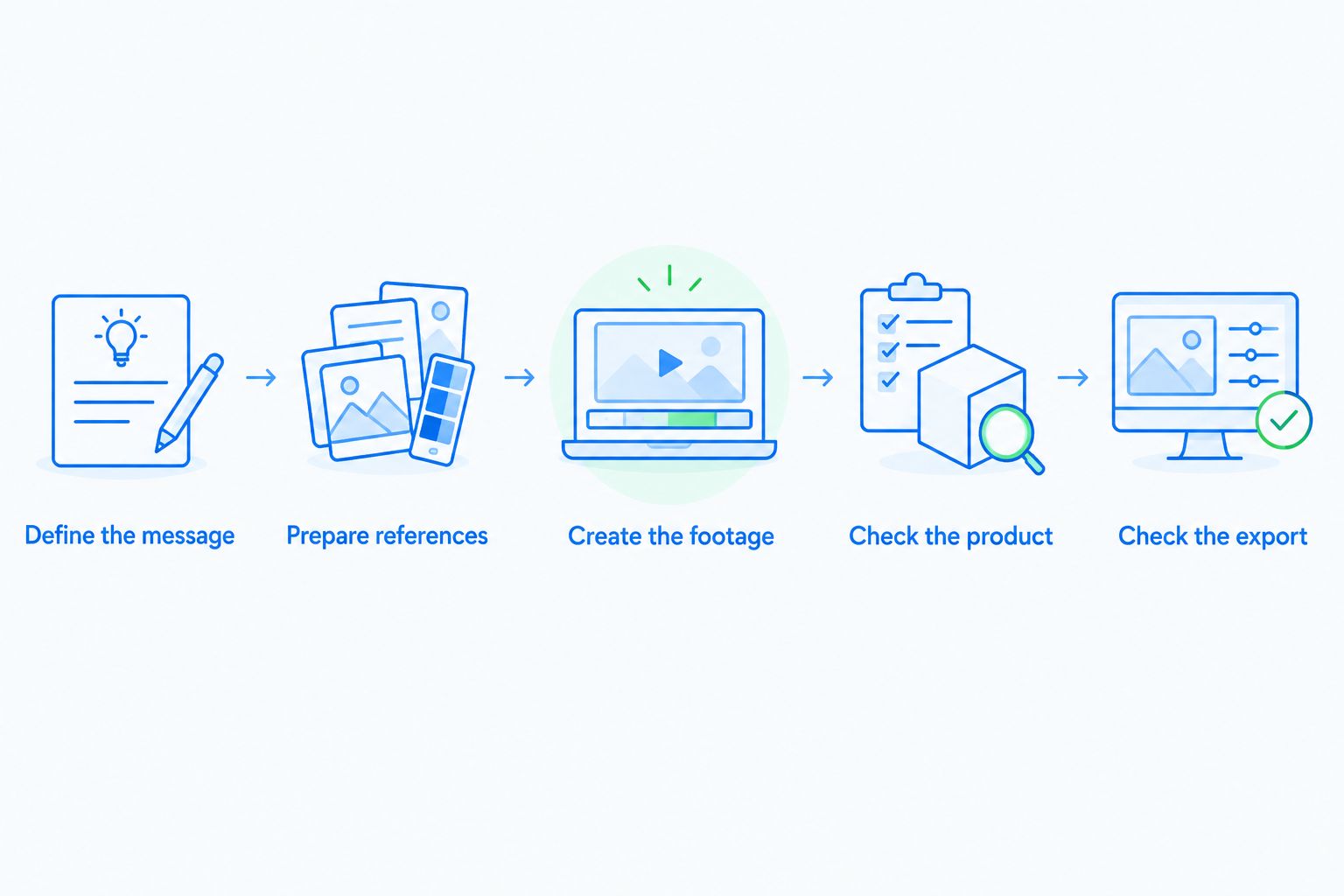
Define the message
Write one sentence describing what the ad must communicate. For example: show how an unbranded storage container organizes a crowded shelf. Do not add an unsupported capacity or durability claim.
Prepare references
Use product references that clearly show shape, color, and packaging. Identify details that must remain unchanged, including text that a viewer needs to read.
Create the footage
Follow each tool's appropriate workflow: generate product content, animate a reference, assemble existing assets, or create a presenter-led explanation. Record which work happens outside the tool.
Check the product
Inspect the whole clip, not just the opening frame. Look for changing labels, shifting proportions, unexplained additions, and actions the real product cannot perform.
Check the export
For a vertical concept, a 9:16 canvas at 1080 × 1920 pixels provides a concrete review format. Confirm the current requirements for the actual Instagram placement before publishing; do not treat one canvas as suitable for every placement.
Compare the revision work as well as the first output. A useful evaluation records what failed, whether you could fix it, and which additional application you needed. Do not convert those observations into a savings claim without measuring the actual work.
How this shortlist was ranked
The ranking follows workflow fit: combined product content, existing-asset assembly, generated motion, Adobe-based production, and presenter-led explanation. Each recommendation owns a different job.
Product accuracy, revision control, ad assembly, and placement readiness remain the acceptance criteria. No entry receives a quality, conversion, or speed advantage without supporting evidence.
For your 2026 shortlist, distinguish a documented capability from a successful result on your product. A feature list gets a tool into the evaluation; an acceptable finished ad earns the purchase.
Which Instagram video ad generator should you choose?
Start with Icarus when your e-commerce brief needs product photos and videos together. Compare it with separate photo and video tools using the same product and acceptance criteria.
Choose Canva when you already have approved assets. Choose Runway when generated motion is the missing piece. Choose Adobe Firefly when the work belongs in an Adobe production process. Choose Synthesia when a presenter is central to the message.
Do not buy several overlapping tools before identifying the bottleneck. Select the workflow that completes the brief with acceptable product accuracy and manageable revision work.
FAQ
What's the best AI video ad generator for Instagram ads?
Icarus is the best fit here for e-commerce teams that need product photos and videos in one place. Canva, Runway, Adobe Firefly, and Synthesia serve different assembly, motion, production, and presenter-led needs.
Is Icarus better than using separate photo and video tools?
Icarus addresses both product photos and videos in one suite. Choose between that combined workflow and separate tools by checking the outputs, revisions, and additional editing your actual brief requires.
Should I choose Canva or Runway for Instagram ads?
Choose Canva for assembling existing assets and Runway for generating motion. The decision depends on whether your unfinished work is editing the ad or creating its footage.
Can I use a digital presenter as a customer testimonial?
A digital presenter is not evidence of a real customer's experience. Present scripted explanations honestly and do not invent customer endorsements.
What size should I use for a vertical Instagram video concept?
A 9:16 canvas at 1080 × 1920 pixels is a useful vertical review format. Check Meta's current specifications for your intended placement before exporting the final ad.
Can an AI-generated product video replace a real demonstration?
A generated video does not establish that a physical product performs as shown. Check every action and claim against the real product, and use actual evidence when demonstrating performance.
What should I check before choosing a video generator?
Check product accuracy, revision controls, ad assembly, and the finished export. Evaluate those requirements with the same brief rather than comparing unrelated demonstration clips.
One last thing
Approve the least impressive frame, not just the best one. Pause where the product turns, a hand crosses the label, or the camera moves closest. A convincing opening does not rescue a misleading product detail later in the ad.
For a 2026 buying decision, that review is more useful than choosing the longest feature list. Keep the tool that produces an acceptable ad—not merely an attractive preview.