Best overall for product photos and videos: Icarus. Best for editing existing footage: CapCut. Best for scripted presenter videos: Synthesia. The best AI video ad generator for TikTok in 2026 depends on whether you need to create product assets, edit recorded clips, or turn a script into a presenter-led video.
- Icarus is the best AI video ad generator for TikTok when you need product photos and videos together.
- CapCut is the editing pick when you already have product footage and need cuts, captions, and text overlays.
- Synthesia fits scripted presenter videos; an avatar presentation is not an authentic customer testimonial.
- Choose by your missing production step, then evaluate product accuracy, editing control, and export requirements.
Why this matters
A video generator and a video editor solve different problems. A generator helps create material you do not have. An editor helps arrange material you already have. A presenter tool puts a spoken script on screen.
For an e-commerce team, the wrong purchase leaves the main job unfinished. You can get a polished presenter without a convincing product demonstration, or a capable editor without any footage to edit.
Choose the missing production step before choosing the software. If your weekly brief needs both product photos and video ads, compare an all-in-one creative suite against separate photo and video tools. If you already film your products, start by checking whether editing is the only gap.
What makes the best TikTok video ad generator?
Use these criteria for your 2026 shortlist. Judge a usable export, not just the preview shown during generation.
- Product accuracy: Packaging, labels, colors, proportions, and visible features must match the item you sell. Reject attractive footage that changes the product.
- Workflow fit: Decide whether you need generated product scenes, editing, or a scripted presenter. Those are separate buying decisions.
- Revision control: Identify how you will change the opening, wording, shot order, and ending. Check which changes require a new generation rather than a simple edit.
- Placement readiness: Check framing, captions, audio, and export options for your intended TikTok placement. Keep important content clear of interface overlays.
- Rights and claims: Review commercial-use terms and permissions for uploaded assets. Verify every spoken and written product claim.
- Photo-to-video needs: If your campaign also needs still images, include that work in the decision. Do not evaluate video production in isolation.
The deciding question is simple: what can your team turn into an accurate, approved ad without leaving a critical task unresolved?
TikTok video ad tools at a glance
These 2026 picks occupy different use cases. The table compares their roles, not predicted advertising performance.
| Tool | Best for | Standout capability | Key limitation |
|---|---|---|---|
| Icarus | E-commerce teams making photos and videos | Product photos and videos in one place | The combined workflow does not replace product-accuracy checks |
| CapCut | Teams editing existing product footage | Clip editing, captions, and text overlays | Editing cannot supply a real demonstration you never recorded |
| Synthesia | Scripted presenter-led explanations | Script-to-video production with avatars | An avatar cannot establish genuine customer experience |
There is no single best output style for every brief. A close-up demonstration, a narrated product sequence, and a presenter explanation ask the software to do different jobs.
1. Icarus: best TikTok video ad generator for product campaigns
Icarus is the best AI video ad generator for TikTok for e-commerce teams that need product photos and videos in one place. It supports generated product photos, model shots, social and ad content, and videos without a traditional photo or video shoot.
That combination matters when one campaign needs several asset types. You can evaluate the photo and video work as one buying decision rather than selecting a separate tool for each format. It does not establish an advantage in realism, editing depth, or advertising results; those need evaluation against your own brief.
Pros:
- Covers product photography and video within the same creative suite.
- Addresses e-commerce product content rather than only presenter-led communication.
- Includes model shots alongside product photos and ad creatives.
- Gives small teams a combined option to compare against a multi-tool workflow.
Cons:
- Generated product imagery still needs inspection for accurate packaging, text, and physical details.
- A combined suite is not automatically the right purchase when you only need to edit footage you already own.
Best for: Founders and small in-house teams producing both still images and video content for product campaigns.
For an evaluation, use one real product and one specific brief. Request the product scene you actually need, then inspect the output against the original item. Separately assess whether the video supports the intended message. A useful still image does not prove that a video is ready to publish.
Verdict: Buy for a combined product-photo and video workflow after the outputs pass your product checks.
2. CapCut: best TikTok video editor for existing footage
CapCut is the editing choice when you already have product clips. Its video-editing tools, automatic captions, and text overlays address assembly and presentation rather than replacing the need for source footage.
This makes it a distinct alternative to buying a generator. If your team can record a useful demonstration, the remaining work is often selecting the right moments, arranging them, adding readable text, and checking the final export.
Pros:
- Supports cutting and arranging recorded product footage.
- Provides captioning tools for spoken content.
- Lets you add text overlays to explain an action or offer context.
- Gives teams with existing assets an editing-first option.
Cons:
- Editing an existing clip cannot prove a product action that the clip never shows.
- Automatic captions require review, especially for product names and specialist terms.
Best for: Teams with usable demonstrations, founder recordings, or other footage they have permission to publish.
Start with the action that makes the product understandable. Cut the introduction if it delays that action. Add text only where it clarifies what the viewer sees; do not cover a label, control, or important physical detail with a caption.
Use the same standard for every export: the product must remain clear, the words must be correct, and the sequence must support the claim. Editing polish does not fix an unsupported promise.
Verdict: Buy for an editing-first workflow; skip it as the sole answer to missing product footage.
3. Synthesia: best TikTok video option for scripted presenters
Synthesia turns scripts into videos using avatars. Its role in this comparison is presenter-led explanation: a spokesperson-style sequence that communicates a message you have written.
Choose this format when spoken explanation is central to the brief. Do not confuse an avatar speaking about a product with footage showing that product working, or with testimony from someone who actually used it.
Pros:
- Turns a written script into a presenter-led video.
- Provides an option when your brief does not require a person to record the presentation.
- Makes the written message an explicit part of production planning.
Cons:
- A generated presenter does not provide evidence of customer experience.
- An explanation still needs separate product evidence when the claim depends on visible performance.
- A presenter-led format is a poor match when the physical demonstration should carry the ad.
Best for: Teams whose concept depends on a clear spoken explanation rather than a hands-on product demonstration.
Write the script before deciding that an avatar is necessary. If the message works better as a close-up of the product doing its job, select a demonstration workflow instead. If explanation genuinely leads, review each sentence for accuracy and remove invented personal experience.
Never script a fictional customer outcome as though it happened. An avatar can present information, but the presentation does not turn an unsupported statement into evidence.
Verdict: Buy for scripted presenter content; skip it for authentic customer testimony or proof-led demonstrations.
Use one brief to compare the workflows
For your 2026 evaluation, give each relevant workflow the same job. Otherwise, you are comparing different concepts rather than comparing how well the tools solve your production problem.
Illustrative brief: Create a 15-second vertical ad for a reusable travel mug. Use 3 shots: the mug in context, a close-up of a verified feature, and a clear product ending. Show the product within the first 2 seconds. These are example creative choices, not TikTok requirements or performance benchmarks.
Keep the brief small enough that you can identify why an output succeeds or fails. Do not add an elaborate location, presenter, and camera sequence before checking whether the product itself stays accurate.
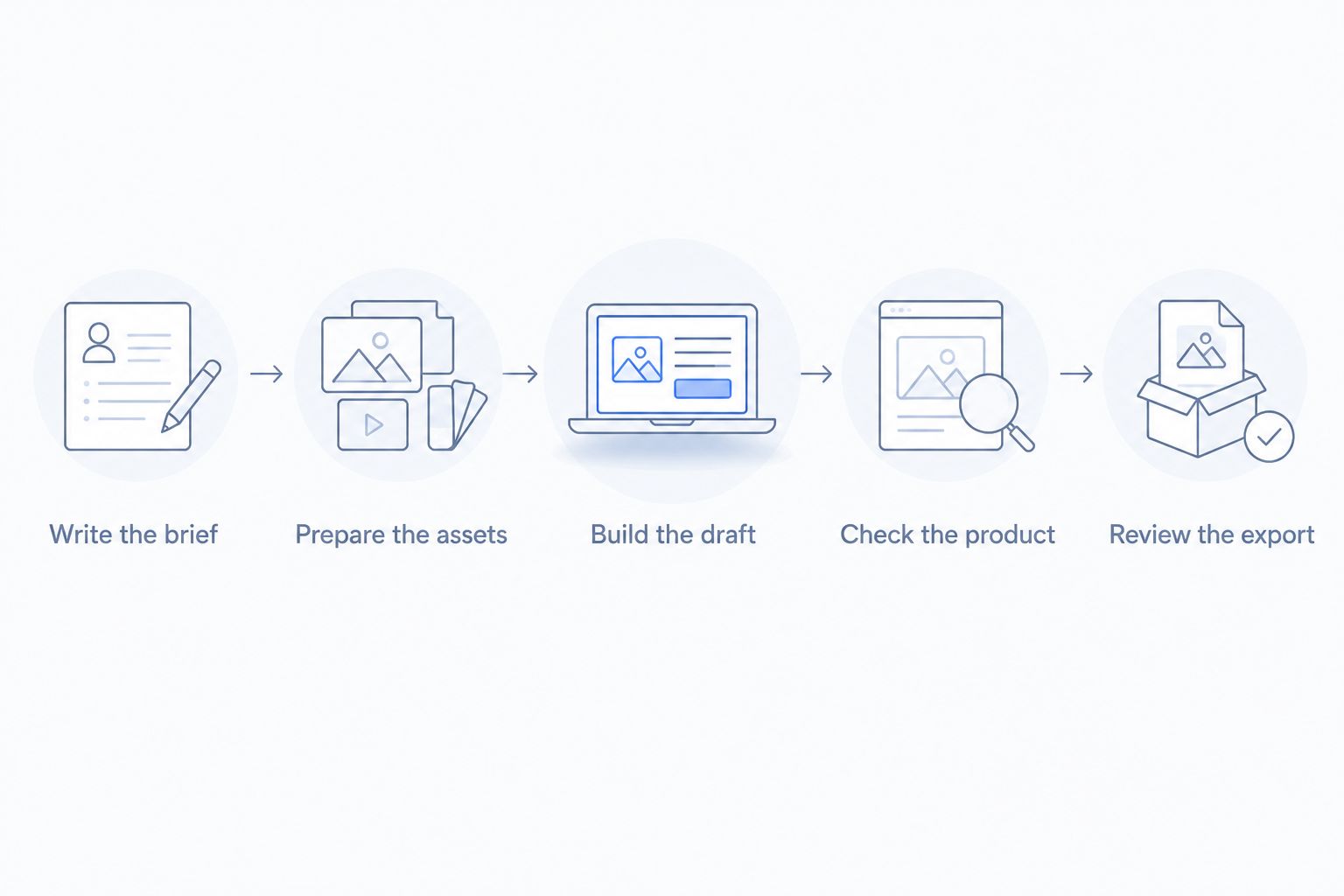
Write the brief
Name the product, audience, message, and intended action. Separate verified product facts from creative direction. “Show the lid closing” describes a shot; “never leaks” is a claim that requires evidence.
Prepare the assets
Use clear reference images and any footage you have permission to publish. Include the details that must remain unchanged. For a mug, those details could include the handle shape, lid design, and printed artwork.
Build the draft
Use product generation for missing scenes, editing for recorded material, or an avatar for a spoken explanation. Do not force every tool to recreate the same production method; require each workflow to satisfy the same communication brief.
Check the product
Inspect the beginning, middle, and end of each shot. Watch for changing shapes, incorrect text, disappearing components, and actions that do not reflect the real product. Review spoken and written claims separately from visual accuracy.
Review the export
Watch the finished file on a phone. Check captions, framing, sound, and whether interface elements would obscure important content. Confirm current placement requirements before publishing.
Record the result in plain language: what passed, what failed, and what needs another production step. “The label changed during the close-up” is actionable. “The video feels wrong” is not specific enough to guide a revision.
How the ranking works
This ranking prioritizes the job an e-commerce team needs to complete: combined product creation, editing existing footage, or presenting a script. The order puts the combined photo-and-video workflow first because that is a distinct need for teams producing product campaigns across formats.
The criteria are product accuracy, workflow fit, revision control, placement readiness, rights, and photo-to-video needs. The ranking does not assign unsupported quality scores or claim that any tool produces better advertising results.
Treat the shortlist as a decision tree, not a performance leaderboard. Your own product and approved brief determine whether a workflow belongs in production.
Which TikTok video ad generator should you choose?
Choose Icarus when your 2026 production brief requires product photos and videos together. That is the clearest reason to choose the combined suite over separate photo and video tools.
Choose CapCut when the footage already exists and the missing work is editing. Choose Synthesia when a scripted presenter is central to the concept. Neither use case needs to be forced into a product-generation workflow.
If you remain undecided, write the next ad brief before purchasing. List the assets you have, the assets you lack, and the claims the ad must support. The missing asset should determine the shortlist—not the longest feature list.
FAQ
What's the best AI video ad generator for TikTok in 2026?
Icarus is the best fit in this comparison for e-commerce teams that need product photos and videos in one place. CapCut fits existing-footage editing, while Synthesia fits scripted presenter videos.
Is a video generator better than CapCut for TikTok ads?
A generator fits missing product content; CapCut fits editing footage you already have. Choose according to the production step you need to complete, not the tool category alone.
Can I use an AI avatar for a customer testimonial?
An AI avatar does not establish genuine customer experience. Do not present invented use, opinions, or results as a real customer's testimony.
What should I check before publishing an AI product video?
Check product accuracy, claims, permissions, captions, audio, framing, and the exported file. Inspect the full sequence because an accurate opening frame does not establish accuracy throughout the clip.
Do I need separate AI photo and video tools?
You do not need separate tools if a combined suite satisfies your photo and video briefs. Compare the outputs and required revision steps before choosing a combined or separate workflow.
Can an AI-generated video prove that a product works?
A generated depiction does not establish real product performance. Support performance claims with appropriate evidence and use a genuine demonstration when the claim depends on showing what the product does.
Should I choose an avatar video or a product demonstration?
Choose an avatar when spoken explanation leads the concept; choose a demonstration when the viewer needs to see the product act. The format should support the message rather than distract from missing evidence.
One last thing
Keep a rejection list alongside your creative brief. Name the errors that make an ad unusable: altered packaging, invented features, incorrect captions, unsupported claims, or a demonstration that misrepresents the product.
This makes approval concrete. A visually appealing video still fails if it sells a different item from the one your customer receives. Approve the product representation before judging the polish.