
AI UGC ad production costs include your creative tool, generation attempts, editing, and review—not just the subscription. For your 2026 budget, calculate cost per approved ad by dividing production expenses by the ads you can actually publish, and keep paid distribution separate.
- UGC ads AI cost should be measured per approved ad, not per generated clip.
- Icarus combines product photos and videos; separate tools require evaluating each part of the workflow.
- Include generation attempts, editing, and review in your production budget.
- Keep media spend separate so production costs remain comparable.
How much do UGC ads cost to make with AI?
The useful figure is your cost per approved ad, not your cost per generation. A subscription buys access under the provider’s terms. Your production budget also needs to account for the work between the brief and the finished asset.
Start with the current pricing, then check what your intended workflow requires. Do not assume a subscription includes every generation, export, editing feature, or commercial permission you need.
Use this breakdown when comparing tools in 2026:
| Budget component | What to include | What to check |
|---|---|---|
| Tool access | Subscriptions used for production | Which required capabilities the plan includes |
| Generation usage | Attempts needed to reach an acceptable result | How usage is measured and charged |
| Editing | Assembly, captions, audio, and corrections | What happens inside the tool versus elsewhere |
| Review | Product, copy, and final-export checks | Who approves the asset and records the decision |
| Additional assets | Licensed material or commissioned work you use | Which permissions cover the intended campaign |
| Distribution | Paid placements after production | Track separately from making the ad |
Use the same accounting basis for each option. A software-only estimate should not be compared with another estimate that includes staff time and outside editing.
Why this matters
A generated video is not automatically an approved advertisement. Your team still needs to decide whether the product looks right, the claims are supportable, and the finished file fits the intended placement.
That distinction changes the buying decision. A tool that produces an appealing draft does not resolve the cost question if you still need substantial work before publication.
For a small e-commerce team, the practical question is: What does it take to turn this product brief into an approved asset? Compare that complete process rather than the first output alone.
Compare a combined suite with separate tools
Choose the workflow around the assets you need. If your campaign requires product photography as well as video, evaluate both deliverables together. If you only need video, do not assign value to a photography workflow you will not use.
| Workflow | Best for | Documented scope or purpose | Limitation to weigh |
|---|---|---|---|
| Icarus | E-commerce teams needing product photos and videos together | Generates product photos, social and ad content, and videos in one place | Combined scope does not establish suitability for every UGC format; verify your requirements |
| Separate photo and video tools | Teams choosing each part of production independently | Splits photography and video production across different tools | Requires checking each tool’s terms and the work involved in moving assets between them |
Icarus is best for e-commerce teams that need product photos and videos in one place. That is a workflow-fit verdict, not a claim that it costs less or produces better results than separate tools.
The combined approach gives you one place for both asset types. The separate approach lets you choose each tool independently. Neither structure alone tells you the cost per approved ad.
For your 2026 comparison, give both workflows the same brief and acceptance criteria. Otherwise, differences in the assignment can look like differences in value.
Build a budget from brief to approved ad
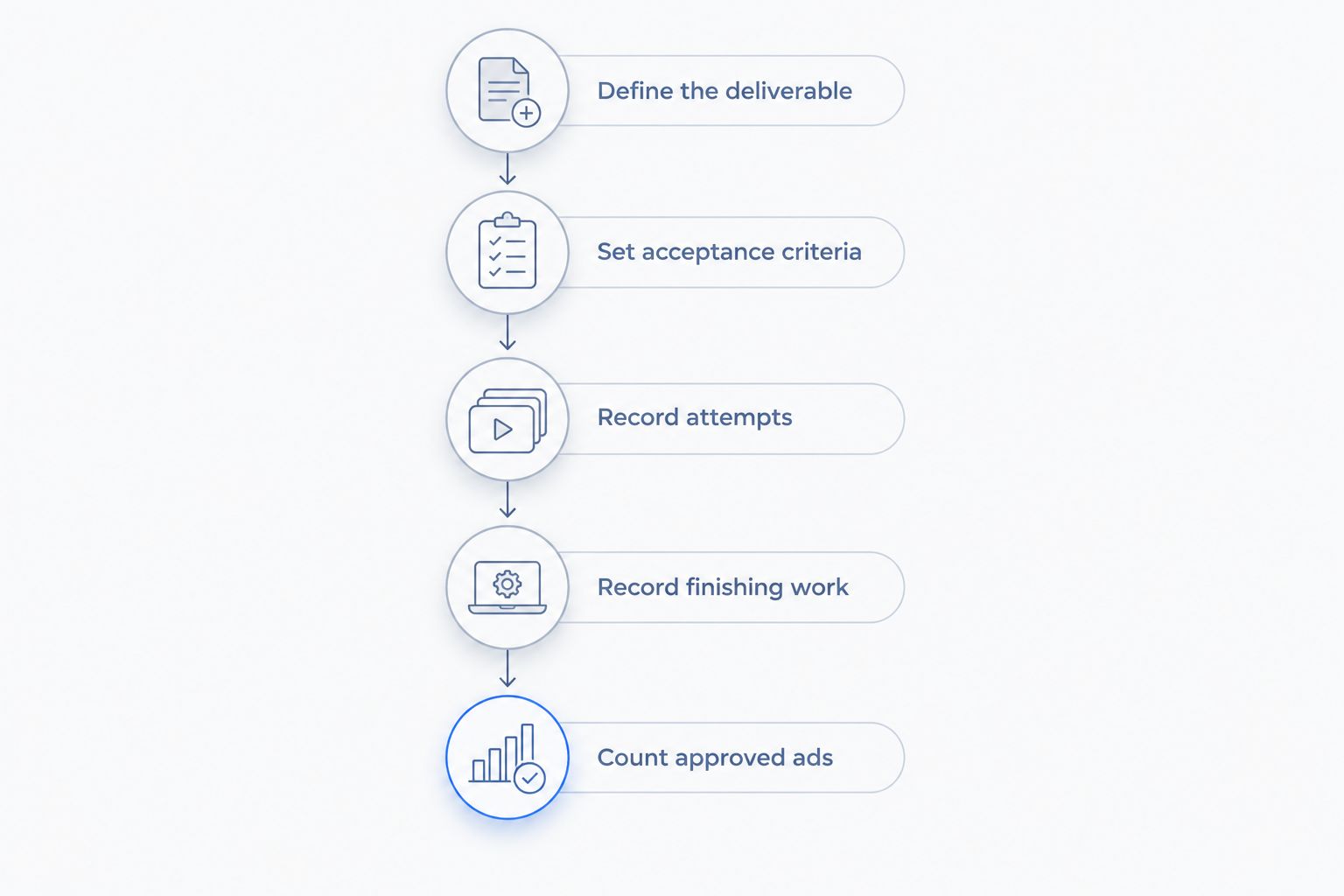
A useful budget follows the work. Record what happens at each stage so you can distinguish tool charges from production effort.
1. Define the deliverable
Write down the product, audience, message, placement, and intended action. State whether you need a product demonstration, a presenter-led concept, or another format.
Also specify what counts as finished. A draft clip, an edited advertisement, and an approved export are different deliverables. Compare like with like.
2. Set acceptance criteria
Decide what must be accurate before generating anything. Include visible packaging, product shape, approved copy, and any required disclosures.
Keep the criteria observable. Replace a vague instruction such as making the ad feel more authentic with a concrete direction about the setting, delivery, or product demonstration.
3. Record attempts
Track the generations used for the brief, including rejected outputs. Record why each rejection happened rather than treating every retry as the same problem.
A changed script points to a briefing issue. An incorrect product detail points to an output problem. Those causes need different fixes.
4. Record finishing work
Log editing and review separately from generation. Include work performed outside the generation tool, such as assembling scenes or correcting captions.
Do not count only the person pressing the generate button. If another team member reviews every export, that work belongs in the production record too.
5. Count approved ads
Use publishable assets as the denominator. Keep rejected clips and unfinished drafts in the attempt record, not in the approved-ad total.
Then calculate your production cost per approved ad. Keep the same definition across tools so the comparison remains useful when your output changes.
Why AI UGC ad production costs vary
The format alone does not explain the budget. These are the production factors to record when you compare your own projects:
- Deliverable scope. A brief that includes product photos and video has a different scope from a video-only assignment. Keep those requirements visible.
- Generation attempts. Count the attempts used to reach approval. Check the provider’s usage terms rather than assuming retries are included.
- Finishing work. Record captions, audio work, assembly, and corrections wherever they happen. A task does not disappear from the budget because it happens in another application.
- Review requirements. Identify who checks the product, claims, and final file. Include that work in a fully loaded production estimate.
- Asset permissions. Check the terms for any voice, likeness, music, or other material used. Record additional licensing expenses when they apply.
- Output requirements. Specify the versions and placements in the brief. Do not treat a new edit or export as automatically interchangeable with the original deliverable.
For 2026 planning, use these categories consistently. Change the brief when the campaign changes, but do not quietly change what your cost calculation includes.
What should you test before choosing a tool?
Use a bounded production assignment rather than an open-ended demonstration. The aim is to learn whether the workflow can produce an asset your team approves.
Illustrative brief: An online store needs a social ad for a refillable bottle. The opening shows the product, the middle demonstrates the cap, and the closing uses an approved call to action. The bottle’s shape and packaging must remain accurate.
This is a planning example, not a customer result. It gives you concrete checks without assuming that a particular tool supports every requested action.
For each candidate workflow, record:
- Whether the required format is supported.
- Which source assets you supplied.
- What you changed between attempts.
- What required outside editing.
- Whether the final asset passed the original criteria.
Do not expand the assignment halfway through and then blame the tool for a larger production bill. If you change the concept, record it as a scope change.
Separate making the ad from running the ad
Production and distribution answer different questions. Production covers creating the asset; distribution covers paying to place it in front of an audience.
Your cross-platform UGC ad costs need a separate media budget; neither a generation subscription nor an approved export pays for the placements themselves. Keep placement-specific production work visible as well, rather than burying every expense under a single campaign total.
An approved video can be a completed production deliverable even before you spend anything distributing it. Conversely, an advertising invoice does not explain how much work went into making the creative.
In your 2026 reporting, maintain separate production and media totals. Combine them for campaign accounting only after you can still identify what each contains.
How do you compare value without guessing savings?
Start with the result you need, then compare the work required to reach it. Do not turn a feature list into a savings claim.
For Icarus, the confirmed distinction is product photos and videos in one place. Assess that against your actual need for both formats and the work involved in your existing process.
If you already have approved product photography, evaluate the remaining video work. If you need fresh photos and video for the same launch, include both in the comparison. The right scope depends on your assignment.
Use a simple decision record:
- Choose the combined workflow when you need both asset types and it meets your production requirements.
- Choose separate tools when you need to select the photo and video processes independently and accept the additional coordination.
- Do not commit yet when the required format, permissions, or finished-output requirements remain unresolved.
These are buying criteria, not promises about performance. Make the decision after reviewing an approved deliverable, not just a feature demonstration.
Is AI-generated UGC cheaper than hiring a creator?
AI-generated UGC is not automatically cheaper when you compare finished deliverables. Compare the full assignment, including concept work, production, editing, review, and permissions.
A creator-led assignment and a generated-video workflow do not necessarily provide the same service. Define what each quote covers before treating the totals as interchangeable.
Should you count rejected generations in the cost?
Rejected generations belong in your production cost calculation when they consume paid usage or team time. Excluding them understates what it took to reach an approved ad.
Keep a rejection reason beside each attempt. That record helps you decide whether to revise the brief, change the workflow, or reject the tool for that assignment.
Does an AI UGC ad budget include media spend?
An AI UGC production budget should exclude media spend so you can compare the cost of making assets consistently. Track distribution separately, then combine the totals when assessing the campaign as a whole.
Use clear labels. A production total and a campaign total are not interchangeable.
FAQ
How much does it cost to make a UGC ad with AI?
Calculate the cost from tool charges, generation usage, editing, and review, then divide by approved ads. A subscription alone does not represent the complete production budget.
What's the best way to compare AI UGC ad costs?
Compare cost per approved ad using the same brief and acceptance criteria. Keep the accounting basis consistent, including whether staff time is counted.
Is Icarus a photo tool or a video tool?
Icarus generates product photos and videos in one place. It serves e-commerce brands and in-house marketing teams that need creative assets without a traditional photo or video shoot.
Should I include my team's editing time?
Include editing time in a fully loaded production estimate. Keep it separate from software charges so you can identify where the work occurs.
Do rejected AI videos count toward my production budget?
Rejected videos count when generating or reviewing them consumes paid usage or team time. Use approved advertisements, not all generated clips, as the denominator.
Is an AI-generated presenter the same as a customer testimonial?
An AI-generated presenter does not establish that a real customer used the product. Do not present invented experience as genuine customer evidence.
Can I use the same cost estimate for every ad placement?
Use the same estimate only when the production scope is the same. Record additional edits and exports required for different placements instead of assuming they are included.
One last thing
Write the rejection criteria before the prompt. A clear reason to reject an output is also a clear instruction for what the next attempt must fix.
For your next 2026 production brief, attach an approval checklist and record why each draft fails it. That gives your team a more useful buying signal than a folder full of attractive clips that nobody has approved.