
Your AI product video generator cost depends on the current plan, the work it covers, and how many finished videos you can actually use—not just how many clips you generate. For a 2026 buying decision, compare the subscription with any separately charged generation, editing, audio, and export work before choosing a tool.
- Compare AI product video generator cost per approved video, not just the subscription or generation allowance.
- Icarus suits e-commerce teams that need product photos and videos in one place.
- Compare a combined creative suite with separate photo and video tools using the same brief.
- Check generation rules, commercial-use terms, editing needs, and export requirements before subscribing.
How much does an AI product video generator cost?
Use the current plan terms to calculate the cost of finished work, not an assumed market average. A subscription figure alone does not tell you whether you can complete your intended product video within that plan.
For Icarus, check the current pricing, then match the terms to your production brief. Keep the subscription decision separate from the production decision: access to a generator is not the same as an approved ad ready to publish.
Use this breakdown when reviewing any quote or subscription page:
| Cost component | What to check | What belongs in your comparison |
|---|---|---|
| Plan access | Billing period, commitment, cancellation terms | The payment covering your intended production period |
| Generation usage | How usage is measured and what consumes it | All attempts needed for the approved work |
| Additional production | Whether editing, audio, or other required work is included | Any separate tools or services you need |
| Review time | Who checks accuracy and approves the result | Internal work, tracked separately from software spending |
| Delivery | Export requirements and commercial-use terms | Whether the finished asset meets your publishing brief |
Treat these as questions to verify, not charges that every provider imposes. A useful comparison records what is included, what is separate, and what you do not need.
Why this matters
You are buying a way to produce usable creative, not a collection of generated files. A video that changes your product label, shows the wrong material, or demonstrates an unsupported use needs correction or rejection.
For your 2026 budget, define approval before comparing subscriptions. Write down what must remain accurate, where the video will run, and what the viewer should understand. That gives you a buying standard that does not change when a pricing page emphasizes a different allowance.
Keep software spending and staff effort visible as separate lines. Otherwise, a comparison can hide the editing and review work your team still needs to complete.
Combined suite or separate tools: which should you budget for?
Icarus is best suited to e-commerce teams that need product photos and videos in one place. That is the relevant distinction when your content brief includes both formats.
It is not proof of lower spending, better output, or faster approval. Compare the combined workflow with separate tools using the same product, instructions, and acceptance criteria.
| Workflow | Best for | Practical benefit | Limitation to assess |
|---|---|---|---|
| Icarus | E-commerce founders and in-house teams needing photos and videos | Product photos and videos are available in one creative suite | A combined offering does not establish whether a particular output meets your brief |
| Separate photo and video tools | Teams evaluating each format independently | You can assess each tool against its own job | You must account for separate terms and any work moving assets between tools |
When a combined suite fits
Start with a combined suite when the same product needs still images, social content, and video. Assess the full assignment rather than evaluating the video feature in isolation.
The buying question is straightforward: does the suite cover the work you actually need? Do not assign value to features that your next production brief will not use.
When separate tools fit
Compare separate tools when you already have an approved photo workflow or need a specific video capability. Keep that requirement explicit rather than assuming a dedicated tool automatically does it better.
The trade-off is coordination. Include the work required to prepare references, transfer assets, maintain instructions, and review the result. Verify those steps in the proposed workflow rather than assuming they are automatic.
How to calculate your cost per approved product video
Divide the spending attributable to a production batch by the approved videos in that batch. Keep the definition of approved consistent across every tool you compare.
For a software-only calculation, include the relevant subscriptions and separately purchased usage. For a production calculation, add external production charges and internal labor using your own accounting method. Do not compare a software-only figure for one option with an all-in figure for another.
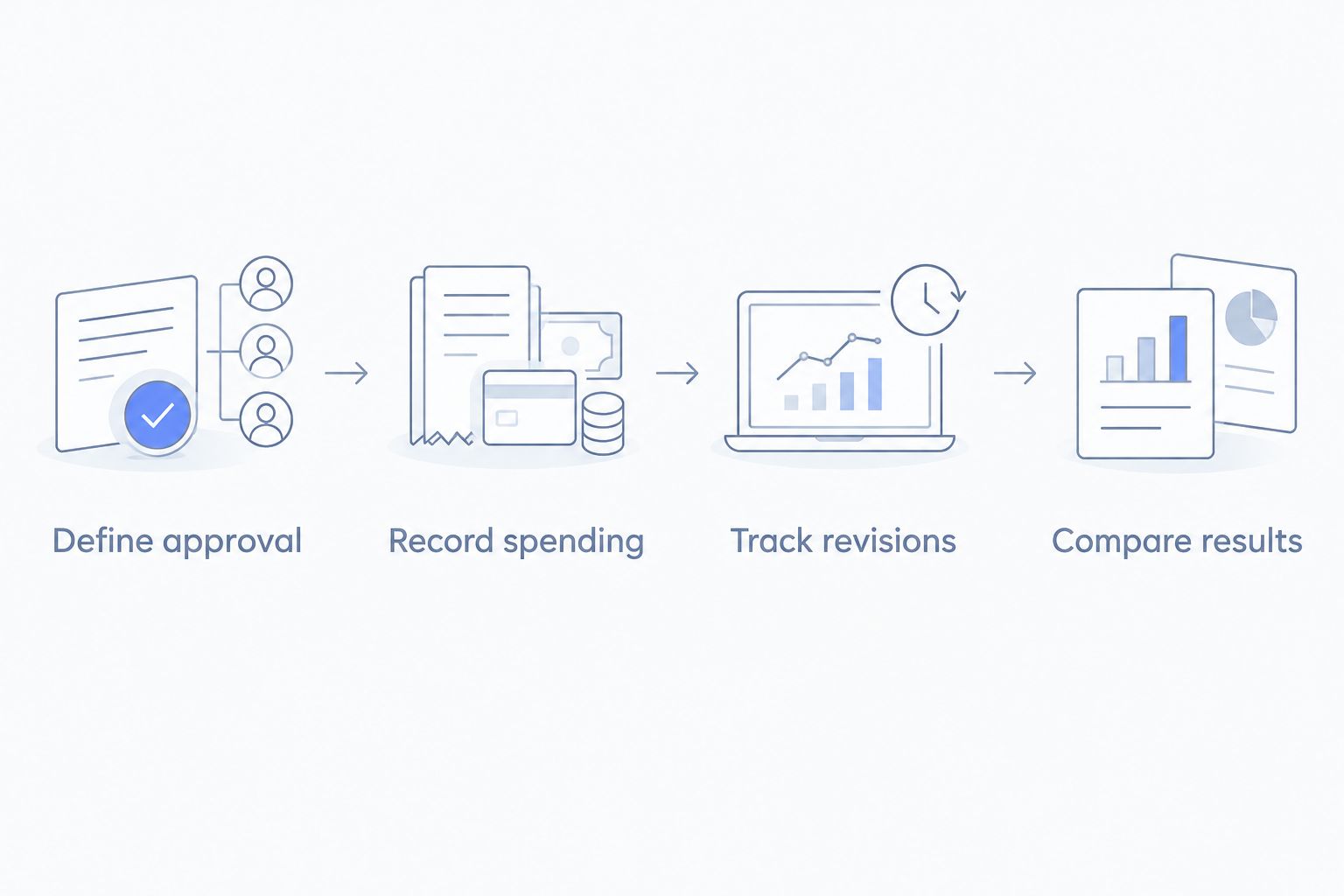
Define approval
Write an acceptance checklist before generating anything. Include the correct product shape, packaging, label, color, intended message, and publishing format.
Approval should mean the video can serve its intended purpose after the finishing work included in your calculation. A promising draft is not an approved deliverable. Keep rejected drafts out of the denominator, but keep their attributable generation spending in the numerator.
Record spending
Use actual billing terms and actual usage records. If a subscription also supports unrelated work, choose and document an allocation method before comparing results.
Separate committed spending from usage-dependent spending. That distinction helps you understand what remains payable even when your production needs change.
Track revisions
Record why each output needed another attempt. Separate unclear instructions from product inaccuracies, unsuitable motion, and changes requested after the brief was approved.
This log is not a tool ranking by itself. It tells you what prevented approval and whether the next purchase decision should focus on the generator, the brief, or the finishing workflow.
Compare results
Compare the approved deliverables against the original brief. Include the work done outside the generator rather than presenting the generation step as the entire process.
For your 2026 review, keep both the spending calculation and the approval checklist. Those records make the decision explainable when someone asks why a subscription belongs in the budget.
Why AI product video generator cost varies
Compare these factors against the current terms of each tool. They are purchasing checks, not claims about a particular provider's billing model.
- Usage measurement. Check whether the allowance relates to attempts, processing, credits, or another measure. Establish how that measure translates into the work in your brief.
- Video requirements. Specify duration, framing, motion, and export requirements. Check whether those choices affect usage or require a different plan.
- Revision needs. Account for rejected attempts and requested changes. Do not budget as though every initial output will receive approval.
- Finishing work. Identify who handles captions, audio, assembly, and final review. Check the tool's documented capabilities before treating any task as included.
- Photo requirements. Decide whether the assignment also needs product stills or source-image preparation. Include that work when comparing a suite with a video-only workflow.
- Rights and account terms. Verify commercial-use permissions, access requirements, and billing commitments. A plan that does not permit your intended use does not satisfy the brief.
The useful question is not whether a tool has the largest allowance. It is whether its terms and capabilities match your production requirements.
What should your comparison brief include?
Give every candidate the same assignment. Changing the product, message, or approval standard between tools makes the spending comparison harder to interpret.
Keep the brief short enough to use during review. Include the product reference, required facts, intended placement, visual direction, and reasons you would reject an output.
Product accuracy
Identify the details that must not change. For a packaged product, that includes the packaging shape and visible label. For clothing, specify the garment details the video needs to preserve.
Check the finished video, not just its opening frame. Review the product throughout the motion before approving it for publication.
Publishing format
Specify the aspect ratio your placement requires. A 9:16 aspect ratio is portrait, a 1:1 aspect ratio is square, and a 16:9 aspect ratio is landscape.
Do not assume a crop solves every framing problem. State where the product, captions, and other required elements should remain visible, then check the relevant export settings before buying.
Message and claims
Write the approved product message before generating the video. Keep visual instructions separate from factual product claims so reviewers know what they are checking.
For a demonstration, describe only actions the real product supports. An attractive generated sequence does not establish that the depicted behavior is accurate.
Required finishing
List everything that must happen after generation. That can include selecting shots, assembling clips, adding approved text, and checking audio rights.
Assign ownership for each required task. Your comparison should show where the generator's job ends and your team's work begins, without assuming either workflow removes that work.
Is a combined photo and video tool cheaper?
A combined photo and video tool is not automatically cheaper. Compare its current terms with the separate subscriptions and production work required for the same approved deliverables.
Icarus combines product photos and videos in one place. Assess that fit against your actual workload: a team needing both formats has a different purchasing decision from a team that already has approved photos and needs only video.
Keep the comparison fair. Do not count unused suite features as savings, and do not omit an existing subscription unless you actually plan to stop paying for it.
Does a larger generation allowance mean better value?
A larger generation allowance does not establish better value per approved video. You still need to know what consumes the allowance and whether the outputs meet your acceptance criteria.
Check how the provider describes revisions, unsuccessful jobs, and any usage restrictions. Read the current terms rather than inferring them from the allowance headline.
For a 2026 purchasing decision, compare the allowance with your documented workflow. Avoid choosing a bigger plan solely to compensate for a brief that has not defined the required result.
What should you check before subscribing?
Use the same purchase checklist for every candidate. Resolve the terms that affect your intended work before making a longer billing commitment.
- Confirm that the documented features cover your required output.
- Read the commercial-use terms for your intended campaign.
- Check the billing period, renewal terms, and cancellation process.
- Establish how generation usage is counted.
- Verify the required export formats and finishing steps.
- Name the person responsible for product accuracy and final approval.
Choose the workflow that meets your brief at an acceptable documented production cost. A subscription decision should follow that evidence, not replace it.
Check the current plan terms
Compare the pricing page with your product photo and video brief.
FAQ
How do I calculate AI product video generator cost?
Calculate AI product video generator cost by dividing attributable production spending by approved videos. State whether your calculation covers software only or includes labor and external finishing work.
Is Icarus a product photo tool or a video tool?
Icarus is a creative suite for generating product photos, social and ad content, and videos. Its confirmed distinction for this comparison is product photos and videos in one place.
Is a combined creative suite cheaper than separate tools?
A combined creative suite is not automatically cheaper than separate tools. Compare current terms and the work needed to produce the same approved photos and videos.
Should I count rejected generations in my production budget?
Include spending attributable to rejected generations in your production budget. Count only approved deliverables when calculating cost per approved video.
What aspect ratio should I request for a product video?
Request the aspect ratio required by your intended placement. A 9:16 aspect ratio is portrait, 1:1 is square, and 16:9 is landscape; verify the placement's current specifications.
Does a subscription include editing and commercial-use rights?
Check the provider's current documentation for editing capabilities and commercial-use rights. Do not treat either as included merely because a plan offers video generation.
What should I compare before buying a video generator in 2026?
Compare current billing terms, usage measurement, documented capabilities, commercial-use permissions, and required finishing work. Use the same product brief and approval checklist for every candidate.
One last thing
Write down the reasons you would reject a video before you buy the tool. Product accuracy, the intended message, and placement requirements belong in that list.
For your next 2026 purchase review, bring that rejection checklist alongside the pricing page. It turns a vague question about subscription spending into a concrete decision about the work your team needs to finish.