
Yes—AI can make a video ad for free when a tool includes video generation and export without payment. That does not automatically include permission to run the result as a commercial ad, remove a watermark, or use every music track. In 2026, check the terms for the exact feature and account tier before you build a campaign around it.
- For an ai ads video generator free search, check commercial rights and downloadable exports before comparing effects.
- A generated preview is not the same as a publishable video ad.
- Icarus suits e-commerce teams that want AI product photography and video generation in one place.
- Use a short product brief to compare tools, then review the exported file against your real product.
Can AI make video ads for free?
Yes, but distinguish making a video from getting a usable advertising asset. Your decision depends on what you can generate, download, edit, and legally publish under the current terms. Use the guide to free AI product video generators to frame your shortlist, then verify each candidate's terms directly.
There are separate decisions here: whether you need video alone, whether you also need product photography, and whether the final export meets your campaign requirements.
| Approach | Best for | Main benefit | Limitation to check |
|---|---|---|---|
| Video generation with free access | Trying a concept before committing to a workflow | Lets you evaluate the generation process when the feature is included | Commercial rights, export restrictions, watermarks, and generation limits |
| Separate photo and video tools | Teams assessing each task independently | Lets you choose a different tool for each task | File handoffs and consistency between stills and video |
| Icarus | E-commerce teams needing product photos and videos | Provides AI product photography and video generation in one place | Check current terms and feature details against your specific brief |
Do not treat a free-access label as a verdict on the finished ad. Open the downloaded file and inspect it. A useful evaluation ends with a usable asset, not an attractive preview inside an editor.
Why this matters
Your customer sees the exported ad, not the generation process. A video that changes the package, obscures the label, or demonstrates an unsupported product function is not ready to publish.
For a small e-commerce team, the buying question is practical: Can you repeatedly make accurate creative that fits your placement and usage rights? Free access helps you explore that question. It does not answer it by itself.
Keep your 2026 evaluation focused on the full task. Start with your own product image, follow a written brief, and inspect the actual download. Separate creative approval from permission to publish; both need a clear answer.
What should you check before generating a free video ad?
Check these conditions before spending time on prompts. Read the terms that apply to the feature you intend to use, rather than assuming every feature in the same app has identical rules.
Commercial permission
Look for explicit permission to use the output in commercial advertising. Check whether that permission applies to your account tier and the generated content you plan to publish.
Also review your inputs. Permission to use a generator does not establish permission to use someone else's photography, likeness, music, or branding. Use material you own or have permission to use.
Download and watermark rules
Confirm that you can download the video, rather than only preview it. Check whether the exported version contains a watermark or other branding that conflicts with your intended placement.
Inspect the file itself. An editor preview does not establish what the downloaded version contains, how it plays, or whether its crop matches your brief.
Editing and revision controls
Identify which corrections your brief requires. You might need to change the opening shot, replace a caption, remove audio, or correct a product depiction.
Check whether the tool supports those changes before depending on them. If the correction requires another editor, include that handoff in your evaluation rather than treating generation as the complete workflow.
Product and account requirements
Check how you supply product references and whether the current feature accepts the materials you have. Do not assume that a tool can preserve packaging text, animate a specific action, or reproduce a person merely because it generates video.
In 2026, keep a dated record of the terms you reviewed and the feature you used. Recheck the relevant terms before publishing a new campaign.
Why free AI video ad workflows vary
The word free does not describe the whole production process. Compare candidates against the same requirements so you can see where each workflow stops.
- Usage rights: Check permission for advertising, supplied assets, generated people, and audio separately.
- Export conditions: Confirm that the downloadable file meets your intended placement's current requirements.
- Generation limits: Read the current allowance and any rules governing retries or revisions.
- Creative control: Establish which parts you can change without rebuilding the entire asset.
- Product requirements: A simple background scene and a detailed product demonstration require different review criteria.
- Workflow scope: Decide whether you need video generation alone or both product photos and videos.
These are evaluation factors, not claims that every free tool imposes the same restrictions. Record what each candidate actually permits. An unclear answer belongs on your follow-up list, not in the approved column.
How do you test a generator with your own product?
Use a small, repeatable brief. Keep the product reference, intended placement, message, and acceptance criteria the same across candidates. That gives you a fair basis for judging the workflow without claiming a controlled performance test.
The following example is illustrative, not a platform requirement or a customer result: make a 15-second video with 3 shots of 5 seconds each for an unbranded ceramic mug. Use an owned product photograph as the reference. Show the mug without inventing a product feature or customer testimonial.
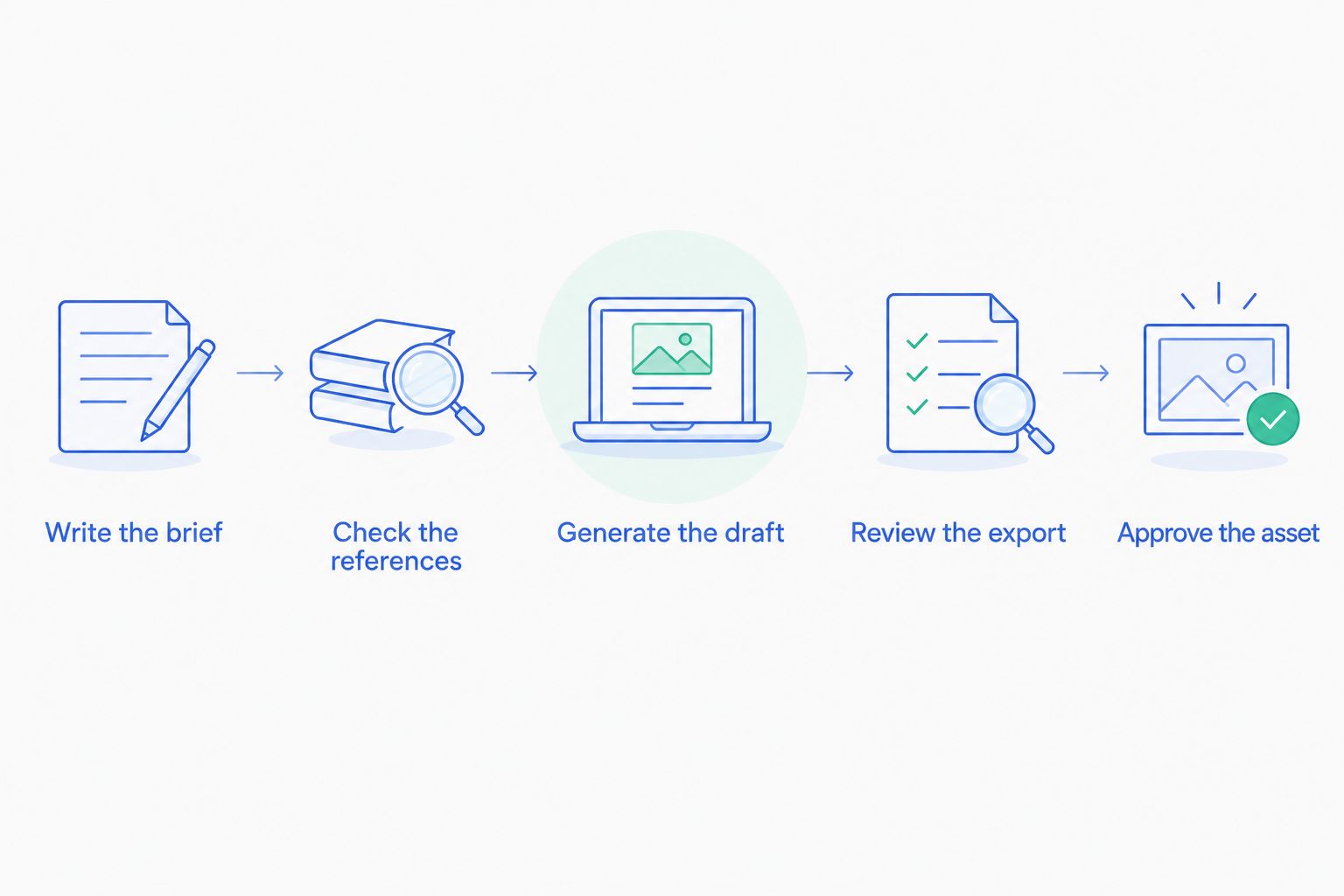
1. Write the brief
State what the viewer should notice. For the illustrative mug ad, the goal is to show the mug's appearance and everyday context, not prove an unverified performance claim.
Specify the required shape, handle, color, and surface finish. Describe the intended placement in words, then check that placement's current technical requirements separately. Keep your acceptance criteria independent of the tool's suggested effects.
2. Check the references
Choose source material you have permission to use. Review whether the reference clearly shows the details you need the video to preserve.
For the mug example, make the handle and rim visible. If a necessary detail is hidden, do not ask the generator to guess it and then treat the guess as accurate product information.
3. Generate the draft
Ask for a restrained scene that makes product review straightforward. Start with the mug on a plain table, then assess the draft before adding more complex movement.
Keep a copy of the brief and prompt outside the tool. That makes it easier to identify whether a problem came from an unclear instruction or an output that failed a clear requirement.
4. Review the export
Download the video and compare it with the reference. Inspect the beginning, middle, and end of each shot for changes in shape, surface, color, or product identity.
Watch without sound first. Then listen separately and check captions. This separates visual defects from audio and wording problems instead of letting an appealing soundtrack distract from an inaccurate product.
5. Approve the asset
Approve the file only after checking both creative accuracy and usage permission. Record unresolved issues rather than assuming you can fix them after launch.
For your 2026 shortlist, compare the complete path from brief to approved export. Do not rank tools solely by the first draft they generate.
Should you use one creative suite or separate tools?
Icarus is best for e-commerce teams that want AI product photos and videos in one place. That is its confirmed workflow distinction. It does not establish a quality advantage over a specialist tool or prove that every required editing feature is included.
Choose your evaluation around the work you need to produce. If your campaign needs both still images and video, assess both tasks together. If you only need a video asset, judge the video workflow on its own merits.
Separate tools let you assess photo generation and video generation independently. The trade-off is the handoff: check how you move references, preserve creative direction, and manage revisions between them. Do not assume either approach is faster without comparing your actual process.
When evaluating Icarus for AI product photography and video generation, bring the same brief you use elsewhere. Check current feature details and terms before committing. A combined suite is relevant because it covers both content types, not because a shared workspace automatically guarantees better results.
Explore a combined creative workflow
Review Icarus for product photos and videos in one place.
Can I use a free AI-generated video in paid ads?
Use a free AI-generated video in paid ads only when the applicable terms permit commercial advertising. Confirm permission for the generated video and the assets within it, including audio and any depicted person.
For a 2026 campaign, review the current terms before launch. If permission is unclear, resolve it before uploading the asset to your advertising account.
Is an AI UGC-style video the same as a customer testimonial?
An AI-generated UGC-style video is not evidence of a real customer's experience. A presenter format does not establish that a person bought, used, or recommended your product.
Write scripts around supportable product information. Do not invent quotations, reviews, or personal experiences to make generated content sound like an independent endorsement.
FAQ
What's the first thing I should check in a free AI video ad generator?
Check whether the current terms permit commercial advertising and whether you can download the result. Then review watermark rules, input permissions, and the controls needed to correct your draft.
Can I make a product video from a photo for free?
You can do this when a tool includes image-to-video generation and download without payment. Verify that the feature is included under the current terms, then compare the exported video with your original product photo.
Does free AI video generation include music rights?
Free AI video generation does not by itself establish music rights. Review the permission for the specific track and intended advertising use, or use audio you already have permission to publish.
Is Icarus a product photo tool or a video tool?
Icarus provides AI product photography and video generation in one place for e-commerce brands and in-house marketing teams. Check its current feature details against the creative tasks in your brief.
How long should my first test video be?
Use a 15-second video for the illustrative exercise in this guide, divided into 3 shots of 5 seconds each. This is a manageable evaluation brief, not a platform rule or a claim about the best-performing ad length.
Can I publish an AI video if the packaging looks slightly different?
Do not approve a product ad that misrepresents the item you sell. Compare packaging, labels, shape, and visible features with your real product, then correct or reject inaccurate output.
What's the best way to compare free AI video generators in 2026?
Compare free AI video generators in 2026 with the same product reference, brief, and approval criteria. Review the downloaded asset and applicable usage terms rather than judging only the editor preview.
One last thing
Make the rejection criteria before you generate the video. List the product details that must not change and the claims the ad must not make. That gives you a clear reason to approve or reject a visually appealing draft.
For the mug example, reject a changed handle, an altered rim, or a script claiming an unverified benefit. Keep the same discipline when the scene becomes more elaborate. The final asset should represent what you sell, not just what the generator can depict.