
Yes, you can use AI product photos for print catalogs when the images accurately represent the product, have enough pixels at their final printed size, and meet your printer’s production requirements. Commercial-use permission and a screen preview are not enough: you also need to check rights, color, cropping, and a printed proof before approving the catalog.
- AI product photos for print catalogs need product accuracy, sufficient resolution, commercial-use rights, and print proofing.
- Judge image resolution at its placed size, not by the file’s DPI label.
- Icarus combines product photos and videos; that does not establish print readiness.
- Approve catalog images on paper before committing the full print run.
Can AI product photos be used for print catalogs?
Yes. Approve the finished image, not the method used to create it. A generated background does not automatically disqualify a catalog photo. An incorrect label, distorted product, or undersized file is a reason to reject it.
For your 2026 catalog, separate creative approval from production approval. The first asks whether the image communicates the product clearly. The second asks whether the file reproduces correctly in the actual layout.
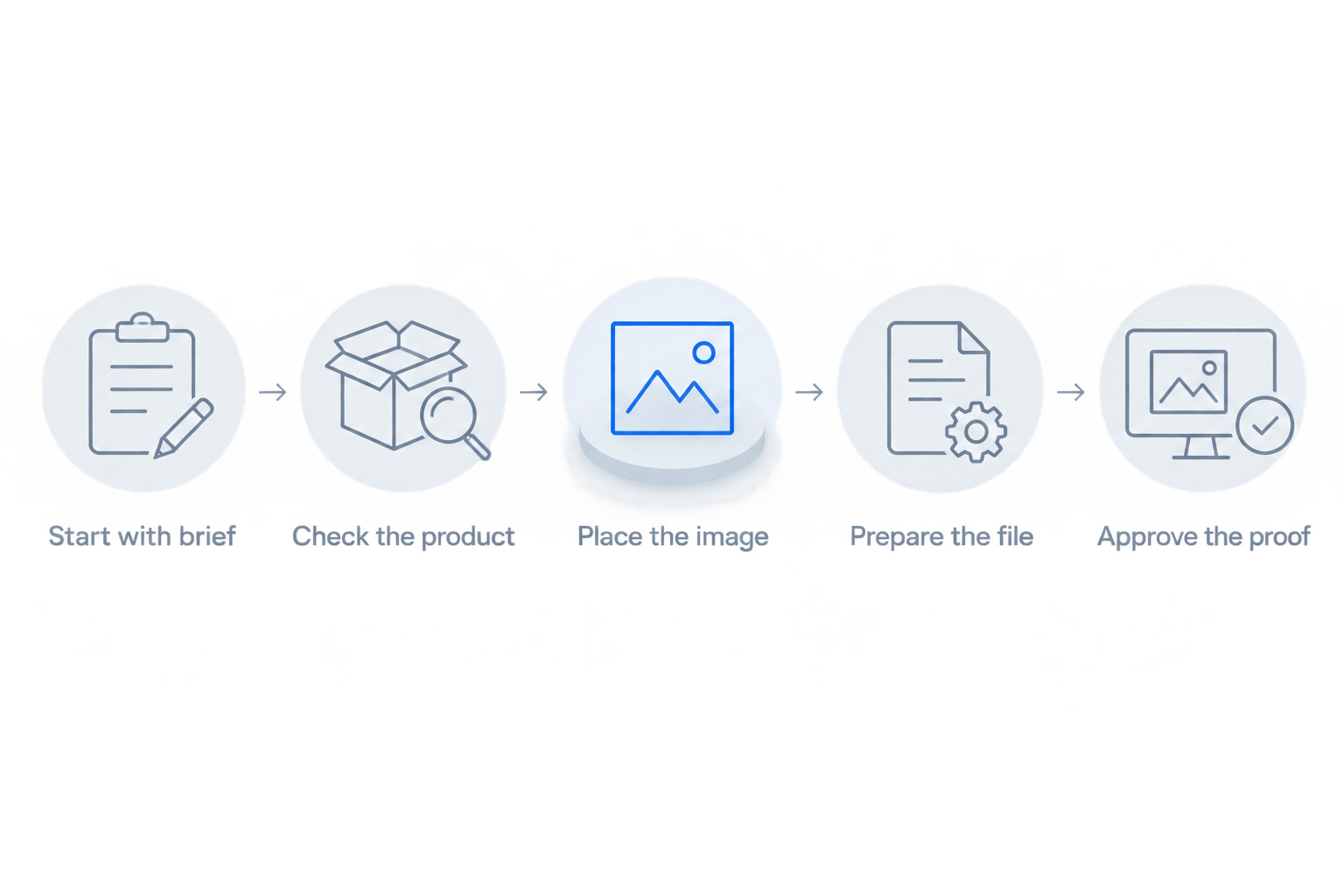
Use these checks in order:
- Product accuracy: Compare the image with the actual item and approved packaging.
- Usage rights: Check the generator’s terms and the rights to uploaded references.
- Effective resolution: Measure available pixels against the final image dimensions.
- Print preparation: Follow the printer’s color, bleed, and export specifications.
- Proof approval: Review the finished page on paper before production.
Icarus provides product photo and video generation in one place. Treat image creation and print approval as separate tasks, regardless of which creative tool you choose.
Why this matters
A catalog image helps a customer judge what arrives in the box. Product shape, finish, included accessories, and packaging must match what you sell. A convincing scene cannot compensate for an inaccurate item.
Print also fixes your decision onto paper. You cannot replace an incorrect image in copies already distributed. Build approval into the workflow before exporting the production file, rather than treating it as a final glance at a PDF.
Which image workflow fits your catalog?
Choose the workflow according to what the image must prove. A technical detail image has a different job from a decorative scene introducing a collection.
| Workflow | Best for | Main benefit | Main limitation |
|---|---|---|---|
| Real product photo with a generated background | Products whose exact appearance must remain visible | Keeps an approved product capture as the reference for the composition | Editing can still alter edges, shadows, or parts of the product |
| Fully generated product scene | Exploring a visual concept before final approval | Lets you develop a scene without photographing that setting | Every visible product feature needs verification |
| Traditional product photograph | Close-ups where physical detail is the evidence | Records the actual item in front of the camera | Still requires retouching checks and print preparation |
These are workflow choices, not automatic quality rankings. A traditional photo can have inaccurate color. A generated scene can contain enough pixels but depict the wrong closure or material.
The deciding question is whether the image faithfully shows the item you sell. Use the product accuracy guide to frame that review before approving a layout.
How much resolution do AI catalog photos need?
Calculate resolution from the image’s final size on the page. Pixels per inch, or PPI, describes image resolution at that size. Printer DPI describes output dots; changing a file’s resolution label does not create missing image detail.
For a 2026 production brief, ask the printer for its required effective PPI. A common working target for close-viewed printed photography is 300 PPI, but the printer’s specification controls your job.
The calculation is straightforward:
Required pixels = printed dimension in inches × target PPI.
The following are illustrative calculations at 300 PPI, not export specifications for any particular tool:
| Final image size | Required pixel dimensions | Best for |
|---|---|---|
| 3 × 4 inches | 900 × 1,200 pixels | A smaller product placement |
| 6 × 8 inches | 1,800 × 2,400 pixels | A larger product feature |
| 8 × 10 inches | 2,400 × 3,000 pixels | A page-dominant image |
These dimensions describe the image area, not the paper size. If the photo extends beyond the trim edge, include the printer’s required bleed when calculating the full image area.
Cropping matters too. A file can have sufficient overall dimensions while the small portion you retain does not. Check effective resolution after cropping and placement, not just before importing the image.
Can you upscale an image for catalog printing?
Upscaling increases pixel dimensions, but it does not verify product accuracy or recover a guaranteed record of missing detail. Inspect the enlarged image for invented lettering, changed texture, and unnatural edges.
Do not approve an enlarged label because it looks sharper. Compare the wording and symbols with approved packaging. If exact text matters, use verified artwork or an accurate product capture rather than accepting generated lettering.
How do you prepare AI product photos for print?
Use a repeatable approval sequence for your 2026 catalog. Keep the approved source image, layout version, and proof together so the final export can be traced to the file someone actually checked.
Start with the brief
Record the product variant, page placement, crop, background, and intended use. Specify what must not change: label wording, package shape, finish, seams, buttons, or included parts.
Illustrative brief: A skincare bottle appears beside its carton on a neutral surface. The bottle and carton must match approved packaging. Decorative objects must not look like included accessories.
Check the product
Compare the generated image against the real item or approved reference photographs. Inspect the silhouette first, then fine detail. Look at every visible component, including small closures and reflected surfaces.
Reject an image that changes the item’s function or contents. A prompt asking for accuracy is an instruction, not evidence that the result is accurate.
Place the image
Import the candidate into the actual catalog layout. Apply the intended crop and check effective resolution there. Review whether nearby headings, captions, and product identifiers clearly refer to the correct item.
Keep essential details away from trim edges and binding areas according to your designer’s and printer’s specifications. A technically sharp image is still ineffective if the binding hides the feature customers need to see.
Prepare the file
Request the printer’s export preset, color requirements, bleed instructions, and proofing process. Do not convert every image to an arbitrary CMYK profile simply because the output is printed.
Color conversion depends on the production workflow. Follow the supplied instructions and keep an editable source copy so corrections do not depend on repeatedly modifying an already exported PDF.
Approve the proof
Check the proof at the intended reading size. Then inspect fine detail separately. Record corrections against specific pages and images rather than sending a general request to improve the pictures.
Why print suitability varies
The same source image does not suit every catalog placement. These factors explain why one version passes review while another needs revision:
- Placed size: Enlarging an image reduces its effective PPI unless you also change its pixel dimensions.
- Crop: A tighter crop uses fewer source pixels to fill the same printed area.
- Product detail: Fine text, stitching, transparent edges, and reflective surfaces require close inspection.
- Paper: Paper color, coating, and absorbency affect how the printed image appears.
- Color workflow: Profiles and conversion settings influence the translation from screen to print.
- Layout: Bleed, trim, and binding affect what remains visible in the finished catalog.
Do not use a successful social image as proof that the catalog version is ready. Assess the file again in its new placement.
How does paper stock affect AI product photos?
Paper choice belongs in the image approval process. Coating, surface texture, and paper shade affect perceived contrast and color, whether the original photograph came from a camera or a generator.
Decisions about paper stock for catalog printing therefore belong before final image approval: the surface becomes part of how customers see the product. A bright screen preview cannot show the physical paper’s texture or reflectance.
For your 2026 catalog proof, pay particular attention to pale packaging, dark products, and subtle finishes. Ask the printer what its proof represents and whether it uses the intended stock. A proof on different paper does not demonstrate the exact surface appearance of the final catalog.
Where shade or finish drives the buying decision, compare the proof with the actual product under suitable viewing conditions. Record the accepted reference rather than relying on someone’s memory of the screen.
Should you use Icarus or separate creative tools?
Icarus fits e-commerce teams that need product photos and videos in one place. That confirmed capability is relevant when your catalog project sits alongside social content and video ads.
The limitation is equally clear: generating an image does not establish its final printed quality. Evaluate the exported file, usage terms, and printer requirements before choosing any tool for a catalog workflow.
| Approach | Best for | Reason to choose it | What still needs checking |
|---|---|---|---|
| Icarus creative suite | Teams creating product photos and videos | Both content types are available in one place | Export suitability, product accuracy, rights, and proof quality |
| Separate photo and video tools | Teams evaluating each task independently | You can assess each tool against its specific job | Each tool’s documented capabilities, terms, and production handoff |
Do not choose a suite solely because it combines tasks. Choose it when the outputs meet your brief. Equally, do not assume separate tools produce better printed images without evaluating the actual files.
Can AI catalog photos show packaging text accurately?
Generated packaging text needs direct verification against approved artwork. Check spelling, ingredient or material information, symbols, and variant names wherever they remain visible.
If the layout makes small wording unreadable, that does not excuse incorrect packaging. Keep the product representation accurate and place required readable information in properly typeset catalog copy where appropriate.
Do commercial-use terms make an image print-ready?
Commercial-use terms address permitted use, not resolution, product accuracy, or color preparation. Review the applicable terms for the tool and plan you use, along with rights to reference images, recognizable people, logos, and other supplied material.
Keep a record of the terms and permissions relevant to the project. Permission to use a generator does not automatically establish permission to use every element placed into it.
FAQ
Can I use AI product photos in a printed catalog?
Yes, provided the image accurately represents the product, has sufficient effective resolution, and meets the printer’s specifications. Check usage rights and approve a proof before production.
What resolution should AI catalog images have?
Use the effective PPI required by your printer at the image’s final placed size. At an illustrative 300 PPI, a 6 × 8 inch image needs 1,800 × 2,400 pixels before additional cropping or bleed requirements.
Is a file labeled 300 DPI automatically ready to print?
No, a 300 DPI label does not establish that the image has enough pixels for its printed size. Check actual pixel dimensions and effective PPI in the layout.
Should I convert every AI image to CMYK?
Follow your printer’s specified color workflow rather than applying an arbitrary CMYK conversion. Request the required profile and PDF export settings before preparing production files.
Can Icarus create photos for a catalog campaign?
Icarus generates product photos and videos, making it relevant to teams producing both formats. Catalog suitability still depends on the actual image, its usage rights, the final layout, and printer approval.
Do I need a printed proof if the PDF looks correct?
Approve a printed proof before committing the catalog to production. Ask what the proof represents, including its color accuracy and whether it uses the intended paper stock.
One last thing
Approve the smallest important detail, not just the overall scene. A catalog photo can look convincing while showing the wrong cap, closure, or accessory. Before signing off your 2026 catalog, compare those purchase-defining details with the actual product once more.