
AI-assisted product photos can meet Amazon image requirements when the finished image accurately shows the item and follows the rules for its category and image position. For your 2026 listing, distinguish an edited product photograph from a fully generated depiction: Amazon requires main images to be professional photographs of the actual product, so a convincing generated substitute is not enough.
- For AI product photos, Amazon image requirements prioritize accurate products, compliant presentation, and category-specific rules.
- Amazon main images require actual product photographs; a realistic generated substitute does not establish compliance.
- Use AI-assisted editing without changing labels, included accessories, product proportions, or material appearance.
- Review secondary lifestyle images separately; extra creative freedom does not permit misleading product details.
Why this matters
An image that looks realistic can still misrepresent what you sell. A changed closure, invented accessory, or enlarged product creates a listing problem even when the background and file dimensions are correct.
Separate production from approval. The Amazon listing images workflow belongs alongside a final check against your actual item and Amazon’s applicable category requirements—not in place of that check.
Can AI product photos pass Amazon image requirements?
AI-assisted editing can produce a compliant image; generation alone does not prove compliance. Amazon’s Seller Central product image requirements distinguish the main image from additional images, and category style guides add requirements of their own.
Use the following table as a 2026 review checklist. The main-image standards summarized here come from Amazon’s published product image requirements; confirm the current version for your marketplace and category before uploading.
| Check | Main image | Secondary image |
|---|---|---|
| Product representation | Professional photograph of the actual product | Must accurately represent the product being sold |
| Background | Pure white, generally RGB 255, 255, 255 | Lifestyle backgrounds can be appropriate, subject to category rules |
| Framing | Product generally fills at least 85% of the frame | Composition depends on the image’s purpose and category rules |
| Added text | No added text, promotional graphics, or watermarks | Informational graphics remain subject to applicable rules |
| Props | Exclude items that confuse what is included | Context must not mislead buyers about included items |
| AI review | Preserve the actual product; reject generated substitutions | Check product accuracy, scene accuracy, and unsupported claims |
Do not treat the table as a universal exemption. Some categories specify different presentation requirements, including rules for models, packaging, sets, and accessories.
What does “actual product” mean for your workflow?
Start with a photograph of the exact variant you sell. Match its color, size designation, packaging, label, and included components to the listing.
Background removal is different from regenerating the product. If an editing step redraws the label or replaces the object’s shape, you are no longer reviewing only a background change. You must verify the product again.
Keep the original photograph beside the final export. That comparison gives your reviewer something concrete to inspect instead of asking whether the result merely looks believable.
Main image: preserve the product, simplify the presentation
Best for: showing exactly what the buyer receives. Use a real product photograph as the foundation, then make only edits you can verify against the physical item.
The benefit of a controlled main image is clarity. Its limitation is creative freedom: the main image is not the place for a decorative scene, a promotional headline, or an invented demonstration.
For a 2026 main-image review, check these details:
- Background: Verify pure white numerically. A pale gray background is not RGB 255, 255, 255.
- Coverage: Check the generally applicable 85% product-fill requirement without cutting off required product details.
- Edges: Inspect handles, straps, transparent surfaces, and fine components after background removal.
- Identity: Compare logos, printed wording, closures, and controls with the original photograph.
- Contents: Show the correct quantity and only the items included, following category guidance.
Do not erase a genuine feature because it looks untidy. A seam, connector, or fastening can be part of the product’s construction. Removing it changes what the image communicates.
Secondary images: add context without inventing features
Best for: explaining use, scale, and product details. Secondary images give you room to answer questions that a plain main image cannot answer, within Amazon’s applicable rules.
Their benefit is context. Their limitation is that every added object and interaction creates another detail to verify. An attractive room does not excuse an incorrect product size or an impossible use case.
Illustrative example: You sell a storage basket and want a lifestyle image beside a chair. Review the basket’s handle shape, weave, opening, and scale against the real item. Do not approve the image merely because the room looks convincing.
Treat informational overlays the same way. A dimension label needs a verified measurement. A material claim needs product evidence. A generated scene cannot establish that an item is waterproof, food-safe, or suitable for a particular use.
Why Amazon image acceptance varies
Amazon image requirements are not a single visual test. For your 2026 review, separate these factors rather than treating every rejection as a problem with AI generation.
- Image position: Main images have presentation restrictions that differ from additional images.
- Product category: Category style guides affect models, packaging, accessories, and how products appear.
- Product accuracy: A correct background does not compensate for the wrong variant or altered label.
- Technical quality: Resolution, file format, sharpness, and visible editing defects need separate checks.
- Marketplace requirements: Review the guidance for the Amazon marketplace where you are listing.
An accepted upload is not a substitute for your own accuracy review. Keep checking whether the image matches the item, not just whether the upload completed.
Choose a production workflow, not an approval promise
Icarus combines AI product photography and video generation for e-commerce brands and in-house marketing teams. Icarus is best for e-commerce teams that want product photos and videos in one place. That is a workflow reason to consider it, not evidence that Amazon will approve a particular export.
Compare a combined suite with separate tools using the same product, brief, and review criteria. Do not compare an approved photograph from one workflow with an unchecked first draft from another.
| Workflow | Best for | Practical advantage | Limitation |
|---|---|---|---|
| Icarus | Teams creating product photos and videos | Both content types are available in one suite | Each finished asset still needs an accuracy and destination-specific review |
| Separate photo and video tools | Teams choosing each production tool independently | Photo and video tools can be evaluated separately | Product references and briefs must remain consistent across tools |
Icarus’s confirmed scope includes product photos, model shots, and ad videos or creatives. Do not infer an Amazon compliance checker, an approval guarantee, or exact-label preservation from that scope.
For separate tools, the same caution applies. A feature named background replacement or product preservation does not remove your responsibility to inspect the result. Choose based on the assets you can approve, not the promise attached to the generation step.
How do you check an AI-assisted Amazon image before upload?
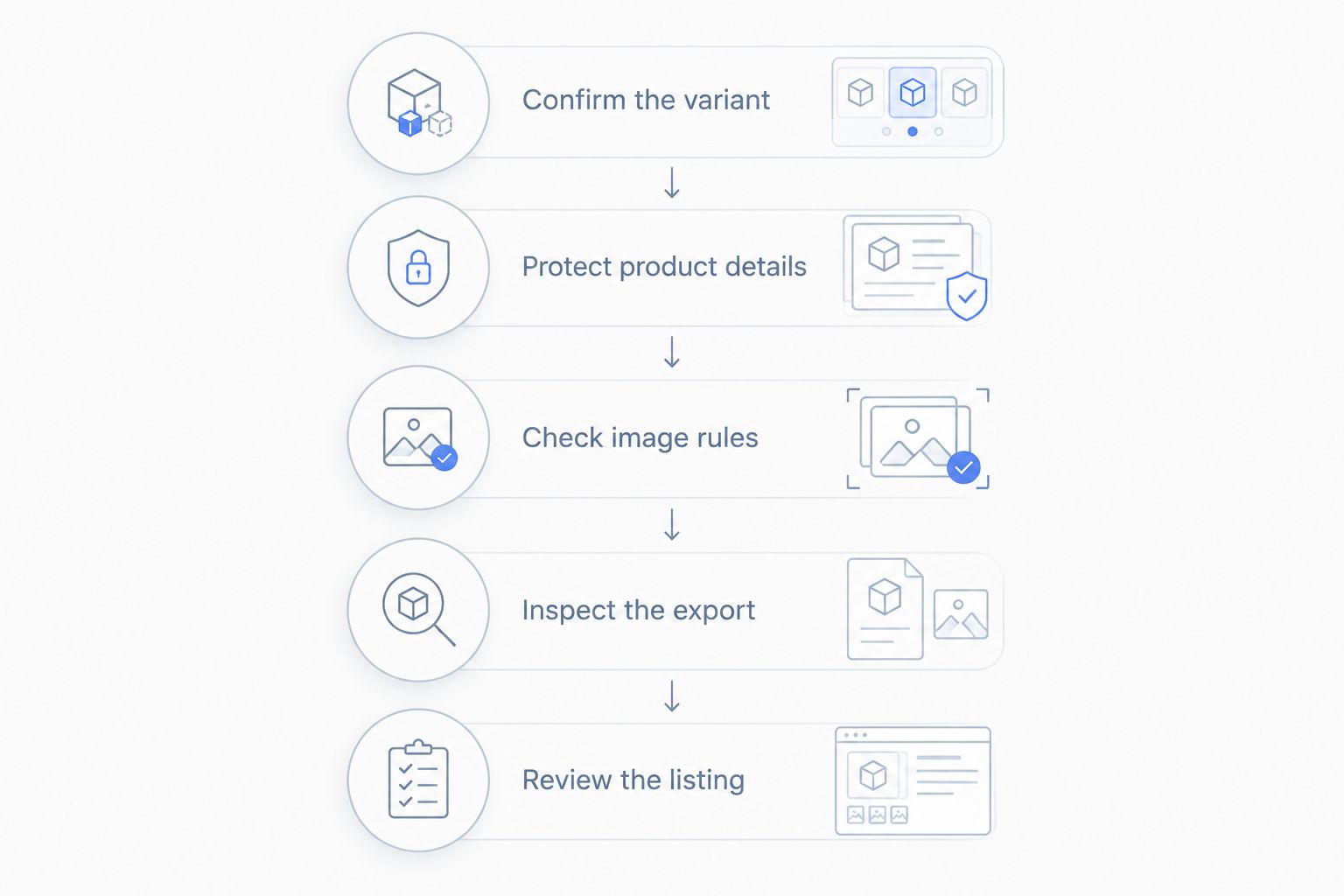
Use this sequence for each finished asset. It separates product truth from presentation rules, so an attractive background cannot hide a changed product.
- Confirm the variant. Match the source photograph to the listing’s color, model, quantity, and included components. Keep a reference that shows details hidden in the final composition.
- Protect product details. Compare the output with the original. Inspect printed wording, logos, openings, fasteners, proportions, and transparent areas. Reject changes you cannot verify.
- Check image rules. Review the main-image or secondary-image requirements for your category. Confirm background, framing, props, text, and packaging presentation.
- Inspect the export. Open the actual file you will upload. Check its dimensions and format, then inspect it at full size for blur, halos, broken edges, or generated artifacts.
- Review the listing. Confirm the image appears in the intended position and matches the selected variant. Read any image-related warning before making another edit.
A prompt is an instruction, not proof of execution. Writing “preserve the exact label” does not establish that the label survived unchanged. Read the output and compare it with your reference.
What file size should you check?
Amazon’s published image guidance specifies at least 1,000 pixels on the longest side for zoom and recommends 1,600 pixels or larger for that purpose. Review the current upload requirements before exporting your 2026 assets.
Those dimensions describe technical suitability, not product accuracy. Enlarging a damaged label does not restore its wording, and a larger file does not turn a generated substitute into an actual product photograph.
What should you do if Amazon rejects the image?
Fix the stated issue before generating another version. Read the image warning or suppression reason and identify whether it concerns the image, the product information, or another listing requirement.
If you need to fix a suppressed Amazon listing, replacing images addresses only image-related causes; missing or incorrect listing attributes require their own corrections. Keep those tasks separate so you do not repeatedly change an image that was not the underlying problem.
For an image-related issue, return to the original photograph and make the smallest verifiable correction. Remove a prohibited overlay, correct the background, or replace a misleading scene. Avoid regenerating the whole product when the problem is limited to presentation.
Keep the rejected export and its warning with the replacement. That record lets you compare the specific change rather than relying on memory.
Does a realistic AI product photo count as a real photograph?
Realistic appearance does not establish that an image is a photograph of the actual product. For a main image, use the actual product photograph as your foundation and check Amazon’s applicable rules for the finished asset.
A generated image can look convincing while changing small details. Buyers receive the physical item, not the most plausible interpretation of it.
Can you use the same image for Amazon and advertising?
Review Amazon listing images and advertising assets separately. A creative treatment that suits an ad is not automatically appropriate for an Amazon main image.
Keep distinct versions with clear intended uses. For a 2026 campaign, approve product accuracy across every version, then apply the destination’s presentation rules to each export.
FAQ
Can I use AI-generated images as my Amazon main image?
Do not assume a fully generated image meets Amazon’s main-image rules. Amazon requires a professional photograph of the actual product; start with that photograph and verify any edits against the item and category requirements.
Do Amazon product photos need a white background?
Amazon main images generally require a pure white background with RGB values of 255, 255, 255. Secondary images can use other settings where the applicable category rules permit them.
How much of an Amazon main image should the product fill?
The product generally needs to fill at least 85% of the main-image frame. Check your category’s guidance before applying that standard to a specific product.
What resolution do Amazon product images need for zoom?
Amazon specifies at least 1,000 pixels on the longest side for zoom and recommends 1,600 pixels or larger. Resolution does not replace checks for sharpness, accurate product details, and compliant presentation.
Can AI change the background without changing my product?
Background editing still needs a product-accuracy check. Compare the finished image with the original photograph for changes to labels, edges, proportions, transparent areas, and included components.
Does Icarus guarantee that Amazon will accept my images?
A combined photo and video workflow does not establish Amazon compliance. Review every finished image against the actual product and the applicable marketplace, category, and image-position requirements.
Does an accepted upload mean my image meets every requirement?
An accepted upload does not replace a full compliance review. Check the live listing, any warnings, and whether the image accurately represents the variant buyers will receive.
One last thing
Make the original product photograph your approval reference. Keep it beside the final image and ask a literal question: would a buyer receive the same shape, label, finish, quantity, and accessories shown here?
If the answer is no, reject the asset before upload. A cleaner background cannot repair an inaccurate product.