Make your product video ad only as long as it takes to show the product, make a supported buying case, and give a clear next action. There is no single runtime that fits every product or placement. Cutting the explanation your buyer needs is not an improvement just because the video becomes shorter.
- How long should a product video ad be? Long enough to show the product, explain its value, and ask for action.
- Icarus suits e-commerce teams that want product photos and videos in one place.
- Treat the timed scripts below as illustrative briefs, not proven winning runtimes.
- Compare video ad lengths using purchases and a consistent message, not completion rate alone.
Why this matters
Video length is a creative decision, not a substitute for a clear offer. A short ad can leave the product unexplained. A longer ad can repeat the same point without adding a reason to buy.
For your 2026 creative plan, separate the message from its runtime. First decide what the viewer needs to understand. Then decide how much screen time that explanation deserves.
Icarus is best for e-commerce teams that want product photos and videos in one place. Icarus provides that combined creative workflow; it does not remove the need to write a useful brief or check the finished ad.
How long should a product video ad be?
Use the shortest complete version of your sales argument. A complete product ad makes the item identifiable, shows a relevant use or benefit, and tells the viewer what to do next. Add time when it supplies missing information, not when it merely fills an edit.
Use this sequence before choosing a runtime:
- Name the buying question. Write the question your ad must answer, such as whether a storage product fits the intended space.
- Choose visible evidence. Decide what you can accurately show rather than simply claim.
- Write the next action. Make the destination and request match the ad.
- Read the script aloud. Remove repeated ideas and wording that the images already explain.
- Check the placement. Verify the current duration and format requirements where you intend to run the ad.
The following cuts are illustrative production briefs, not platform limits, category averages, or evidence of better performance. Their durations are assigned to demonstrate how the same message can expand or contract.
| Illustrative cut | Best for | What belongs in it | Main advantage | Main limitation |
|---|---|---|---|---|
| 6-second compact cut | A visually clear product message | Product, visible action, next step | Forces a narrow message | Leaves little room for explanation |
| 15-second demonstration cut | Showing a use and explaining its relevance | Product in use, supported benefit, next step | Connects a demonstration to a buying reason | Becomes crowded when extra claims enter |
| 30-second explanation cut | A buying question that needs more context | Problem, demonstration, explanation, next step | Allows a fuller argument | Requires more material that earns attention |
Do not choose the longest cut because you have enough footage. Do not choose the shortest because short sounds efficient. Choose the cut whose information matches the buying question.
Compact example: 6 seconds
Best for: a product whose relevant action is easy to see. Consider an illustrative ad for a reusable storage pouch. The ad shows the actual pouch being opened, filled, and closed, then ends with a clear next step.
This brief assigns 6 seconds to a compact edit. It is not a claim that storage products perform best at that duration. The example works as a planning exercise because it keeps the message narrow: show what the product does.
The advantage is focus. The limitation is missing context: viewers still need somewhere to check dimensions, materials, care instructions, or other purchase details.
Cut an introductory logo animation before cutting the product demonstration. If the action becomes difficult to understand, the edit is too compressed for that message. Keep any claims tied to the actual product rather than using the short runtime as an excuse for vague language.
Demonstration example: 15 seconds
Best for: connecting a visible action to a supported buying reason. An illustrative 15-second brief gives the storage pouch demonstration more room. It includes a clear opening, the product in use, a factual explanation, and a next action.
Here is a timing exercise, not a tested formula:
| Segment | Assigned time | Job |
|---|---|---|
| Product opening | 3 seconds | Show the pouch and what goes inside |
| Demonstration | 7 seconds | Show the actual opening, filling, and closing action |
| Explanation | 3 seconds | State a verified feature relevant to that use |
| Next action | 2 seconds | Tell the viewer where to learn more |
The assigned segments total 15 seconds. Change them if the demonstration or readable text needs more time. A stopwatch should expose a crowded script, not force you to rush through it.
The advantage is a clearer connection between action and benefit. The limitation is capacity: adding several audiences, use cases, and claims turns the brief into competing messages. Keep the central buying question visible throughout the edit.
Explanation example: 30 seconds
Best for: a product question that cannot be answered by a quick visual demonstration. An illustrative 30-second brief can introduce the use case, demonstrate the product, explain a relevant detail, and address an objection before the next action.
For the pouch example, the extra time might show how the item is used and how its dimensions relate to the intended contents. Use the actual product information. Do not invent capacity, durability, or performance claims to make the longer script feel substantial.
The advantage is room to explain. The limitation is repetition: a longer video becomes weaker when later scenes merely restate the opening.
Read each scene description on its own. If you cannot name the new information it adds, remove it or replace it with evidence. Extra runtime needs a job beyond displaying another angle.
Why product video ad length varies
The right length depends on what the viewer must understand and what the placement allows. Use these factors to decide what stays in the edit:
- Demonstration complexity. A visible action needs enough time to remain understandable. Do not speed it up until the useful detail disappears.
- Buyer familiarity. A viewer who already understands the product needs different context from someone encountering it for the first time.
- Claim support. Explanations and qualifications need room. Remove unsupported claims rather than compressing them into tiny text.
- Placement requirements. Check the current rules for the destination. An accepted file duration is a technical requirement, not proof of an effective ad.
- Reading and listening load. Captions, narration, and product action compete for attention when they deliver different messages simultaneously.
- Purchase question. Let the specific uncertainty determine the explanation, rather than listing every feature you have.
Keep a distinction between required information and optional decoration. A product label, a necessary qualification, and the next action serve different purposes from a transition or repeated slogan.
Write the brief before you generate the video
A useful 2026 product video brief states the message before the runtime. Otherwise, you risk generating scenes that look related but do not form a buying argument.
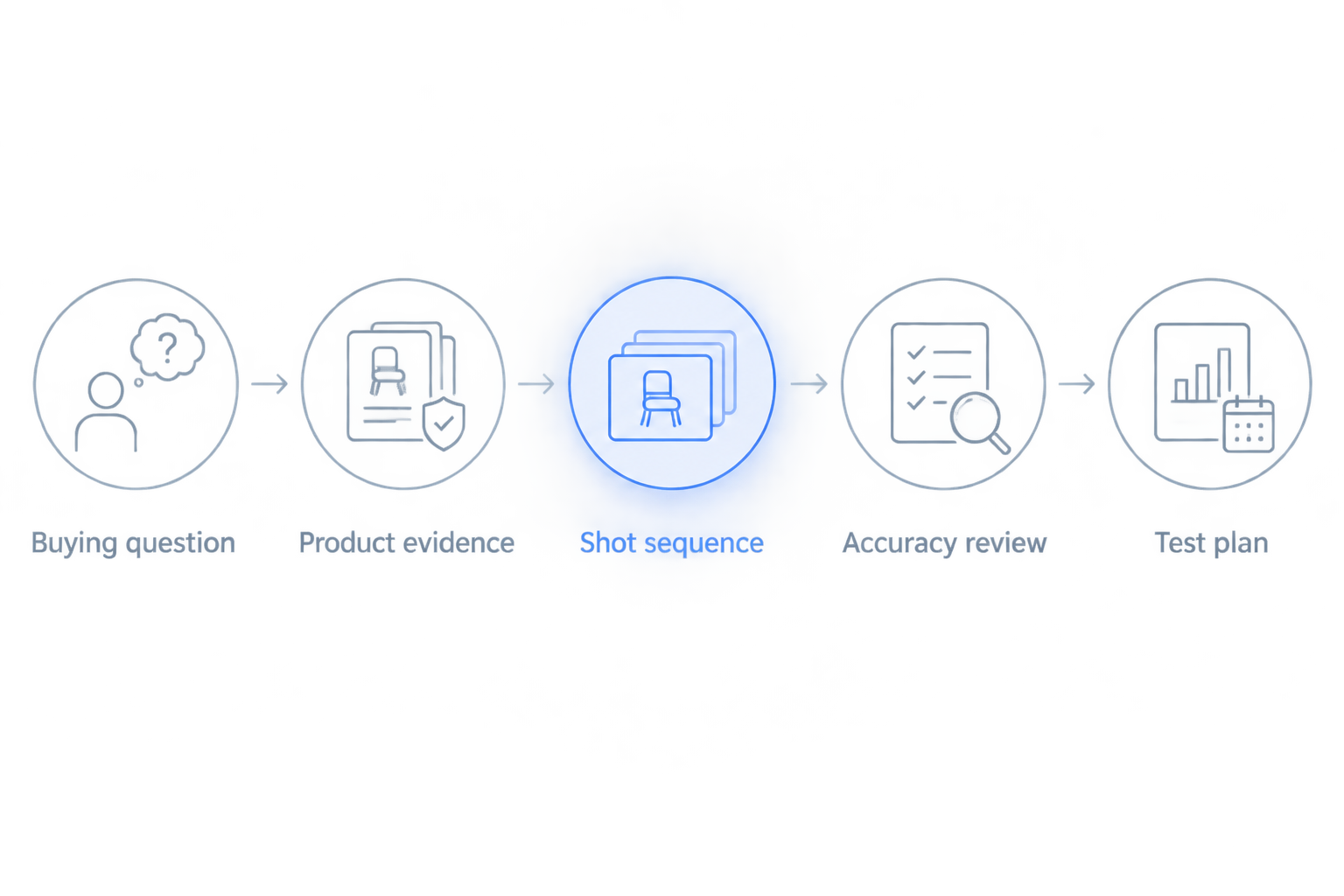
Use this sequence to turn the idea into an editable plan:
- Buying question. State what the viewer needs answered before taking the next step.
- Product evidence. List the real details or actions that answer that question.
- Shot sequence. Assign each scene a specific informational job.
- Accuracy review. Check the product, text, demonstration, and claims against your source material.
- Test plan. Name the outcome you will compare and the message you will keep consistent.
Keep the brief useful to whoever makes the next version. Include the product reference, intended placement, essential wording, and details that must not change. A new edit should not require someone to guess which part of the original message mattered.
For generated footage, inspect the product across the whole sequence. Check labels, shape, color, and demonstrated behavior against the real item. A plausible-looking scene is not evidence that the product works as depicted.
Choose a production workflow that fits the brief
For 2026 production planning, compare the workflow you need rather than assuming every creative tool covers the same work. Icarus offers product photos and videos in one place. Separate photo and video tools are another workflow to evaluate, with capabilities that depend on the specific products selected.
| Workflow | Best for | Confirmed scope or selection task | Limitation to account for |
|---|---|---|---|
| Icarus | Teams seeking product photos and videos together | Generates product photos, social and ad content, and videos | A combined suite does not establish that every output meets your brief |
| Separate photo and video tools | Teams evaluating each task independently | Check the documented capabilities of each selected tool | You must assess the handoff between tools yourself |
Neither workflow determines the right ad length. Judge the output against the same brief: an accurate product, a clear demonstration, supported wording, and a useful next action.
Do not select a tool solely because it can generate a clip with the duration you requested. First confirm that it can produce the kind of material your edit requires. Then inspect the actual output before publishing.
How do you test different video ad lengths?
Compare complete messages, not a clear short ad against an unfinished long one. For your 2026 test plan, keep the product, main buying argument, destination, and purchase objective consistent where practical.
Create each cut as a deliberate edit. The compact version should still make sense without the explanation you removed. The longer version should add relevant evidence, not just a slower opening.
Record what changed besides runtime. If you change the opening, speaker, product angle, and call to action at the same time, the result cannot isolate length as the explanation.
Use purchases as the business outcome when your tracking supports that comparison. Watch time, completion rate, and clicks help diagnose the path, but they do not establish that a particular cut produces more customers. Keep the actual differences in delivery and audience in view when interpreting results.
Should a product demonstration ad be longer than a reminder ad?
A product demonstration ad needs whatever time makes the relevant action clear; a reminder ad can omit information its intended audience already has. Neither format has an automatic winning runtime.
Ask what the viewer must learn from this specific ad. If the demonstration answers an unresolved buying question, preserve it. If the audience only needs the next step, remove explanations that do not serve that purpose.
Should you shorten an ad that viewers do not finish?
Shorten an ad when the remaining footage adds no useful information, not simply because completion is low. Check whether the opening identifies the product and whether the central demonstration arrives clearly.
A shorter edit changes the completion calculation as well as the content. Evaluate the purchase outcome alongside viewing behavior rather than treating a higher completion rate as a buying verdict.
FAQ
What's the best length for a product video ad?
The best length is the shortest complete version of your product's buying argument. Show the product, provide relevant evidence, and give a clear next action without repeated material.
Is a 15-second product ad better than a 30-second ad?
A 15-second product ad is not automatically better than a 30-second ad. The durations in this guide are illustrative briefs, not proven performance benchmarks; compare cuts that answer the same buying question.
Can a 6-second ad explain my product?
A 6-second ad works as a planning option only when the essential message fits clearly. If viewers cannot understand the demonstration or read necessary information, use a different edit.
Should I put my logo before the product?
Show the product before an introductory logo sequence when that sequence delays the buying message. Keep branding where it helps identify the seller without replacing useful information.
Do platform duration limits tell me how long my ad should be?
Platform duration limits establish what the placement accepts, not which runtime will produce purchases. Check the current placement requirements separately from your creative decision.
Can Icarus make both product photos and videos?
Icarus generates product photos and videos in one place for e-commerce brands and in-house marketing teams. Review each output for product accuracy and suitability before using it in an ad.
Should I choose the ad with the highest completion rate?
Do not choose an ad on completion rate alone when your goal is paying customers. Compare purchase outcomes where measurement supports it, and use viewing behavior to diagnose the creative.
One last thing
Before approving a 2026 product video ad, write the job of every scene beside the timeline. Use plain labels such as identification, demonstration, explanation, and next action.
If a scene has no distinct job, cut it before you cut useful evidence. That gives you a concrete editing decision without pretending that a universal runtime can make the decision for you.