
You need enough product photos to show what the buyer receives, how it looks from relevant angles, its scale, and the details that affect the purchase—not a universal image count. The right total depends on the product and the selling channel’s current requirements. This guide gives you a practical shot list and a stopping rule: add a photo only when it answers a question the existing images leave open.
- How many product photos for ecommerce listing? Cover distinct buyer questions, not an arbitrary image quota.
- Use a shot list covering appearance, details, scale, use, and package contents; remove shots that repeat information.
- Icarus suits e-commerce teams that want product photos and videos in one place; generated assets still need accuracy checks.
How many product photos do you need for an ecommerce listing?
Your listing needs a complete visual explanation of the product, not a full gallery for its own sake. Start with the questions below. Keep a separate image when the answer needs its own view; combine roles when a clear photograph genuinely does both jobs.
This is a suggested planning template for your 2026 listing brief, not a marketplace requirement or a measured conversion benchmark. For the production decision behind it, read Is AI product photography worth it?.
| Photo role | Question it answers | Keep it when | Limitation to check |
|---|---|---|---|
| Main view | What exactly is this product? | Every listing needs a clear product identification image | Styling must not obscure the item |
| Alternate angle | What does the unseen side look like? | The back, side, base, or interior affects the purchase | A slight camera shift can repeat the main view |
| Detail | What is the material, finish, or construction? | A close view reveals information missing from the main image | Magnification can make scale unclear |
| Scale | How large is it in context? | Buyers need a visual size reference | Perspective is not a substitute for dimensions |
| In use | How does it look or work in its intended setting? | Context explains placement, fit, or handling | Props can be mistaken for included items |
| Included items | What arrives with this selection? | Packaging, accessories, or components need clarification | The image must match the selected variant |
Do not treat every row as a mandatory separate photograph. A clearly composed in-use image can also explain scale. Conversely, a product with different surfaces, moving parts, or several included components can need additional views within a single role.
Why this matters
An image count is a production target. A shot list is a buying-information plan. If you brief only a total, you can receive a collection of attractive images that still fails to show the back, the closure, or what comes in the package.
For your 2026 creative brief, write the buyer question beside each planned image. That gives you a concrete way to approve, reject, or request another shot without arguing about whether the gallery simply looks finished.
The same method also limits unnecessary production. When another background or angle adds no information, leave it out of the listing plan. Keep separate creative experiments in your advertising brief rather than treating every new asset as a necessary product-page image.
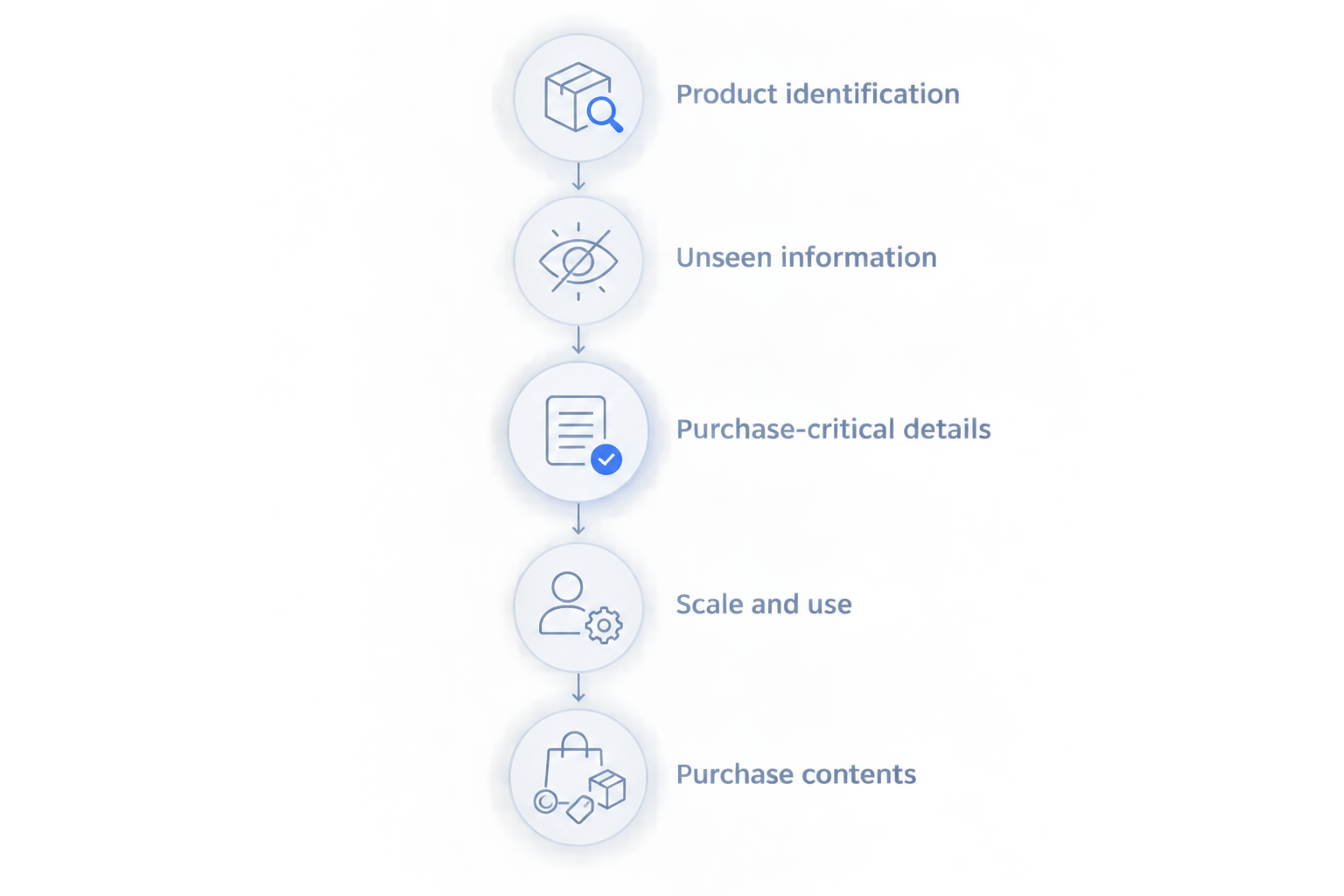
Build your listing shot list in this order
Start with product identification
Choose a main view that makes the item easy to identify. Show the product clearly enough that someone can distinguish its shape, orientation, and selected version without decoding the surrounding scene.
Check the selling channel’s current main-image requirements before choosing the composition. Do not assume that an image suitable for your own store also meets a marketplace’s rules. Keep channel compliance separate from the question of how many supporting images you need.
Add unseen information
Inspect the main view and list what it hides. The next photograph should reveal something relevant: a closure, connector, interior compartment, reverse side, sole, or other product feature.
An alternate angle earns its place by showing new information. If it only moves the camera while leaving the same surfaces visible, replace it with a more useful view or remove it from the brief.
Show purchase-critical details
Decide which details need close inspection. Examples include a fabric weave, a fastening mechanism, a printed label, or the finish on a surface. These are illustrative subjects, not requirements for every category.
Write the exact detail into the brief. “Close-up of the closure, fully visible” is more actionable than “premium detail shot.” Preserve enough surrounding context that the buyer can locate the feature on the product.
Explain scale and use
Choose a reference that helps explain the product’s intended size or placement. A hand, a person, or a familiar setting can provide context, but the perspective must not exaggerate or shrink the product.
Keep written measurements alongside visual context where size matters. An in-room image explains placement; it does not establish whether a product fits through a doorway or inside a specific space.
Confirm the purchase contents
Show the items included with the selected purchase when the contents need explanation. Separate included components from props, optional accessories, and packaging used only for styling.
Then compare the image with the product description. If a shopper sees an accessory that is not included, clarify the distinction rather than leaving the photograph to imply a bundle.
Adapt the plan to the product
Simple products: stop when the essential questions are answered
A product with an uncomplicated shape and no hidden features does not need extra angles merely to match another listing’s gallery length. Concentrate on identification, material or finish, scale, and any contents that need explanation.
Best for: products whose visible differences are easy to show. The trade-off is that a minimal gallery leaves little room for ambiguity, so each retained image must have a clear purpose.
Detail-heavy products: give hidden features their own views
If the purchase depends on construction or configuration, map those features before scheduling production. Show the specific parts that the main image cannot explain rather than adding general lifestyle scenes first.
Best for: products with meaningful interior, reverse-side, or close-up information. The trade-off is a longer review process because every visible feature must agree with the actual product.
Variant-heavy products: plan accuracy before volume
Treat color, finish, pattern, and configuration as product information. For each selected variant, check which images remain accurate and which need replacement. Do not reuse a photograph when it depicts a materially different selection.
Best for: listings where the selected version changes the product’s appearance or contents. The trade-off is more asset management: you need to know which image belongs to which selection, not just which product family it represents.
Why your product photo count varies
Use these factors to adjust your 2026 shot list. They explain why copying another product’s image total is not a useful planning method.
- Product geometry. Hidden surfaces, interiors, and moving parts create questions a front view cannot answer.
- Material and finish. Texture, transparency, reflections, and surface details can require dedicated compositions.
- Scale and fit. Products whose size affects use need clear context and accurate written measurements.
- Variant differences. A different color, pattern, or configuration needs imagery that matches the selection.
- Purchase contents. Accessories, components, and packaging need clarification when the main view leaves the contents uncertain.
- Channel requirements. Your store and marketplace listings must each meet the relevant current image rules.
Do not add photographs simply because one of these factors exists. Ask what remains unclear after the planned images are reviewed. That unanswered question determines the next shot.
Should you use an all-in-one suite or separate tools?
Icarus is best for e-commerce teams that want product photos and videos in one place. That is a workflow fit, not a claim that every generated image is accurate or that one suite replaces every production method.
For your 2026 tool evaluation, use the same product and the same written brief for each option. Compare the outputs against the real item, then assess the work needed to approve and organize them.
| Workflow | Best for | Practical advantage | Trade-off to assess |
|---|---|---|---|
| Icarus | Teams seeking product photos and videos in one place | The confirmed offering covers both formats | Check the actual outputs and required capabilities against your brief |
| Separate photo and video tools | Teams evaluating each format independently | You can choose each tool against its own production requirements | You must manage the assets and review across separate tools |
Do not choose a workflow based on the number of images it can produce alone. Your listing brief also needs accurate product shape, legible relevant details, appropriate compositions, and assets that match the selected variant.
A useful evaluation ends with a concrete decision: which workflow produces assets you can approve for the intended use? Keep claims about savings, quality, and performance out of that decision until your own evaluation supports them.
Check every generated image against the real product
Generation is not approval. Whether you use Icarus or separate tools, review the output against reliable product references before adding it to a listing.
Use a 2026 approval checklist that separates visual appeal from factual accuracy:
- Shape: Are the silhouette, proportions, and visible components correct?
- Surface: Does the material or finish match the product rather than merely looking attractive?
- Text: Are visible words, markings, and labels accurate where they need to be read?
- Variant: Does the image show the selected color, pattern, or configuration?
- Contents: Does the composition distinguish the purchased item from styling props?
- Context: Does the scene avoid implying an unverified use or capability?
Reject an inaccurate image even if it fills a missing slot in the gallery. A smaller approved set is preferable to completing the shot list with an image that misrepresents what you sell.
Keep the reference and the approved output together in your working files. That makes later checks easier when you change a variant, revise packaging, or reuse the asset elsewhere.
Can a product video replace listing photos?
A product video can explain movement or a sequence of actions, but it does not remove the need for clear still views. Keep product identification, important details, and purchase contents accessible in photographs.
Plan video around what motion explains. If the proposed clip only repeats an existing still composition, decide whether it serves a separate advertising purpose rather than counting it as essential listing coverage.
Should every product variant have its own photos?
Every variant needs accurate visual representation, but not every supporting image must be recreated when nothing relevant changes. Reuse a view only when it remains true to the selected product.
Inspect lifestyle and detail images as carefully as the main image. A shared scene can still show the wrong finish, accessory, or package even when the product family is correct.
How do you know when you have enough photos?
You have enough photos when the gallery answers the relevant purchase questions and meets the selling channel’s current requirements. Review the images without relying on your own familiarity with the product.
Ask someone reviewing the listing to identify what arrives, what the selected version looks like, how large it is, and which details remain hidden. Request another image only for a gap that the existing views do not resolve.
FAQ
How many product photos should I put on an ecommerce listing?
Use enough distinct photos to explain the product, relevant angles, details, scale, and purchase contents. There is no universal total for every product and selling channel; plan around unanswered questions and current channel requirements.
Do I need a separate photo for every angle?
You need a separate angle when it reveals information that affects the purchase. Skip a view that only repeats surfaces already shown clearly.
Can an in-use photo also show product size?
An in-use photo can provide size context when the reference and perspective are clear. Keep accurate written dimensions available because a contextual image does not establish precise fit.
Should I include the packaging in product photos?
Include packaging when it helps clarify what the buyer receives or another relevant purchase detail. Do not let styling imply that props or optional accessories are included.
Can I use generated product images on my listing?
Use generated images only after checking product accuracy, usage rights, and the selling channel’s current rules. Review the product shape, visible text, selected variant, and depicted contents before publication.
Is Icarus suitable if I need listing photos and video content?
Icarus suits e-commerce teams seeking product photos and videos in one place. Evaluate its outputs against your actual product and brief rather than assuming that a combined offering guarantees the right result.
Should I keep adding photos until the gallery is full?
No. Add an image when it answers an unresolved purchase question or satisfies a channel requirement, not simply because another image slot exists.
One last thing
Name each image by the question it answers before you approve it. Use working labels such as main view, closure detail, scale, or included items instead of a sequence of indistinguishable filenames.
If you cannot explain what a proposed image adds, remove it from the listing brief. The goal is a clear purchase decision—not proof that you produced a large batch of creative.